Assets Setting
The setting fixes three things: which account capital investment accumulates on, which operation date the depreciation service window fills in, and which model (1 or 2) the services and disposals work with.
Where to find it: Modules → Fixed Assets → Settings → Assets Setting
A worked example
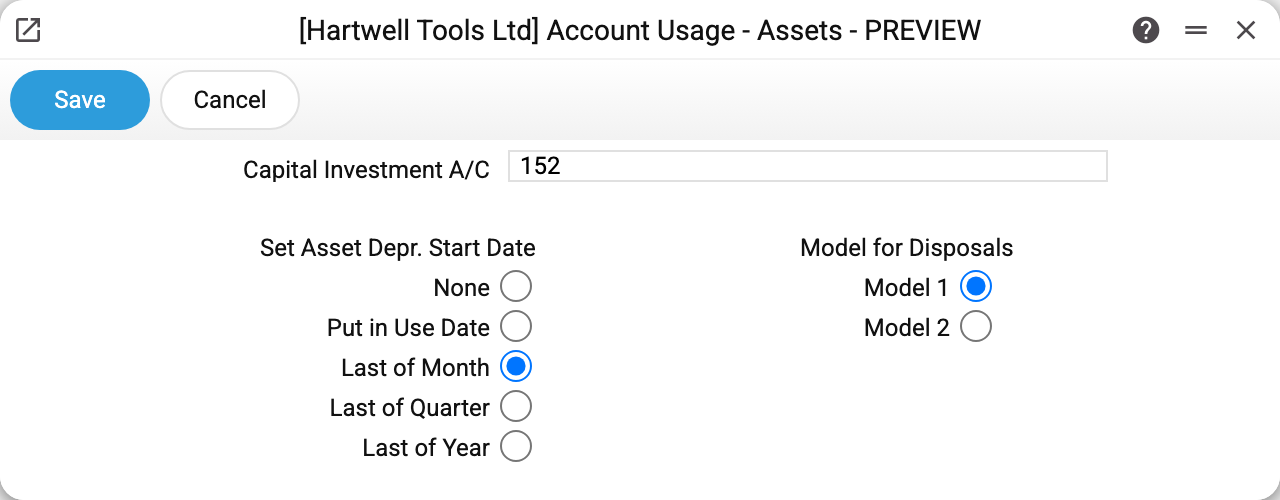
At the top, the capital investment account (152 in the example): costs for an asset gather there while it is not yet in use. Commissioning takes the value off this account unless another one is given in the service window.
On the left, five options for the default operation date of the depreciation service. On the right, the model: the commissioning, depreciation and their deletion windows open with it; the disposal takes its depreciation account and residual value by it, and the depreciation sheet the model it shows.
What "Set Asset Depr. Start Date" fills in
The switch charges nothing and changes no cards. It only fills in "Oper. Date" when the depreciation service window opens — from the services menu or from the asset card through the "Depreciation" menu item. The date in the window can be changed by hand. Which period is actually charged is decided by the service: the period after the "Used with" date, then by the "Depreciation date".
| Option | What goes into "Oper. Date" |
|---|---|
| None | nothing: you enter the date yourself (empty means the service takes today); the card's "Depreciation" item refuses with "Fixed asset cannot be depreciated" |
| Put in Use Date | the card's commissioning date under the setting's model. From the asset card's "Depreciation" item — right away; from the services menu — as soon as "Inv. No." is typed or picked in the window. No number, no card with it, or no commissioning date on it — "Oper. Date" stays empty and the service takes today |
| Last of Month | the last day of the current month |
| Last of Quarter | the last day of the current quarter |
| Last of Year | the last day of the current year |
The example uses "Last of Month": a manual run gets the end of the current month, and the depreciation posting carries that date. A scheduled run does not read the switch — its operation date is always the day of the run.
Typical situations
No depreciation is charged. The switch has nothing to do with it: the service skips assets that are not commissioned, closed, or already depreciated down to the salvage value — the order to check is in Asset Depreciation.
The charge landed on the wrong day. The posting is dated with the window's "Oper. Date", or with the day of the run when scheduled. Check what the switch filled in, or enter the date by hand.
The option was changed. Posted charges stay as they are: the new option only affects the next openings of the service window.
Where to look next
- Fixed assets — the asset cards and their dates.
- Depreciation sheet — the result of the charges.