Cron Tasks
Maintenances the system runs by itself on a schedule: recalculating a price list every night, loading exchange rates every morning, sending reports every Monday. Each record is one maintenance with its parameters and schedule, and it holds the log of all runs.
Where to find it: Modules → System → Registers → Cron Tasks
Scheduling a maintenance
- Open the maintenance in its module and fill in the parameters as if running it by hand.
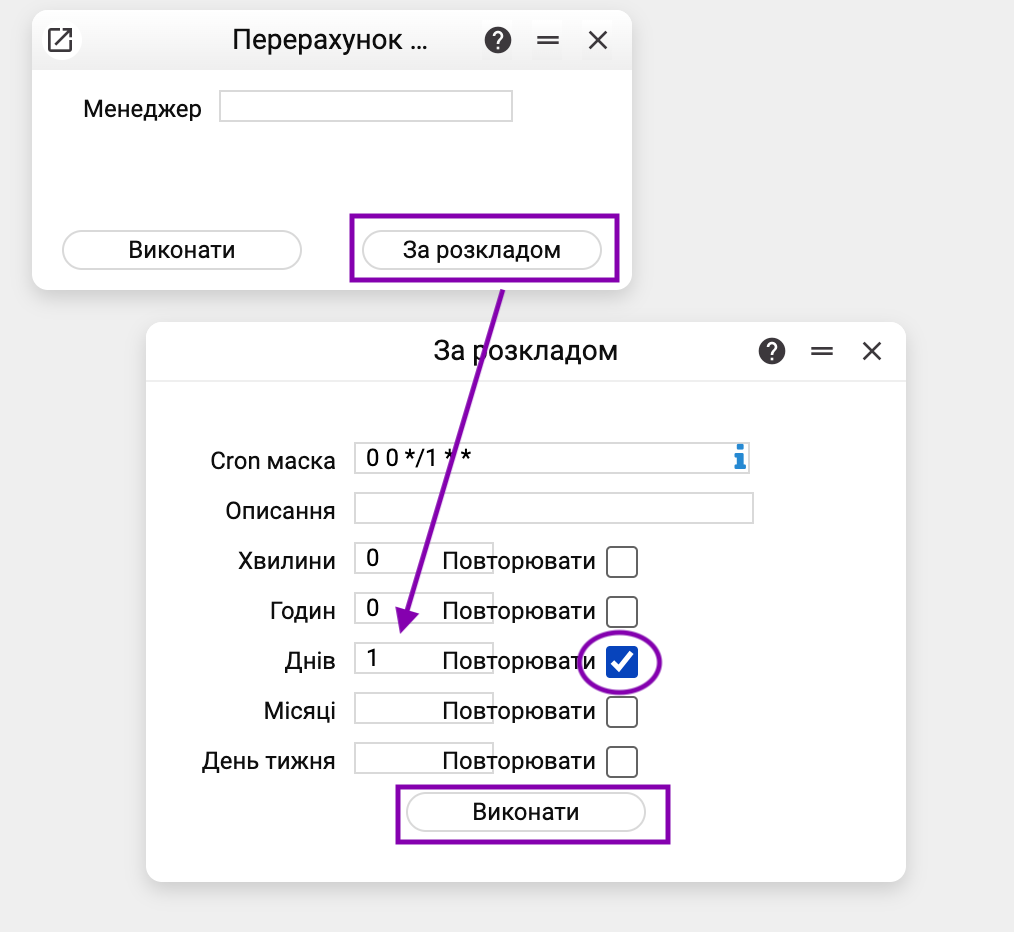
- Press "Scheduled" (instead of "Execute"). The schedule window opens.
- Set the time with the Minutes, Hours, Days, Months and Week Day fields — they build the Cron mask. An empty field means "any". The "Repeat" checkbox next to a field means "every N": 30 in minutes with the checkbox — every 30 minutes, without it — at minute 30. The mask can also be typed by hand; the "About cron" button next to it explains the notation.
- Add a Description and press "Execute" — "Operation scheduled successfully!". A new task appears in the register.
The maintenance parameters are stored as they were at the moment of scheduling. The task runs in the company where it was scheduled.
The task card
- Code, Description, Mask — the task's name and schedule. The mask can be changed in the card: after saving, an active task follows the new schedule.
- Key — which maintenance is run; Type, Company — service fields.
- Status — "ACTIVE" (runs on schedule) or "PAUSED" (stopped). The "Stop" and "Start" buttons switch it.
- Parameters — the maintenance parameters it is run with.
- Executions — the run log: start date and time, duration in milliseconds, Result ("SUCCESS", "WARNING" — reached the end but did not process some records, "FAILED" — failure) and the error text. The log keeps the last 1000 runs; card menu → "Delete logs" clears it.
Common situations
The task does not run. Check the status: "PAUSED" — press "Start". Then check the mask: time follows the server clock.
"FAILED" in the log. The "Error" column holds the reason the maintenance gave. Run the maintenance by hand with the same parameters: it shows the same refusal in the usual window. A task's parameters are changed by scheduling the maintenance again.
"This task is already running". While a maintenance runs on schedule, a manual run of the same maintenance in the same company is refused — two copies never run at once. The next scheduled run is also skipped if the previous one has not finished.
"Time limit of 30 min exceeded; the task may still be running in the background". A scheduled run took longer than the limit. By default it is 30 minutes; the server administrator can change or switch it off. Changes the maintenance made within its transaction are rolled back, while writes outside it may have gone through partly — check the maintenance's result. The task may still be running in the background; until it finishes, the next scheduled runs are skipped and a manual run answers "This task is already running". A manual run of a maintenance from its window has no time limit.
"The schedule mask is not valid" / "Cron mask is not valid". A mask has five parts separated by spaces: minutes, hours, day of month, month, day of week. For example, "0 6 * * *" — every day at 06:00, "0 9 * * 1" — every Monday at 09:00.
After a server restart. Tasks with the "ACTIVE" status resume by themselves; "PAUSED" ones stay stopped.
The task is no longer needed. Delete the record — the schedule goes with it.