Contact Classifications
Labels attached to a contact on top of the category: industry, acquisition channel, campaign participation — anything you may later want to select customers by. Unlike a category, a contact may carry any number of classifications.
Where to find it: Modules → Sales Ledger → Registers → Contact Classifications
Example walkthrough
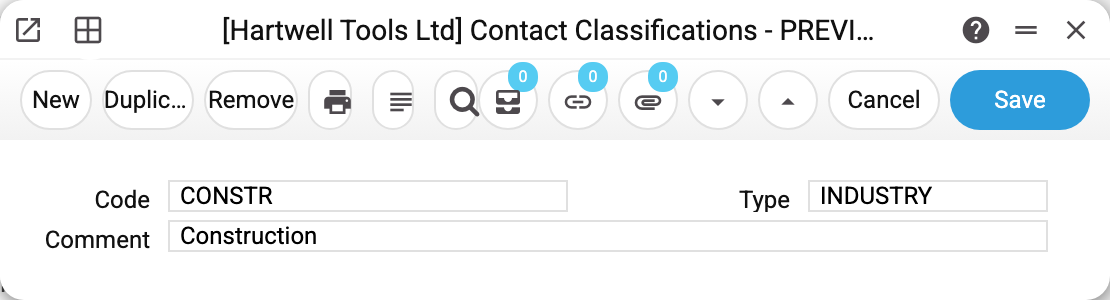
Classification CONSTR — «Construction», type INDUSTRY. The type comes from the classification types register and says which «axis» the label belongs to.
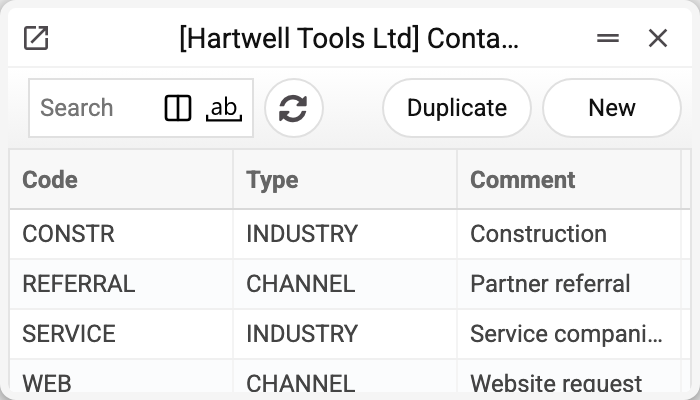
The list shows the design: two axes — acquisition channel (WEB, REFERRAL) and industry (CONSTR, SERVICE). Millbrook Construction Ltd carries both labels on its card: «CONSTR,REFERRAL» — a construction company that came in through a referral.
How it works
The «Classification» field on the contact card is multi-valued — values are listed comma-separated. Each one is verified: a label that does not exist blocks saving.
Classification is about selection, not terms. It substitutes nothing into documents: it selects contacts — in the contact list (the filter button), in the contacts report, in the Contract billing service (the «Classification» field), and when a quotation price list is linked to customers (the «Link to contacts» menu item, field «Contact Classifications»). The Customer Information Report and the Vendor Information Report show the contact's labels with their comments.
A comma means different things in different filters. In the contact list filter «CONSTR,REFERRAL» means "and": only contacts carrying both labels are found; "any of" is written with a plus: «CONSTR+REFERRAL». In the contacts report and when linking a price list, «CONSTR,REFERRAL» means "or" instead: a contact with at least one of the labels qualifies. And the contract billing service searches for the typed text as part of the field: the code «B2» also catches contacts labelled «B2C», while «CONSTR,REFERRAL» finds only those whose labels stand next to each other in exactly that order. So do not create codes where one is part of another (B2 and B2C) — otherwise the service bills customers you did not mean.
The type keeps things tidy. It does not restrict the choice — two labels of the same type may sit on one card — but the register makes it obvious what each label is about.
Typical situations
The label is not accepted on the card. Check the spelling: only codes from this register are accepted (the card window raises lower-case letters to capitals itself). A space after the comma does no harm: «CONSTR, REFERRAL» is saved as «CONSTR,REFERRAL». The refusal «Classification '…' is not found!» means there is no such code in the register.
Too many labels. Introduce types: one axis for «where they came from», another for «what they do». The list becomes readable and the report meaningful.
Customers need to be selected by label. Use the filter button in the contact list, field «Classification»; the filter looks for the label among all values of a contact. Several labels comma-separated mean "all together", with a plus — "any of" (see above).
The label will not delete. A contact or employee card holds it (also among other comma-separated labels) or the Prom Creation of New Customers setting does — the refusal says where: «A record of «Contact Classifications» is used in: Contacts!». Without the label such a card could no longer be saved. Remove the label from the cards and from the setting — then the deletion goes through.
Print variables
Values available in this document's printed form templates. How to write a variable in a template — see Print Forms.
Header fields:
| Variable | What it holds |
|---|---|
| ContClassT_No | Code |
| CliClassT_No | Type (code) |
| CliClassT_Comment | Type (name) |
| ContClassT_Comment | Comment |