Binotel Connection
The link between the ERP and Binotel telephony: access keys. It is the foundation — until these four lines are filled in, nothing else in telephony works.
Where to find it: Modules → Telephony → Settings → Binotel Connection
A worked example
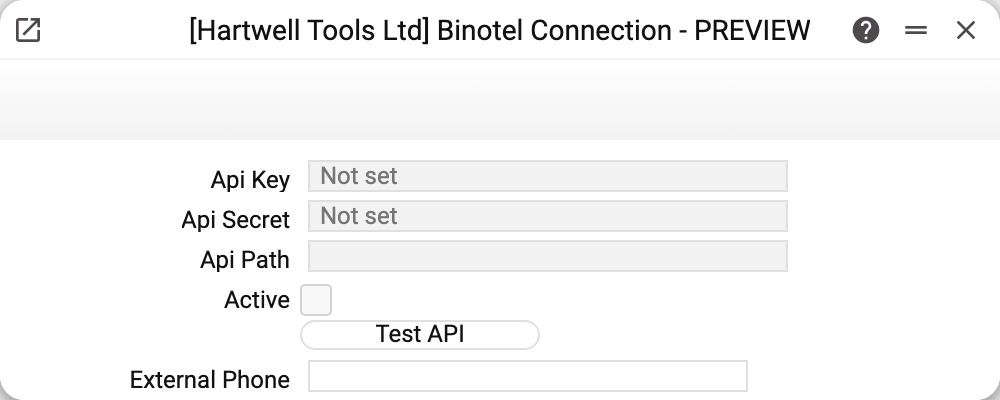
- Api Key and Api Secret — the credentials from the Binotel account; the secret signs every request. Once saved they are not shown — the fields display a mask of dots. A field left untouched keeps the saved value on save; a typed value replaces it; erasing the mask erases the key;
- Api Path — the host the system talks to: the host name only, without
https://and without a path — the system adds the port and the request path itself; - Active — turns the integration on: with it cleared, a call from a card does not go out and the system answers "Binotel integration is turned off". The "Test API" button works with it cleared too, so the keys can be checked before switching it on;
- Test API — a settings check that places no call;
- Call to External Phone — a real call: from the current user's extension to the number in the "External Phone" field. It needs "Active" ticked and the user's phone mapping; the call is recorded in the Binotel log. A successful call is not confirmed by the window — a message appears only on a refusal.
In the demo company the fields are empty: telephony is not connected, and the shot shows exactly where configuration starts.
What "Test API" actually checks
The system reads the saved record and looks for key, secret and path. If any of them is missing it reports that the Binotel connection details are absent. If everything is filled in, the button shows nothing — no message is the success. This is a completeness check of the setting, not a deep test of the service: to see a real reply from Binotel you need an actual call.
The order of work
- Obtain the key and secret from the Binotel account.
- Fill in the three fields here and save — the check reads the saved record, not the screen.
- Press "Test API".
- Tick "Active".
- Map extensions to users — that is a separate setting, and without it a call from the system will not go out.
Typical situations
The test fails right after typing. Usually the record simply has not been saved, or one of the three fields is empty.
"Binotel server is unavailable". That answer comes from the network, not from the setting: check the host and outbound access from the server.
"Binotel did not make the call: …". After the colon comes Binotel's own answer, for example "Can't call to the ext": Binotel could not reach the extension (switched off or not registered). The connection itself is fine — check the handset and the phone mapping. No task is created for such a call.
The secret has to change. It is a password: change it in the account and here at the same time, and don't send it through chat apps.
"Api Path" was changed and saving is refused: "The saved key is sent only to the saved server. To use another server, type the key". Once the key and secret are saved, the system accepts a new path only together with the key and the secret typed again — so the saved key never goes to a foreign server. Type both again and save.
Where to look next
- Phone mapping — whose extension is whose.
- Binotel Call Actions — which tasks a call should raise.
- Binotel log — what the system recorded about calls.