Delete company (cascade)
The most dangerous operation in the system: it erases a company along with all its data — documents, reference data, balances, history, attached files.
Where to find it: Modules → Database Maintenance → Maintenances → Delete company (cascade)
A worked example
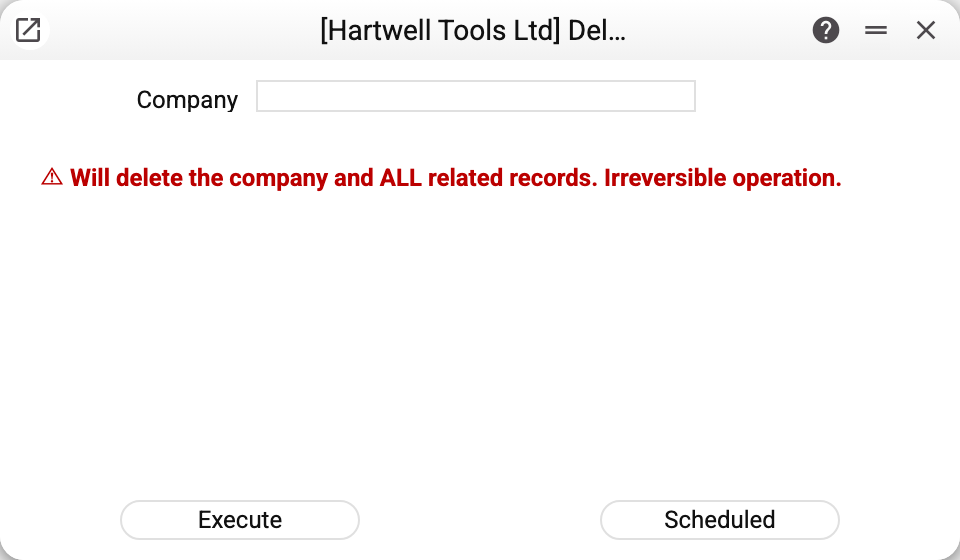
Two fields: "Company" — the code of the company to delete — and "Confirm code" — the same code typed once more. If they do not match, the window will not start the deletion ("Confirm deletion: enter the company code once more!"), and the server refuses a request without a matching second code as well. There is deliberately no "are you sure?" dialog: people click "yes" without reading, whereas typing the code a second time can only be done on purpose.
The "Scheduled" button in this window is greyed out: an irreversible operation cannot be scheduled — the server refuses even a direct request ("This operation is irreversible and cannot be scheduled!"). Run it with "Execute" only.
Which company, and who can run it
The service deletes the company whose code was typed — any company in the database, not only the one you are working in (that one too: your own session then ends as well). It does not delete the main company of the database: "Cannot delete the main company".
The right to run it comes only from a separate row for this very maintenance in the role with the right to run ("Full access" or "run only (for action permission)"). The role's general row for all maintenances and the "Default access" of the user card do not open this service — neither in the menu nor by a direct request; a person without a role cannot run it. This is so since 24.10.2026: before, anyone whose role opened maintenances could run it. To give the service to an administrator, add a row for it to their role.
What exactly gets deleted
The service does not follow document links: in every table of the database it erases all rows marked with this company — documents in every register, reference data, ledger entries, balances, housekeeping registers, settings, scheduled tasks. Files go with the rows: the company's attachments and print form templates are erased from the file storage (a folder on the server, or S3) as soon as the deletion in the database has completed successfully.
Not deleted: user cards (see below) and references to this company's code in documents of other companies — the service leaves those rows alone and lists them in its summary: "References to this company code remain in documents of other companies: …".
The deletion in the database runs as one transaction: if it fails halfway, nothing changes, and the files stay in place too.
!!! danger "This cannot be undone" There is no reversal and no recycle bin. Data comes back only from a database backup, and attachment and template files only from a copy of the file storage: a database backup does not contain them.
Before running it:
- have a fresh backup of the database and the file storage, and check the company code twice: the next code in the list means somebody else's data;
- if other companies take data from this one (it appears in the "Master" column of the Register sharing setting), remove those rows first: the shared data lives in this company and disappears with it. The service checks for this ("Cannot delete: company is a source of sharing for other companies. Remove sharing configuration first"), but check the setting yourself as well;
- if this company itself takes shared data (its No. is in the "Shared with" column of the same setting), remove its No. from there first. The service checks for this ("Cannot delete: the company is listed in the Shared with column of register sharing. Remove it from there first"): the setting may attribute a No. with no company behind it to another company — which would then see the shared data. The service cannot strike the No. out for you — with an empty "Shared with" the row opens to every company; decide yourself whether to remove the No. or delete the row;
- review this company's scheduled maintenances in Cron Tasks: the service erases their records and, once the deletion has succeeded, also stops a schedule already running on the server (before 30.10.2026 it kept going until the server restarted — the tasks had to be removed by hand).
What happens to the company's people
The service does not delete user cards — they are shared by all companies in the database. But three things happen to the people who worked in this company:
- Sessions end. Everyone whose current company is this one, or who has it on the "Companies" tab of their card, sees the login window on their next action.
- Those who worked only there are closed. If, after the deletion, a person has no other company left on the "Companies" tab, the service ticks "Closed" in their card: they cannot sign in by any route. Without this, a person with no companies would land, on sign-in, in the first active company of the database — where they were never given access. The service summary names these users: "Users without another company are closed: …".
- People with other companies sign in to them as before, with the role of their "Companies" row.
The system user is never closed. A user whose "Companies" tab was already empty before the deletion is not closed either: by the sign-in rule such people go to the first active company of the database, and the deletion does not change that. To let a closed person work again, an administrator adds another company on the "Companies" tab and clears "Closed" — see Users.
When it is justified
- a test company created for training and no longer needed;
- a mistakenly created company nobody has worked in;
- a finished client engagement in a service database where the data need not be kept.
In every other case, clearing the company's active flag is the right move: the data stays and nobody can switch into the company any more. Sessions already open in it end on the person's first action after the flag is cleared (the change takes effect within half a minute), with the message "Company is inactive, please sign in again". The company's scheduled maintenances keep running, though — stop them separately.
Where to look next
- Companies — the list and the gentle way to close one.
- Register sharing — what else ties companies together.