VAT Invoices Issued
The VAT invoice you issue to a customer: the document that moves your VAT liability into settlements with the tax authority and is then registered in the state register. It is not typed by hand — the system creates it from an invoice, and for a return or a price change you issue an adjustment calculation instead.
Where to find it: Modules → Sales Ledger → Registers → VAT Invoices Issued
This is Ukrainian VAT accounting, and the whole block is built around its rules; if your company does not report VAT in Ukraine, none of this is needed.
How the VAT invoice appears
The document menu of an approved invoice has an entry "Create VAT invoice":
- from an ordinary invoice it creates the VAT invoice itself: the system carries over the rows, the amounts and the VAT rates, fills the invoice type from the VAT setting and opens the finished document. The invoice must be approved — otherwise you get "Confirm the document before creating VAT invoice";
- from a credit note (an invoice of the credit type) it opens a new, not yet saved adjustment calculation against the VAT invoice of the reversed invoice: rows with a minus and reason 103. If that invoice has no VAT invoice, you get "VAT invoice not found for this invoice";
- calling it twice on the same invoice answers "VAT invoice for all products created" — the document is not issued twice.
If the invoice is fully covered by prepayments, no VAT invoice is created either: the advance already had one of its own.
A worked example
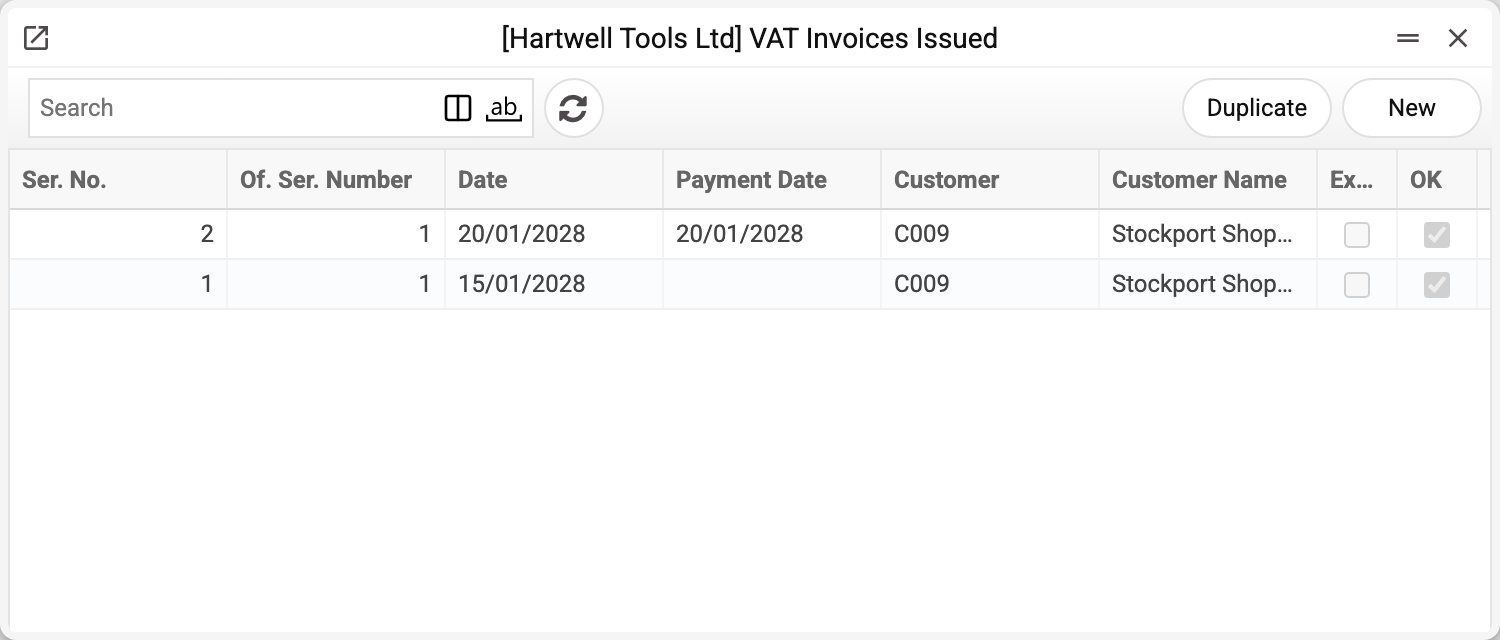
Two documents from January 2028: VAT invoice 1 and adjustment 2 against it.
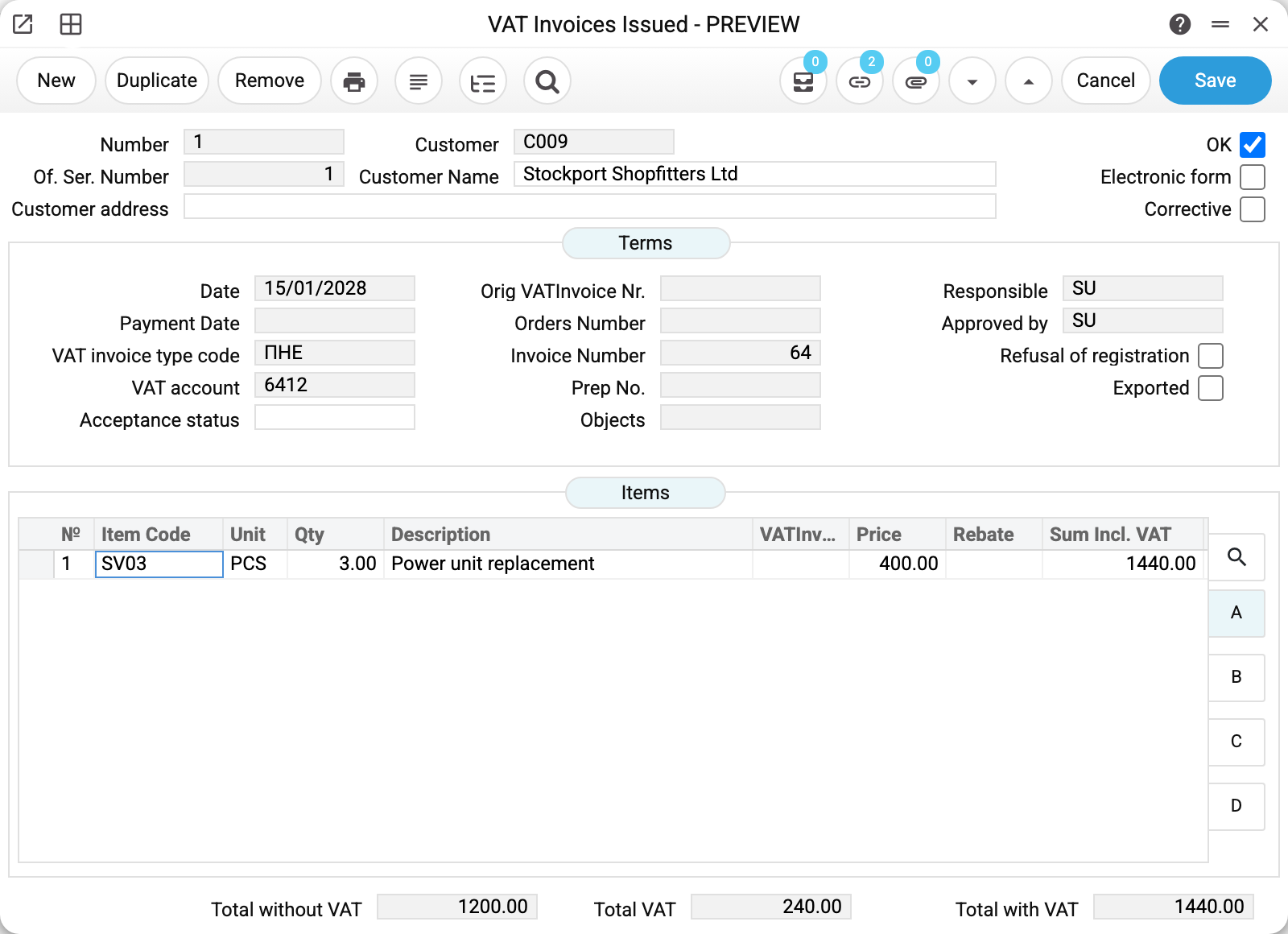
VAT invoice 1 was created from invoice 64 for Stockport Shopfitters: three power units at 400.00, 1200.00 net, VAT 240.00, 1440.00 gross.
What to read in the header:
- Number is the internal number in the register; Of. Ser. Number is the number the document carries to the tax authority (its own continuous sequence);
- VAT invoice type code comes from the types register — here ПНЕ, the electronic VAT invoice. It is filled from the VAT setting;
- Invoice Number is the source document the VAT invoice was built from; that link ties it back to the sale;
- VAT account is the tax account of the first row's VAT code (6412); the posting itself uses the accounts of the rows' codes — see "Ledger entries";
- Acceptance status holds the reason the invoice is not handed to the buyer (a supply to a non-payer, for instance); the codes live in the reasons register;
- Responsible and Approved by — who drew it up and who approved it;
- Exported is set by the M.E.Doc export once the file has been produced: the service or the card's «Export for Medok» item (see "Export to M.E.Doc");
- Refusal of registration marks that the state register rejected the document.
A posted invoice is locked — in the window, through the API and for the AI agent. Only Refusal of registration and Exported can be changed: they are not the invoice's content but what happened to it after sending, and a refusal arrives after posting. Any other change, including "Reset VAT invoice", is refused with "A posted document cannot be edited!": remove OK first, make the change and post the invoice again.
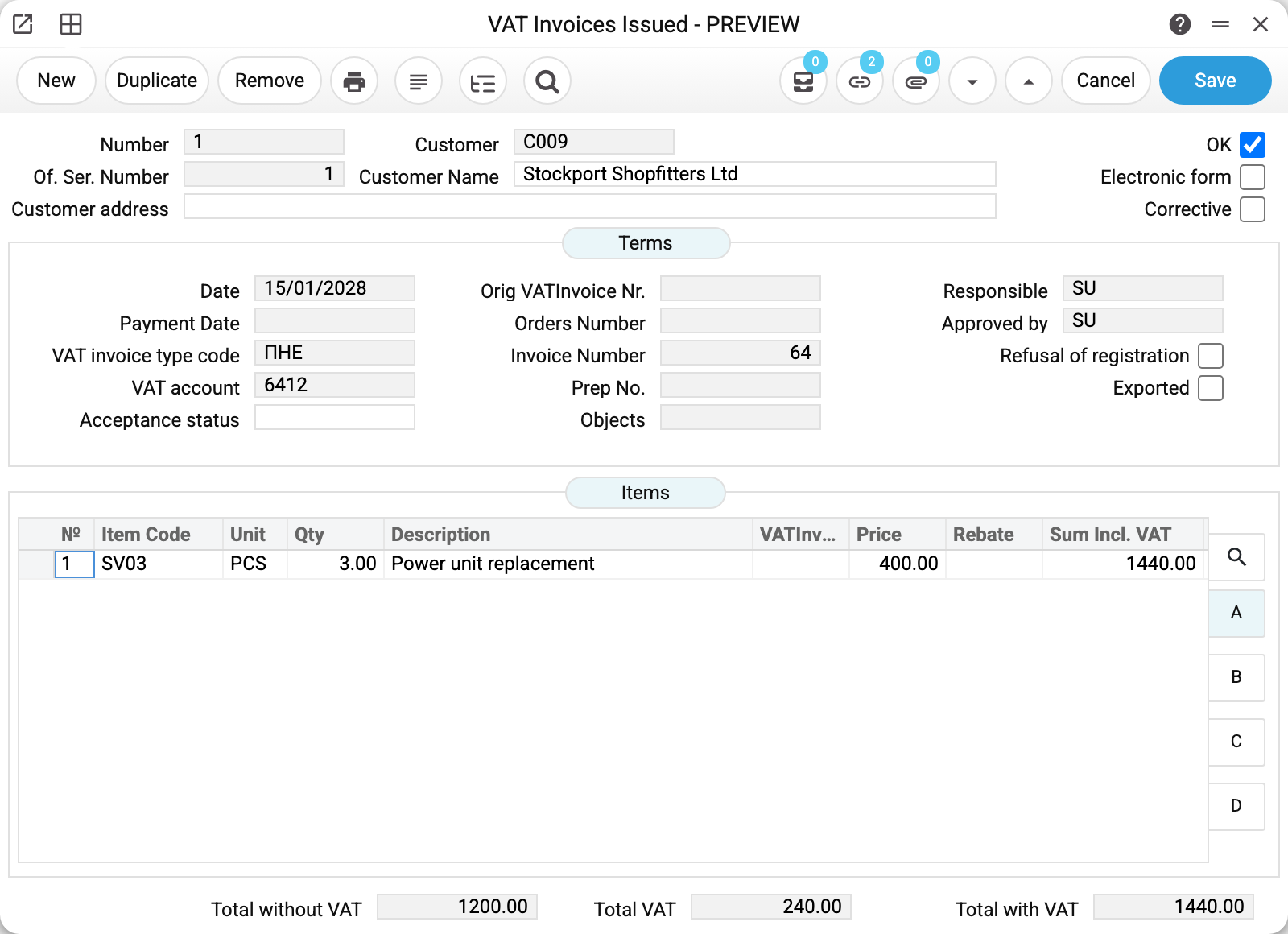
The rows carry the item or service code, the unit, the quantity, the price, the rebate and the amount including VAT. The unit is not only for printing: without it the XML export for M.E.Doc will not be produced.
The adjustment calculation
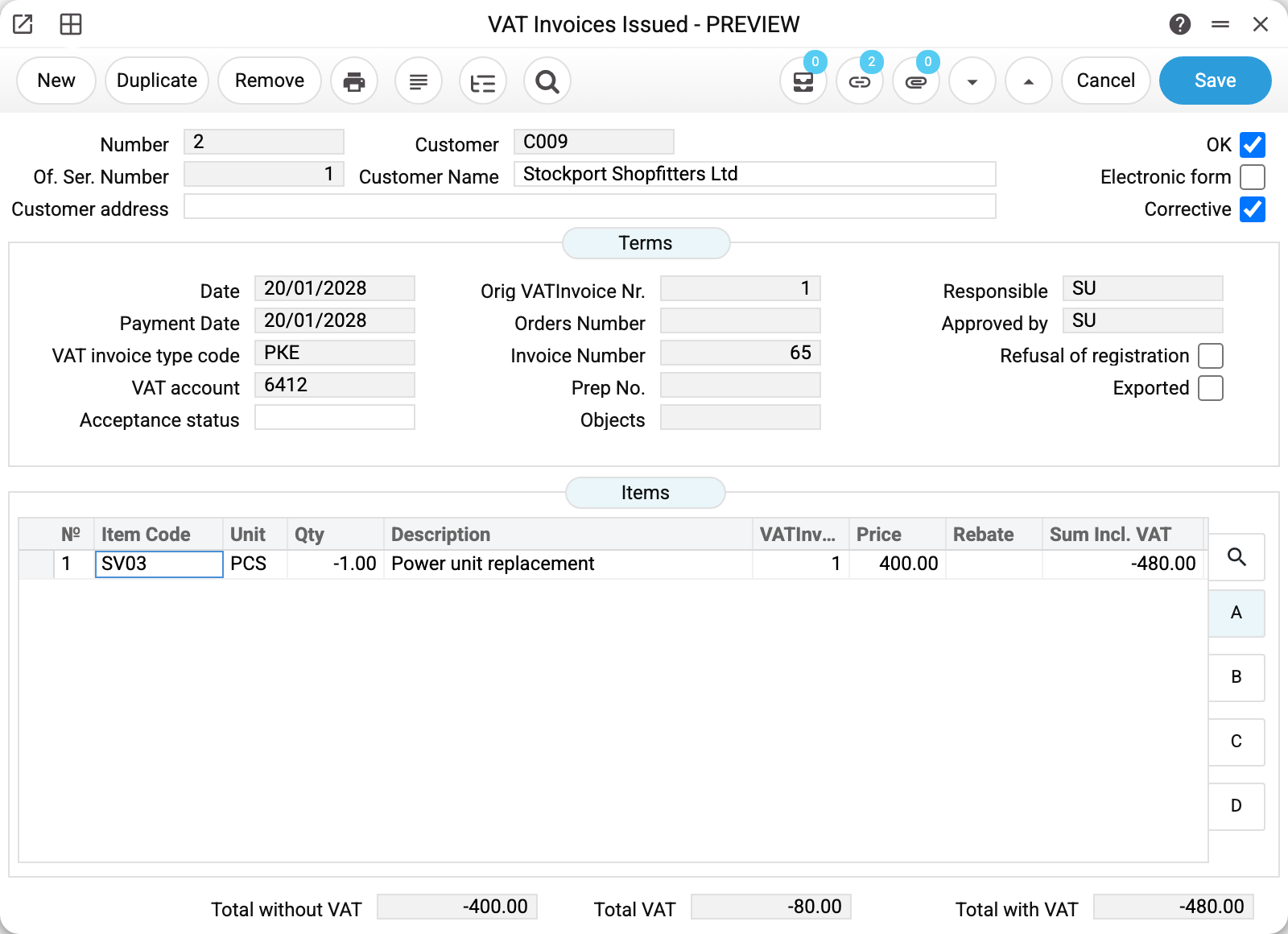
An adjustment is the same document with the Corrective box ticked, type РКЕ, and a reference to the original in Orig VATInvoice Nr. The row carries a minus: −1 × 400.00 = −480.00 including VAT, and it states which row of the original VAT invoice it changes.
Every adjustment row needs a reason from the adjustment reasons register — 103 in the example, "goods or advance payments returned". Creating from a credit note fills it in; a reason entered by hand is looked up in the register, but an empty one is not refused — keep an eye on it yourself.
⚠️ The system does not check whether the quantity has gone negative. Several adjustments against one VAT invoice simply add up; keeping the returns within what was sold is the accountant's job. The VAT invoice status report shows what is left after all of them.
Export to M.E.Doc
A single VAT invoice is exported by the «Export for Medok» item of the document menu in its card; all of a period — by the export service. The item builds one XML file in the M.E.Doc format (windows-1251 encoding) and marks the invoice "Exported" at once, before the browser even saves the file.
- The file takes the saved invoice. Save a new one or one with unsaved changes first — otherwise «Please, save document!».
- An invoice already exported is not exported again: «The document has already been exported!». To export it once more, clear "Exported".
- A regular invoice without rows is not exported: «VAT invoice … has no rows — there is nothing to export». An adjustment without rows (only the header details corrected) is exported.
- The other requirements are those of the service: company details, a unit and a VAT rate in every row, the customer in "Contacts", the responsible person in "Users", a filled "Of. Ser. Number". Without any of these the export refuses and names the invoice — the list of refusals is in the service article.
Ledger entries
Approving the VAT invoice moves the tax from an unconfirmed liability into settlements with the budget:
| Dr | Cr | Amount | What it is |
|---|---|---|---|
| 6432 | 6412 | 240.00 | the liability is confirmed by the VAT invoice |
The adjustment posts the reverse entry for its own amount. The accounts come from each row's VAT code in the VAT setting — the "Tax liability is unconfirmed" and "VAT" columns of that code: an ordinary VAT invoice debits the first and credits the second, an adjustment, with its negative amounts, the other way round; rows with different codes each give their own pair. The document's "VAT account" field does not take part in the posting. If a code with non-zero tax has no account filled in, the VAT invoice will not post and names the row.
Print variables
Values available in this document's printed form templates. How to write a variable in a template — see Print Forms.
Header fields:
| Variable | What it holds |
|---|---|
| VATInvoicesIssued_OK | OK |
| VATInvoicesIssued_Number | Number |
| VATInvoicesIssued_OfficialNumber | Of. Ser. Number |
| VATInvoicesIssued_CustomerAddress | Customer address |
| VATInvoicesIssued_Customer | Customer |
| VATInvoicesIssued_CustomerName | Customer Name |
| VATInvoicesIssued_InvExp | Electronic form |
| VATInvoicesIssued_Corrective | Corrective |
| VATInvoicesIssued_Date | Date |
| VATInvoicesIssued_PayDate | Payment Date |
| OBJ_No | Objects (code) |
| OBJ_Comment | Objects (name) |
| VATInvoicesIssued_OriginVATInvoice | Orig VATInvoice Nr. |
| VATInvoicesIssued_OrderNumber | Orders Number |
| VATInvoicesIssued_InvoiceNumber | Invoice Number |
| VatType_No | VAT invoice type code (code) |
| VatType_Desc | VAT invoice type code (name) |
| VATInvoicesIssued_PrepNo | Prep No. |
| VatFailRes_No | Acceptance status (code) |
| VatFailRes_Desc | Acceptance status (name) |
| VATInvoicesIssued_OKPerson | Responsible |
| VATInvoicesIssued_OKBy | Approved by |
| Acc_No | VAT account (code) |
| Acc_Comment | VAT account (name) |
| VATInvoicesIssued_RefusalOfRegistration | Refusal of registration |
| VATInvoicesIssued_Expored | Exported |
| VATInvoicesIssued_TotalWithoutVAT | Total without VAT |
| VATInvoicesIssued_TotalVAT | Total VAT |
| VATInvoicesIssued_TotalWithVAT | Total with VAT |
Row fields:
| Variable | What it holds |
|---|---|
| MNo | Row position number |
| MCode | Item Code |
| MUnitCode | Unit |
| MQty | Qty |
| MDescription | Description |
| MCNCode | CNCode |
| MImported | Imported |
| MPrice | Price |
| MRebate | Rebate |
| MSumWithVAT | Sum Incl. VAT |
| MAmountVAT | Amount VAT |
| MSerialNumber | Serial No. |
| MObjects | Objects |
| MInvoiceNumber | Invoice No. |
| MInvoiceRowNumber | Invoice row No. |
| MVATInvoiceRowNo | VATInvoice row No. |
| MAdjustmentReason | Adjustment reason |
| MVATRate | VAT Rate |
| MAdjustmentGroupNumber | Adjustment group number |
The records the document refers to through its form fields (location, customer, currency…) also expose the rest of their variables — code and name are already listed in the tables above, the rest is described in the register's article:
- Objects — Objects
- VAT invoice type code — VAT Invoice Types (
VatType_*) - VAT account — Accounts
Common situations
"Create VAT invoice" answers "Confirm the document…". The invoice is not approved — tick OK first.
The VAT invoice is not created: "Field "VAT Rate" is required". The invoice row had no VAT rate: the row is carried over, and a VAT invoice with a row without a VAT code does not save. For an invoice from a sales order that has no VAT rate either in the header or in any row, the message is different — "VAT rate is not specified in sales order No. …" with the order number. Check the rate column on the invoice.
You need a VAT invoice for an advance. It comes from the payment, not from an invoice; the advance number then shows in the "Prep No." field.
The customer returned part of the goods. Raise a credit note for the returned quantity and build the adjustment from it. Quantity is what matters: the adjustment reverses the row by the quantity stated on the credit note.
The register rejected the document. Tick "Refusal of registration" — this works in a posted invoice too, no need to remove OK. The document stays in the books marked as not registered.
"A posted document cannot be edited!" The invoice is posted and something other than "Refusal of registration" and "Exported" was changed. Remove OK (needs the "Can remove OK" right), correct and post again.