SMS Reports
The log of messages sent by the SMS Notification mailing: to whom, when, with what text, and what the provider replied. Service order SMS — status changes or ones sent by hand from the card — are not recorded here.
Where to find it: Modules → Database Maintenance → Registers → SMS Reports
A worked example
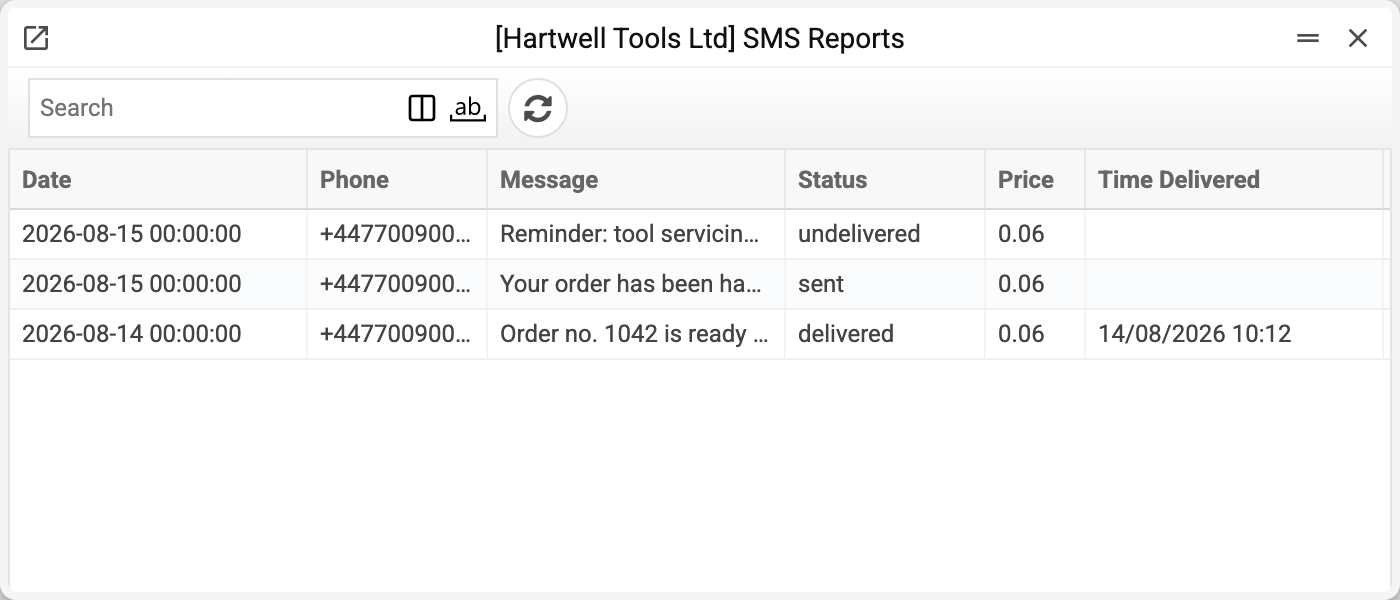
The list shows the date, the phone number, the text, the status, the price and the delivery time; the contact, the provider's message id and the error description open inside the record itself.
Right after sending the status is create. Only a BSG delivery report rewrites it: with TurboSMS and Atompark the status stays create, and the price, currency and error description stay empty. BSG statuses arrive in its own words and are not translated: delivered, sent (accepted and on its way), undelivered. An empty delivery time next to sent means the message is still travelling, not that it was lost.
!!! note "The date column looks unusual"
The "Date" column shows values like 2026-08-15 00:00:00 — a technical form rather than the usual 15/08/2026. This is a display defect; neither the data nor the search is affected.
The send-date/delivery-time pair is what the log exists for: the gap between them shows how long the message took.
What the status tells you
Sending an SMS is not instant: the provider accepts the message, queues it and delivers when the handset is reachable. So the status changes over time, and the error fields fill in only on failure.
The price beside the status is a practical touch: the log shows what a campaign cost and whether you are paying for undelivered messages. Only BSG returns a price.
Typical situations
A customer says no SMS arrived. Find the number — status and delivery time say whether it landed.
A message with an error. The description comes from the provider: wrong number, unreachable subscriber, insufficient funds.
The log is empty. Messaging is not configured: the operator is chosen in SMS notifications ("Sender Service"), BSG access is set there too, TurboSMS — in the SMS settings, Atompark — in "Atompark Settings". With no operator configured the service refuses with "No SMS sender service is configured". There is no record either when the contact card has no "Notify customer" tick or no phone.
One reminder is missing and there is no record of it. The service sends reminders one by one: a connection failure with the operator on one of them skips just that SMS (the reason is in the server log), the rest of the reminders go out.
Where to look next
- SMS settings — service access and balance.
- SMS notifications — which events trigger a message.