Goods Receipts
The goods have arrived. A goods receipt is the only purchasing document that puts them into the warehouse and gives them their cost.
Where to find it: Modules → Stock → Registers → Goods Receipts
The purchase order agrees the deal, the supplier invoice creates the debt, and stock changes here — nowhere else. So this document decides:
- how much you have — the stock figure goes up by exactly what is in the rows;
- what it cost you — the cost of the batch, which travels with the goods to the customer and into the profit;
- when it appeared — by the transaction date, not by the date of the invoice or the order.
Cost is not automatically the same as price. Price is what the supplier asks; cost is the price plus everything you added to get the goods into the warehouse: carriage, duty, a broker's fee.
The register lives in the Stock module. It is usually created from the purchase order card with «Create incoming» or from a posted customs clearance; for a stocktaking surplus the stocktaking comparison writes it. A receipt can also be entered by hand, without an order — then the rows are free (see step 3 below).
Where it sits
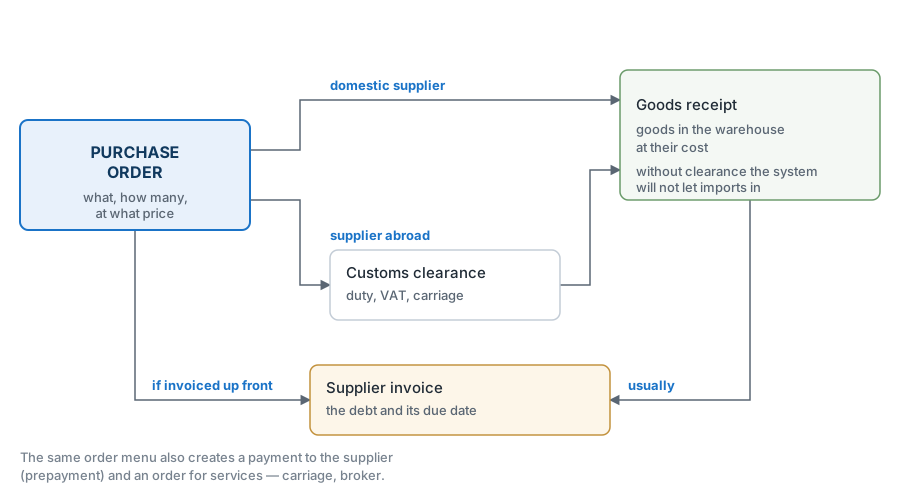
With a domestic supplier the road is direct: order → receipt. With an import, customs clearance stands in between, and the receipt is then created from it: the «Create incoming» button works only in a posted clearance (in a draft — "Please, make OK document!"). Whether it is an import, the system decides by the supplier's card: «Non-resident» on the «Conditions» tab, and «Create incoming» on the order refuses ("Vendor is non-resident! Create custom clearance before incoming, please!"). For a resident supplier the road from the order stays open even when that order has a clearance, and a receipt entered by hand is not checked at all — receive an imported batch from the clearance, otherwise the goods enter at a cost with no duty in it.
What approval does
- raises the stock at the location in the header;
- creates the batch at the cost from the rows — this is what shipments will later draw on, FIFO;
- posts to the ledger: goods to the debit of the stock account, the settlement account on the credit side;
- writes the received quantity back into the order, so the order knows what has been done.
A worked example
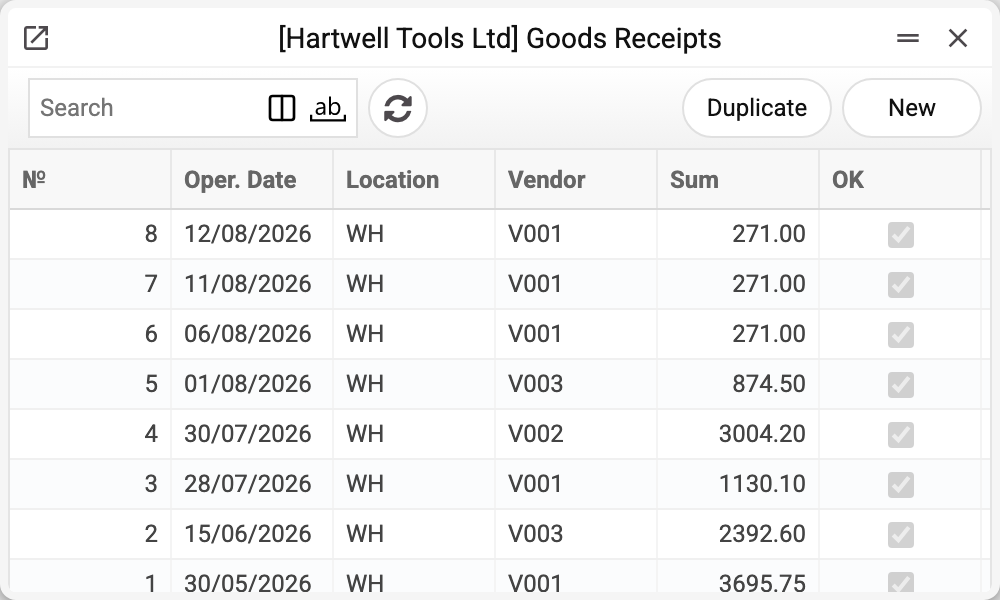
One row in the journal is one arrival at the warehouse: transaction date, warehouse, vendor, amount and the OK tick. The amount here is the value of the goods received; comparing it with the vendor invoice is the first move when a discrepancy shows up.
The first part of order №6 has arrived — five hammer drills.
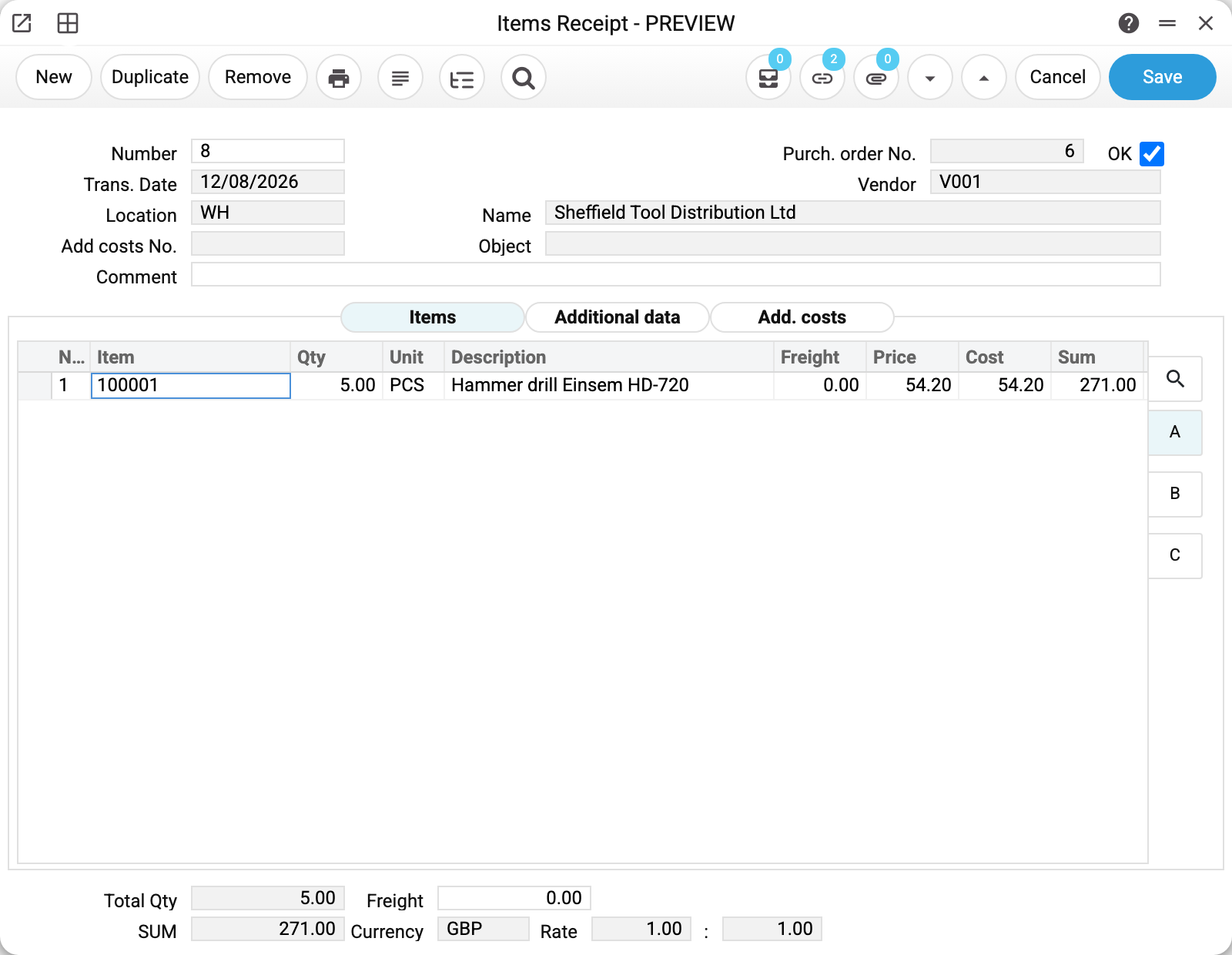
The header is short, and every field in it decides something:
- «Location» WH — where the goods go. A mistake here means the batch is in the wrong warehouse, and you find out when a shipment cannot find it;
- «Purch. order No.» 6 — where the rows came from. That link is what lets the order count what has been done;
- «Trans. Date» 12/08/2026 — the date the goods appear in the books. This is the day they actually arrived, not the day the paperwork was done;
- «Add costs No.» — empty, because the supplier is domestic. For imports it carries the number of the clearance.
Price, freight and cost

Three numbers in the row, and the first two are the ones people mix up:
- «Price» 54.20 — what the supplier asks per unit;
- «Freight» 0.00 — carriage per unit of goods: it is added to the unit cost, so the whole row carries freight × quantity;
- «Cost» 54.20 — what the goods will be worth in stock.
Here price and cost coincide precisely because carriage was not paid separately. As soon as freight or additional costs carry an amount, the cost goes up while the price stays where it was — and the gap between the columns becomes visible.
«Sum» 271.00 is 5 × 54.20, the value of the row before tax. There is no tax in a receipt at all: VAT is the supplier invoice's business, and stock deals in clean value. The exception is a receipt made from customs clearance in a company that is not a VAT payer: customs VAT is not refunded to it, so it goes into the value of the receipt and of the batch.
At the bottom: «Total Qty» 5.00 and the total value of the receipt.
How it enters the books

Sheet B shows the accounts the goods will enter on: «Cost Acc.» 201 — where the value of the goods is posted, «Credit Acc.» 685 — the contra account. Both come from the settings and the item card; they rarely need changing in the row, but they are worth a look before approval — these two numbers decide the ledger entry.
«Serial No.» sits here too: if the item is tracked by unit, the numbers are entered on this sheet, and the batch lives by them from then on.
A separate «Additional data» tab holds a single read-only field — «Stock Take Date». It is filled in by the stocktaking comparison when that writes a receipt for a surplus on its own: the date later shows which stocktake the receipt came from. On a hand-made document the field stays empty.
What changed after approval
Five drills appeared in warehouse WH at a cost of 54.20. In order №6 the drill row got its fives, and the order stayed open — the drill drivers have not arrived. When these drills go out to a customer, the shipment will carry that same 54.20 in its cost column.
What the document posts
A goods receipt puts the goods on the balance sheet but creates no debt to the supplier — that is the vendor invoice's job. Hence the shape of the transaction: the stock account is debited, the purchase account is credited.
| Dr | Cr | Amount |
|---|---|---|
| 201 | 685 | 271.00 |
On the left the goods went onto the balance sheet; on the right an obligation appeared — but not yet to a particular supplier. This is what accountants call goods received but not invoiced: the goods are here, the invoice is not. Account 685 shows how much stock you hold without documents, and the vendor invoice clears that balance, moving the debt onto the supplier.
Why the goods go on the balance sheet straight away, without waiting for the invoice: stock is recognised when it is received and control over it has passed — otherwise the warehouse would hold something the books know nothing about.
If the lines carry freight or additional costs, those are separated out into credit rows of their own, each on its account from the settings. The credit total does not change: the same amount is just split between the settlement account and the expense accounts.
Where the accounts come from
Both accounts are visible in the line, on sheet B: «Cost A/C» and «Credit A/C». They are filled in when the document is created — from the item card, its group and the general settings — but from that moment they live in the line, and the transaction is built from them.
The practical consequence: if someone edited the accounts in the line, the document posts by the edit, not by the company rules. So sheet B is worth a look before approval — afterwards, stock documents cannot be un-approved without a separate permission.
The exception is a change of the account's source in a draft. Change the location in the header, and «Cost A/C» in every row with an item is found again from the new location, even one typed by hand; change the item in a row, and the account comes from the new item. Choosing the same location or item again does not change the account.
If a line arrives with no accounts, they are still resolved on approval: the stock account along the chain item card → item group → location card → the «Account Usage» setting → «Stock» tab → «Cost Items Acc.»; the purchase account from the same setting, the «Purchase Cost» tab, field «Purch. Control Account».
How to work with it
1. Create it from the order
Order card → «Create incoming». The rows carry across with the quantities still outstanding.
2. Bring it in line with reality
Correct the quantities to what was actually delivered. Delete the lines that are not in this consignment from the document (a receipt will not save a line with zero quantity) — they stay in the order and come next time.
3. A set is received as one position
If the supplier delivered a ready-made set, enter a line with the set code and a quantity — once the quantity is in, the system replaces that line with the components at their purchase prices. No line of the set is left in the document: it is the items themselves that land in the warehouse. This works in a receipt without an order: in a receipt created from a purchase order the set of lines cannot change — a new line, set or item, will not save («It is forbidden to change goods in receipt»).
Each component carries a "↳" mark before its code — that is how you can tell the row was put there by the system, not by hand. Which set it came from is shown by the "Set" column, but that column exists only in companies where the "Show "Set" column in Goods Receipts and Stock Movements" box is ticked in the items setting; the set code itself is always stored in the row. If you change the item code in such a row, the link to the set is dropped and the row becomes an ordinary one.
4. Enter the carriage
If transport is paid separately, enter the freight and the additional costs. This has to be done before approval: after it the cost of the batch is fixed.
5. Approve
OK and save. The goods are in stock, the batch exists, the ledger entries are made — provided the "Goods Receipts" mark is set on the Logistics tab of the Records from Subsystems setting; without it stock and batch are the same, but there is no ledger entry. After that only the comment can be edited.
6. Next
- «Create supplier invoice» — when the invoice for this delivery arrives. Only from an approved receipt: a draft gives no invoice — «Goods receipt is not approved!», because a draft's quantities and prices can still change;
- «Create Return to Vendor» — if the goods are faulty;
- «Printing labels» and «Generate ser. num.» — marking up the batch;
- «Open transaction record» — the ledger entry that was made.
How to be sure the document is right
- The quantities equal what was actually delivered, not what was ordered.
- The location in the header is where the goods were really put.
- Every row has a non-zero «Sum» — that is the value the batch enters stock at. An empty sum is worked out by the system from the quantity, price, exchange rate, freight and additional costs; the batch enters stock at zero value only when there is neither a sum nor a price — and then the sale will show a fantastic profit.
- If carriage was paid separately, the freight is entered before approval.
- After approval, «Open transaction record» shows an entry for the value of the document.
Print variables
Values available in this document's printed form templates. How to write a variable in a template — see Print Forms.
Header fields:
| Variable | What it holds |
|---|---|
| Ok | OK |
| No | Number |
| Ord_No | Purch. order No. |
| Trans_Date | Trans. Date |
| Loc_Code | Location (code) |
| Loc_Name | Location (name) |
| Vendor | Vendor |
| Vendor_Name | Name |
| Objects | Object |
| Sum_Qty | Total Qty |
| Total | SUM |
| Trans_Rate | Rate |
Row fields:
| Variable | What it holds |
|---|---|
| MNo | Row position number |
| Item_Code | Item |
| Qty | Qty |
| Units | Unit |
| Description | Description |
| Price | Price |
| Cost | Cost |
| Sum | Sum |
| MCost_Acc | Cost Acc. |
| Cred_Acc | Credit Acc. |
| MObjects | Object |
| Serial_No | Serial No. |
| Unit_Name | Unit name |
| BAR128_Items_Code | Service barcode of the item card in CODE128: the record type and number, encoded. It holds neither the item code nor the "Barcode" field, and scanning it into a document row or at the POS does not find the item |
The records the document refers to through its form fields (location, customer, currency…) also expose the rest of their variables — code and name are already listed in the tables above, the rest is described in the register's article:
- Location — Locations (
Loc_*) - Exchange Rates (
System_rate) - Company details — name, addresses, bank accounts, officers, the printing user: Main Company
Common situations
Less was delivered than ordered. The normal course: enter the actual quantity. The order stays open for the difference.
More was delivered than ordered. The system will not let you approve that: OK returns «Can't accept more items than ordered». Raise the quantity on the order first, then approve the receipt — that way the order also carries the trace that the agreement changed.
One batch on two lines. When an item is tracked by batches, one batch number in a receipt is one line. The system will not approve two lines with the same number: OK returns «This serial number is already in use for the batch», with the item, the number and the quantity in brackets. Put the quantity on a single line. The system answers the same way when a batch with that number is already in stock: a new arrival is a new batch, so give it its own number. With per-unit tracking a number means one unit: a line for several pieces, or a number that is already in stock, returns «For this product, the serial number must be unique per unit».
The supplier's invoice arrived after the goods. That is common and not a problem: the goods enter stock on the receipt, and the debt appears when you raise the supplier invoice.
A wrong cost on an approved document. It cannot be corrected — a batch and ledger entries already stand behind it. This is fixed by a stock revaluation, and that is worth doing with your accountant.
The goods are imported. Customs clearance is posted first and the receipt second: duty, excise and clearance costs have to land in the cost, otherwise it is understated by the whole amount of those payments. Import VAT goes into the cost only if the company is not a VAT payer; for a VAT payer the clearance leaves it out of the cost.
Field reference
Header
| Field | Description |
|---|---|
| Number | Receipt number, assigned automatically |
| Trans. Date | The date the goods appear in the books |
| Location | Where the goods go |
| Add costs No. | Clearance number for an imported batch |
| Comment | Free text |
| Purch. order No. | The order the receipt was made from |
| Vendor, Name | The supplier and their name from the card |
| Object | Analytical objects of the document |
| OK | Approval: puts the goods into stock and posts to the ledger |
Item rows
| Field | Sheet | Description |
|---|---|---|
| Item, Description | all | Item code and name |
| Qty, Unit | all | How much arrived and in what units |
| Set | A | Code of the set the system expanded the row from; empty for an ordinary item. The column is visible only with the box ticked in the items setting |
| Freight | A | Carriage per unit of goods (for the row — freight × quantity) |
| Price | A | The supplier's price per unit |
| Cost | A | The value the goods enter stock at |
| Sum | A | Value of the row |
| Cost Acc. | B | The account the value of the goods is posted to |
| Credit Acc. | B | The contra account of the entry |
| Object | B | Analytics of the row |
| Serial No. | B | Serial numbers, if the item is tracked by unit |
| Add. costs 1-5 | B | Other costs that land in the cost of the batch |
Document totals
| Field | Description |
|---|---|
| Total Qty | Total units received |
| Freight | Carriage on the document |
| Total | Value of the receipt |
| Currency, Rate | Currency of the document and its rate against the base one |