Stock Depreciations
Goods have spoiled, broken or are no longer fit to sell. A stock depreciation takes them off the location and charges their value to expenses.
Where to find it: Modules → Stock → Registers → Stock Depreciations
It differs from a movement in that the goods do not turn up anywhere else: the quantity in the company goes down. It differs from a sale in that no money will come for them: instead of revenue there is a cost. So the document has two equally important results:
- the location balance falls by the written-off quantity;
- the value goes into expenses — to the account named in the header.
Goods are written off at cost, not at the selling price: what lands in expenses is what they cost you.
The document lives in the Stock module. It is usually created by hand; a shortage found by a stocktake is written off by the «Stocktaking comparison» task — more on that below, in «Common situations».
What approval does
- decreases the balance on the location from the header;
- takes the batches by FIFO — the oldest ones go first, and their cost determines the amount;
- posts a transaction: the amount to the debit of the account in «Write-off account», to the credit of the stock account of the item.
A worked example
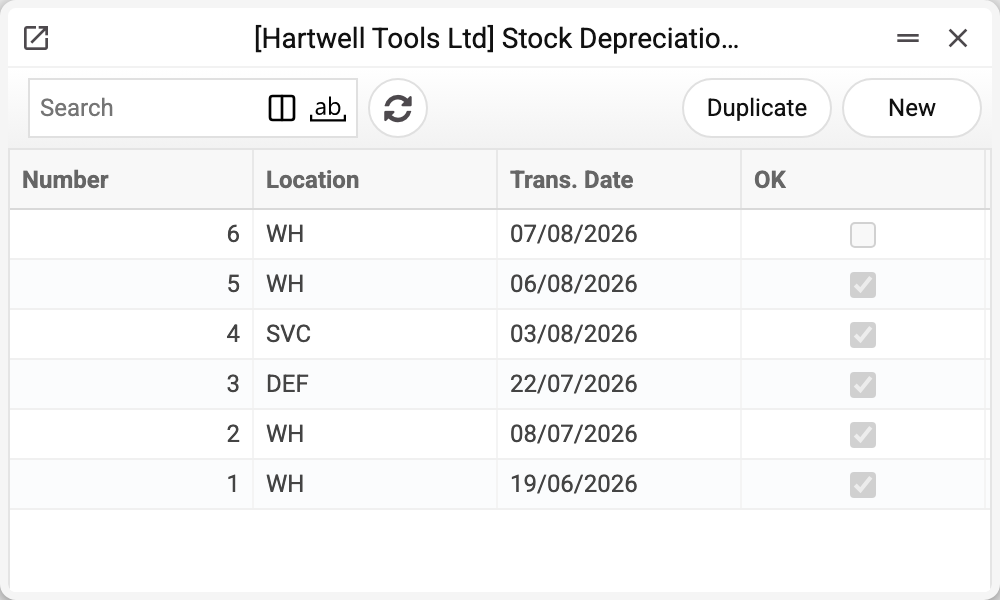
The journal shows the number, location, transaction date and approval. No. 6 is not approved yet — the goods leave the balance only when it is posted. We will take No. 1 of 19/06/2026.
Personal protective equipment spoiled in storage — safety glasses and respirators.
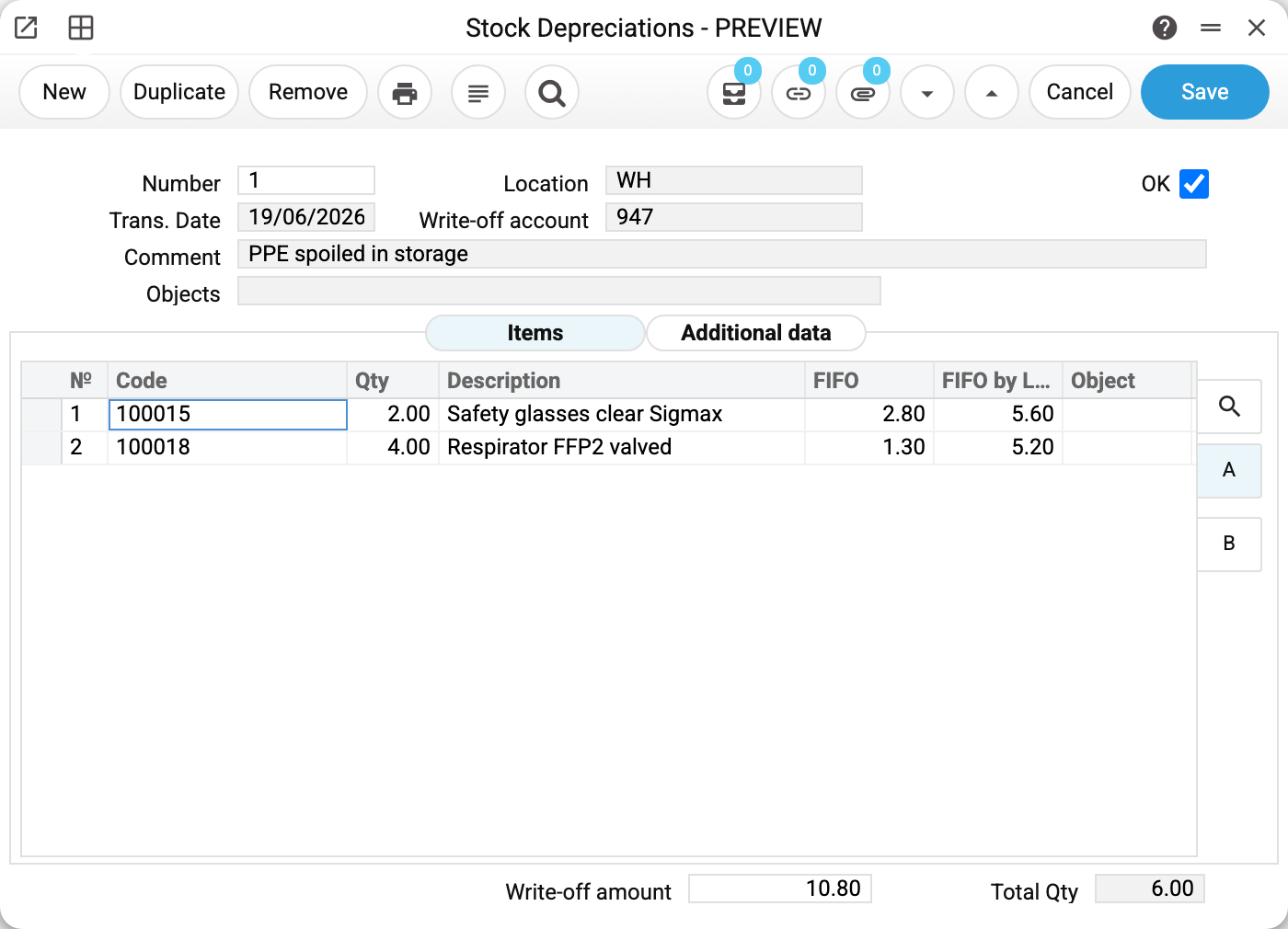
Two header fields decide things:
- «Location» WH — where the goods leave from;
- «Write-off account» — where the expense lands. This is the account that will later show what the losses cost. A mistake here will not change the stock, but it will distort the reporting;
- «Trans. Date» 19/06/2026 — the day the goods disappear from the balance;
- «Comment» — the reason. «PPE spoiled in storage» tells a storage loss apart from breakage during loading or a supplier defect, and six months later memory will not restore that.
In the lines on the «Items» tab:
- «FIFO» 2.80 — the cost of one unit: the value of the batches the goods were taken from (oldest first), divided by the line quantity; if one batch was enough, it is that batch's price, if two were needed, the average of the two;
- «FIFO by Line» 5.60 — the value of all the batches the line took; «FIFO» is derived from it: 5.60 / 2 = 2.80.
At the bottom — «Write-off amount» 10.80 and «Total Qty» 6.00: 5.60 for the glasses plus 5.20 for the respirators, two pairs and four pieces.
The neighbouring «Additional data» tab holds a single field — «Stock Take Date». You cannot type it in: the date is stamped by the «Stocktaking comparison» task when it writes the shortage off on its own. From there the date goes into the item history and ties the write-off to that particular stocktake. On a hand-made document the field stays empty, and that is correct.
The cost is neither typed in nor taken from the item card — the system pulls it from the batches on the location. So two identical positions bought at different times will be written off at different prices, and that is not an error, that is FIFO.
The «FIFO» and «FIFO by Line» columns and the «Write-off amount» total are visible only to a role with the «Show cost price» permission (off by default). Without it the columns are missing, the total is empty, and these values are empty in the printed form too.
What changed after approval
The warehouse is two pairs of glasses and four respirators lighter. The expense account carries 10.80, and the value of the stock has fallen by the same amount. In the profit report that sum joins the costs of the period the document date belongs to.
What the document posts
The posting of a depreciation looks like this: the expense account from the header is debited, the stock account is credited. A shipment makes a posting of exactly the same shape — there, too, the cost leaves the stock account for an expense one. The difference is not in the posting but in what stands on the other side: a shipment is part of a sale, and the revenue from the customer invoice will stand against its cost; a depreciation has no revenue, so the loss shows in full.
| Dr | Cr | Amount | For what |
|---|---|---|---|
| 947 | 201 | 5.60 | two pairs of glasses |
| 947 | 201 | 5.20 | four respirators |
Each batch written off gives its own pair of rows in the transaction — a debit and a credit: a position assembled from two deliveries produces two pairs with different amounts. Here the total 10.80 matches the «Write-off amount» field, but not always: the field adds up the batch values unrounded, while the transaction rounds each batch separately, so with batches carrying fractions of a cent the two can differ by a cent or two.
The write-off posts only if the «Stock Depreciations» box is ticked on the «Logistics» tab of the «Records from Subsystems» setting; without it the document is approved with no transaction and no warning.
Where the accounts come from
The two sides of the transaction appear in different ways, and the difference matters.
The debit stands in the document — but it got there by itself. The «Write-off account» field is filled in on creation: the system takes the account from the «Account Usage» setting, the «Stock» tab, the «Stock Losses» field — 947 «Shortages and losses from damage to valuables» in the example. A write-off made by «Stocktaking comparison» gets another account from the same tab — «Inventory Deficit Acc.». From there it is yours: the suggested account can and should be changed, because breakage during loading, spoilage in storage and a shortage found by a stocktake often belong to different expense lines. A duplicate of the document takes the original's account, not the default from the setting. A document with an account missing from the chart of accounts will not be saved. An existing but wrong one will not stop the document — the goods still leave the location, and the loss simply ends up where nobody looks for it. Approval is stopped only by a closed account, or by one that requires an object of a certain type when the document has none (see «When the program refuses»).
The credit is not shown in the document at all — the system resolves it on approval, separately for each line, in this order:
- the item card;
- the item group;
- the location card;
- the «Account Usage» setting → «Stock» → «Cost Items Acc.».
The first link that names an account wins. So one document can post different positions to different stock accounts if their groups differ, and writing off the same glasses next month will post differently if the account on the item card was changed in between.
There will be no transaction in two cases: the write-off amount is zero (the batches came onto the location at zero cost), or the generation of depreciation transactions is switched off in the settings. The amount is judged as it goes into the transaction — per batch, with the company's money rounding (usually to cents): 1000 pcs at 0.004 is a transaction of 4.00, while a single piece at 0.004 rounds to zero and gives no transaction.
How to work with it
1. Create the document
Stock module → «Stock Depreciations» register → «New».
2. Fill in the header
Location, date, write-off account and a comment with the reason. A new document already carries today's date, the write-off account from the setting and the location from the user card — together with that location's objects in the «Objects» field. Change the location and its objects in «Objects» change too; on approval the location's objects are added there again if they were removed. Set the transaction date no earlier than the day the goods arrived at the location.
3. Fill in the lines
Item first, then quantity: once the code is chosen, «Description» and «Object» are filled in from the item card and the quantity is reset to 0. For an item with serial numbers, the serial number goes on tab B of the lines — the «Serial No.» column.
The cost is not typed in: «FIFO» and «Write-off amount» are filled in on approval from the batches on the location. In a new draft they are empty; a document that was un-approved, and its duplicate, keep the old values — they are recalculated on approval.
4. Approve
OK and save. The goods have left the location, the expense is in the books. After approval only the comment can be changed.
When the program refuses
On any save, drafts included:
- an empty location, date, write-off account or item code in a line — «Field "Location" is required!», «Field "Trans. Date" is required!», «Field "Item" is required!», «Field "Write-off account" is required!»;
- a location, account or item missing from the registers — «Location '…' is not set!», «Account '…' is not set!», «Item '…' is not set!»;
- a negative quantity — «The quantity cannot be negative».
On approval:
- an empty or zero quantity — «Qty cannot be "0"!»;
- less stock on the location than is being written off — «This quantity of goods (…) is out of stock …: available …, short ….»;
- no serial number on a serial item — «Enter the serial number per item»;
- no stock account found at any link of the chain above — «Warehouse account not defined!»;
- the transaction date falls in a closed period (the «Closing changes» setting, «Logistics» tab, «Stock Depreciations» field) — «Period closed!»;
- a closed account — «Unable to save closed account!»; an account that requires an object of a certain type when there is none — «Enter an object with type …».
How to be sure the document is right
- The location is the one the goods actually disappeared from.
- The write-off account matches the reason: storage losses, defects and shortages found by a stocktake usually go to different accounts. If in doubt, that is a question for the accountant, not for the storekeeper.
- The quantity equals what was really disposed of, not what it looked like.
- The write-off amount looks plausible: if it is suspiciously small, the goods may have entered stock at zero cost, and the place to look is the goods receipt.
- The comment names the reason instead of repeating the word «write-off».
Print variables
Values available in this document's printed form templates. How to write a variable in a template — see Print Forms.
Header fields:
| Variable | What it holds |
|---|---|
| Ok | OK |
| No | Number |
| Loc_Code | Location (code) |
| Loc_Name | Location (name) |
| Cost_Acc | Write-off account |
| Trans_Date | Trans. Date |
| Comment | Comment |
| Objects | Objects |
| Tot_FIFO | Write-off amount |
| Tot_Qty | Total Qty |
Row fields:
| Variable | What it holds |
|---|---|
| No | Row position number |
| Item_Code | Code |
| Qty | Qty |
| Description | Description |
| FIFO | FIFO |
| FIFO_line | FIFO by Line |
| MObjects | Object |
| Serial_No | Serial No. |
| Unit_Name | Unit name |
| Units | Unit code |
The records the document refers to through its form fields (location, customer, currency…) also expose the rest of their variables — code and name are already listed in the tables above, the rest is described in the register's article:
- Location — Locations (
Loc_*) - Company details — name, addresses, bank accounts, officers, the printing user: Main Company
Common situations
Writing off a shortage found by a stocktake. The usual route: a stocktake records that fewer were counted, and «Stocktaking comparison» writes the depreciation itself for each location with a shortage — with the «Stock Take Date», the comment «According to the result of the inventory on» plus the date, and the «Inventory Deficit Acc.» account — and approves it at once if there is enough stock. If not, the depreciation stays a draft, and whoever ran the task gets the message «Not all products are available in stock. Check Stock Depreciation» with the document number. If you write a shortage off by hand, quote the stocktake number in the comment — then the link between «why» and «how much» stays visible.
The goods are defective and the supplier will take them back. Then this is not a write-off but a return to vendor: you get the money back instead of losing it.
The write-off amount on an approved document came out as zero. That means the batches on the location carry zero cost. The write-off will go through, but nothing will reach the expenses and the loss will look free. The cause is usually further up the chain, in the receipt. If the field is not zero but empty, your role lacks the «Show cost price» permission.
A mistake, and the document is approved. In an approved depreciation only the comment can be changed, and it cannot be deleted: «You cannot delete a confirmed charge!». The fix is to untick «OK» and save — the goods return to the same batches, the transaction is deleted, the document is a draft again; then correct it and approve it anew. If the transaction date is already in a closed period, «OK» cannot be unticked: «Period closed!», the same lock as on approval. Unticking «OK» takes two role permissions together, both off by default: «Can remove OK» and «Can unconfirm Stock Depreciations» (or the wider «Can unconfirm stock documents»). Without the second one the program replies «You cannot unapprove a warehouse document!». Without these permissions the fix is made by the administrator or by someone who has them.
Field reference
Header
| Field | Description |
|---|---|
| Number | Document number, assigned automatically |
| Trans. Date | The day the goods leave the location |
| Location | The storage place written off from |
| Write-off account | The expense account the value goes to |
| Comment | Reason for the write-off |
| Objects | Analytical objects of the document |
| OK | Approval: removes the goods from the balance and posts the transaction |
Item lines
| Field | Description |
|---|---|
| Code, Description | The position and its name |
| Qty | How many units are written off |
| FIFO | Average unit cost over the batches the line was written off from |
| FIFO by Line | Value of all the batches written off for the line |
| Object | Analytics of the line |
| Serial No. | Serial number of an item with serial numbers (tab B) |
Document totals
| Field | Description |
|---|---|
| Write-off amount | Total cost of what was written off |
| Total Qty | How many units were written off |