Payment Terms
This reference answers a single question: when the money is due. "Prepayment", "on delivery", "net 30 days" — these are not notes in a contract but codes placed on a document, from which the system calculates the due date.
Where to find it: Modules → Purchase Ledger (also in modules: Sales Ledger) → Registers → Payment Terms
The reference is shared by both directions: the same codes appear on customer invoices and on vendor invoices. One "30 days" card therefore serves both what we owe and what is owed to us.
A worked example
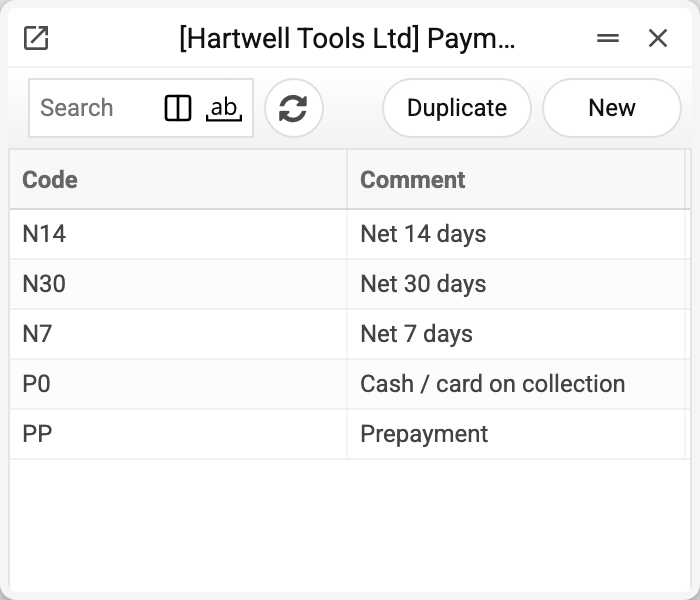
Five typical terms: PP (prepayment), P0 (cash on collection), N7, N14 and N30 (net terms). Let us open the last one:
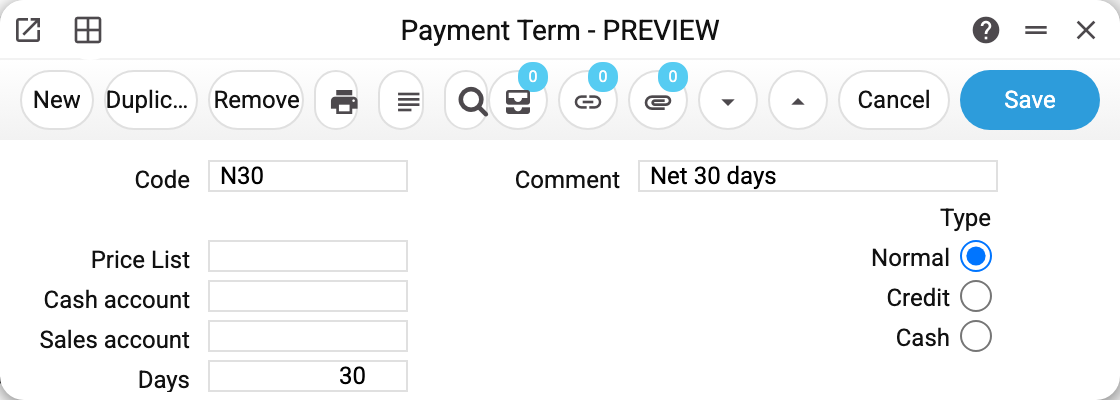
The whole card is a code, a comment (what the salesperson sees in the picker), a type and a number of days. Thirty days mean exactly one thing: when an invoice is issued with this term, its "Payment Date" becomes the document date plus 30 days. That date is what the aged debt reports — for receivables and payables — later measure overdue days against.
Three types, three behaviours
Normal — a plain deferral for the stated number of days. The most common case; "prepayment" is the same normal type with zero days.
Credit — the term used for credit notes. When a credit note is created from an invoice, the system does not ask which term to apply: it takes the card with the "Credit" type — the first one by code — and uses it. That is why there should be exactly one such card in the database — otherwise a credit note gets the first one by code, not necessarily the one you meant.
Cash — the invoice counts as settled into the cash desk straight away. In that case the postings go not to the customer settlement account but to the cash account from this very card. Without "Cash account" a card of type "Cash" will not save in the first place: «Field "Cash account" must be filled». If such a card is left over from earlier without the account, an invoice, a vendor invoice or a sales order with it will not save: «Specify the cash account in the payment terms card».
From end of month
The "From end of month" checkbox under "Days" moves the starting point: the days are counted not from the document date but from the last day of its month. This is the "30 days after the end of the month" arrangement.
Example for the 30 term with the checkbox ticked: an invoice of 04.06 is due 30.07 (not 04.07); of 09.08 — 30.09; of 15.01 — 02.03 (01.03 in a leap year). With zero days the due date is the last day of the next month.
One rule serves every document that takes its due date from the term: customer invoices and vendor invoices, including those created from orders, goods receipts, quotations, contracts and rentals.
Only normal terms can have the checkbox: a credit note counts its due date by its own rule, and cash terms have no due date at all. Switching the type to another one clears the checkbox; a credit or cash term with it ticked is not saved: "Only Normal payment terms can count days from the end of the month".
The remaining fields
| Field | What it is for |
|---|---|
| From end of month | The days are counted from the last day of the document date's month — see "From end of month" above |
| Price List | Attaches a dedicated price list to the term: choosing this term on an order or an invoice switches the document to this price list and recalculates the row prices from it, including prices corrected by hand. This is how "cheaper when paid in advance" is set up |
| Sales account | Overrides the revenue account on the customer invoice — needed when sales on special terms must land on their own ledger account |
| Cash account | The cash desk account for the "Cash" type |
How a term reaches a document
The default term is set on the business partner's card — separately for the customer side and the vendor side (contact card, "Conditions" tab). From there it comes into a document when the partner is selected in it, and from a sales order, a quotation or a purchase order — into the invoice created from them (also after a shipment or a goods receipt: the delivery itself does not hold the term). On every document the term can be replaced by hand.
The due date is calculated when the document is created and recalculated only when the term, the partner or the invoice date is changed on an invoice that is not yet approved. So a new number of days on the term card leaves issued invoices as they are — until their term or date is changed on the invoice itself.
Print variables
Values available in this document's printed form templates. How to write a variable in a template — see Print Forms.
Header fields:
| Variable | What it holds |
|---|---|
| PaymentDeals_Code | Code |
| PaymentDeals_Comment | Comment |
| PaymentDeals_PriceList | Price List |
| PaymentDeals_CashAccount | Cash account |
| PaymentDeals_SalesAccount | Sales account |
| PaymentDeals_Days | Days |
| PaymentDeals_Type | Type |
Common situations
An invoice is issued but the due date is empty. No term was set at all: without one there is nothing to count the due date from. A term with zero days does not leave it empty — the due date then equals the invoice date. Check the partner card: if it is empty there, documents are created without a term. The exception is a customer invoice: if «Default Payment Deal» is filled in the Invoice Setting, the invoice takes the term from there.
A customer pays later than agreed. Do not edit the term card — that would change the rule for everyone. Correct the term (or the due date) on the invoice itself.
A discount for prepayment is needed. Create a separate term with zero days and attach a price list with reduced prices to it.
A credit note picked up the wrong term. Check whether two cards with the "Credit" type exist: the system takes the first one by code.