Payments History
The chronicle of invoice payments: who, when, how much and under which document. The system maintains it — it is a trace, not a working document.
Where to find it: Modules → Database Maintenance → Registers → Payments History
A worked example
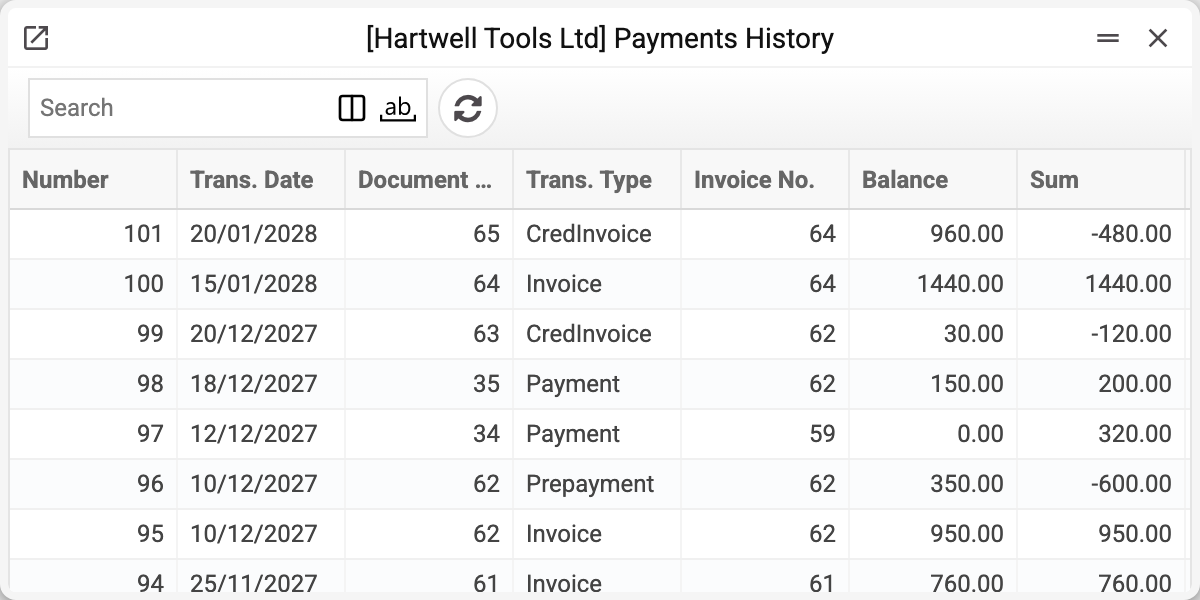
A row records an event in the debt on a customer invoice: entry Number, Trans. Date, the Document No. that caused it, Trans. Type, Invoice No., Balance — the debt on the invoice after this event — and Sum. The type is shown as a code: Invoice — the posted invoice itself, Payment — a payment, CredInvoice — a credit note, Prepayment — a prepayment offset against the invoice, InvoiceCash — payment of the invoice at the till. Several rows sharing an invoice number are the whole history of its debt, from the invoice to the last payment.
Why it exists when payments do
The payments register answers "which documents did we post"; this history answers "what happened to each invoice". The difference shows when one payment closes several invoices: the document holds a single sum, while here each invoice gets its own row.
This is where the answers to two awkward conversations come from: "we did pay" (when and how much is visible) and "the amount is wrong" (every reduction of the balance is visible).
How rows appear and disappear
Post a payment and rows appear for each invoice in its matrix. Reverse the posting and that payment's rows are deleted while the balances in open invoices are restored. The history therefore always matches the current state rather than keeping cancelled attempts. A posted invoice (the invoice itself, payment at the till, the offset prepayment) and a credit note write rows of their own too.
Typical situations
A customer insists they paid. Find the invoice number — every payment against it is here.
The balance does not add up. Look at "Balance" in the last row for the invoice — that is its outstanding amount, and it must match open invoices. Simply adding up "Sum" does not work: a payment is recorded with a plus although it reduces the debt.
The history is empty although payments exist. Either the payments are unposted, or the database was filled by import — in which case the "Fill Payments History" service builds the history.
Where to look next
- Open invoices — the current balances.
- Prepayment history — the same for advances.