Exchange Rates
The rate journal: one entry — one currency's rate for one date. Every foreign-currency document takes its rate from here, and the rule is single: a document takes the latest rate dated no later than the document date. There is no need to enter a rate every day — only on the dates it changes.
Where to find it: Modules → Nominal Ledger → Registers → Exchange Rates
Walkthrough
EUR rates in the demo:
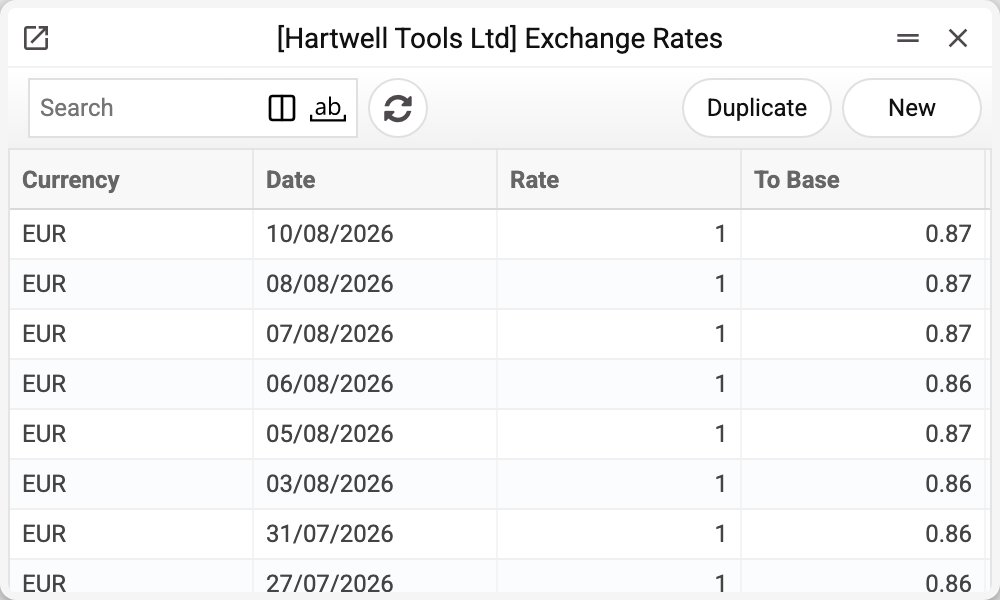
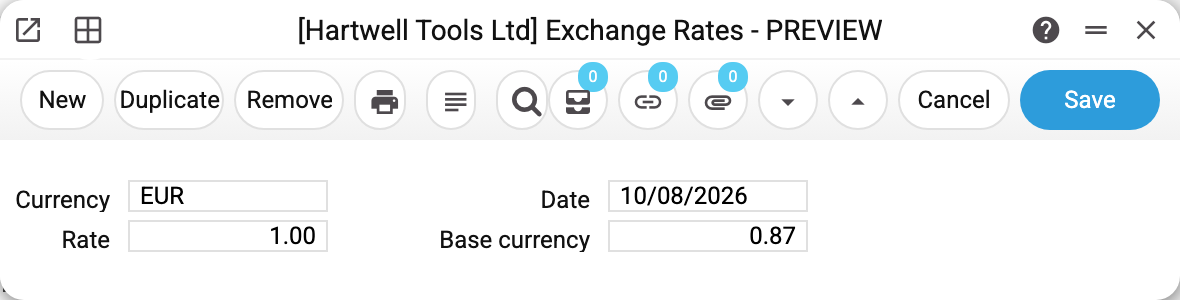
An entry is four mandatory fields: the currency, the date and the rate pair "Rate : Base currency". The pair reads as a proportion: "1 EUR = 0.87 GBP" — Rate 1, Base 0.87 (the demo company keeps its books in GBP). It can be scaled: "10 : 8.70" — the same proportion, for currencies whose rates are customarily quoted per 10 or 100 units.
How documents take the rate
- Document date 15/08, rates exist for 08/08 and 20/08 → the 08/08 rate is taken (the latest not-later one).
- No rate on or before the date at all → the document gets no rate: "Exchange rates are not filled in!" — with the currency code and date (the document window refuses as soon as the currency or date is picked).
- The base currency needs no rates: always 1:1.
- A document's printed form (the System_rate variable) takes the rate from the register by the same rule — on the document date or the latest earlier one. For the base currency and for a document without a date the variable is empty.
- The rate fills into a document when the currency is picked, and in many documents it can be adjusted by hand for that one document. There is no way to forbid this for a particular currency: the "Not change…" flags in the currency register are not shown in the window and have no effect.
One code + one date = one entry (a duplicate will not save). If the currency has "NBU Exchange Rate" set and the company's base currency is the hryvnia, the window fills in the NBU rate for the entry date itself (when the currency is picked or the date changed), and a manual entry is checked against the National Bank API: "Base currency" must match the NBU rate × "Rate" to the precision of exchange-rate rounding (a scale works too: 5010 / 100; if the NBU rate × "Rate" rounds to zero, as with tiny currencies under coarse rounding, it must match exactly), otherwise the entry is blocked. If the NBU does not answer, the entry is saved unchecked. With another base currency the "NBU Exchange Rate" flag has no effect: the rate is entered by hand. The exception is a company that sees the shared "Exchange Rates" of the main company: the records belong to the main company, so for it the flag applies whatever its own base currency.
Print variables
Values this record adds to printed form templates — its own and those of the documents that refer to it.
Record variables:
| Variable | What it holds |
|---|---|
| System_rate | System rate of the document's currency |
Common situations
Entered today's rate, but an older document still computes the old way. As it should: a document takes the rate for ITS date, not for today.
"The NBU exchange rate is set for this currency. Manual editing is prohibited". The currency carries the "NBU Exchange Rate" flag: manual entries may only match the official value. Fill the rates with the "Central bank exchange rates" service.
Need to correct a wrong rate. Open the entry of that date and fix the pair — this changes the rate only for documents you create from now on. A document already saved keeps the rate in its own fields (an invoice also posts by them), so neither the journal fix nor saving the document again changes it: correct the rate in the document itself — pick the date or currency again, or enter the pair by hand.
The rate "jumps" between days in reports. Check for neighbouring dates with a different pair scale (1:x vs 10:x) — the proportion is the same but it reads oddly; stick to one scale.