User Setting
The user card holds the login and the rights. This small register holds the employee's working attributes, picked up by documents through their login: which sales department the person belongs to and which account their advance money is tracked on.
Where to find it: Modules → System → Registers → User Setting
The register lives in the System module. One record per login: the «Code» field is the login. The register is shared by all companies of the database: an employee has one record, and it applies in every company where the person works.
A worked example
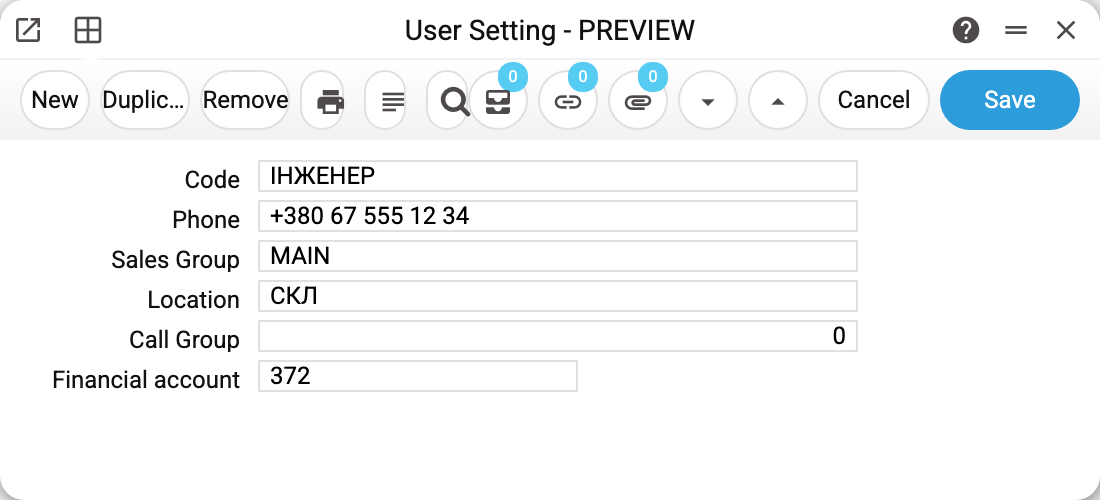
The frame shows a service engineer.
- «Code» — the user's login from the «Users» register. This is how documents find the record — by an exact match. A login that is not among the users (a typo) is not saved: the program refuses with «This user does not exist» and highlights the «Code» field.
- «Department» — the employee's sales department. It works in servicing: when an engineer accepts a device on a service order, their department is filled into the document — the order immediately «belongs» to the department whose person accepted it. This happens only on the first acceptance of an unpaid order: if the order already has a prepayment or a cash or card payment, the department stays as it was — just as in the window, where a paid order's department is not switched.
- «Financial account» — the personal settlement account of this advance holder. When the employee is paid money on account, the ledger entry lands on this account; when the field is empty — on the common account from the «Account Usage» setting (the «Salary and expenses» tab, «Settlements with reporting persons»). In the example the account is 372 — the same as the common one: a separate account is created when one person's advance money has to be visible as its own line. The account applies in every company: if the chart of accounts of the company where the employee is paid has no such account, the payment or the expense claim will not be posted there — the refusal «Account '…' is not found». The field also accepts a closed account (the picker offers it), but the payment or the claim will not be posted — «Unable to save closed account».
- «Phone», «Location», «Call Group» — the employee's reference bindings: the work phone, the warehouse and the telephony call group.
«Location» and «Department» are checked only when they are set or changed: the code must exist in the current company's register, otherwise the refusal says that the location or the sales group does not exist. Each company has its own warehouses and departments, so a code entered in another company does not stop you from changing, say, the phone.
Common situations
A service order landed «in the wrong department». The department was filled in from the settings of whoever ACCEPTED the device. Check the «Department» of that employee's record. If the order was paid before acceptance, the department did not change at all — it stayed as it was on the order.
Advance payments should be visible per person. Create a personal sub-account in the chart of accounts and put it into «Financial account» — the following personnel payments will land on it, and the employee's expense claims will credit the same account. A cash out takes its account not from here but from the cash item: when you pay such an employee from the till, pick an item with their personal account: the payout lands on the account of the chosen item (an item with the common 372 — on 372, with 377 — on 377), while the claim clears the personal one.
There is no record for a login. That is normal: the register is filled in as needed. Without a record, documents use the common settings.
The record exists, but documents do not see it. «Code» holds another user's login. The program only checks that such a user exists, not that it is the right employee, so documents simply take the common settings. Pick the right login in the «Code» field from the list of users.
Field reference
| Field | Description |
|---|---|
| Code | The user's login — the key to the card |
| Phone | The employee's work phone |
| Department | The department; filled into service orders on acceptance |
| Location | The warehouse the employee is tied to |
| Call Group | The telephony call group |
| Financial account | The personal advance account; empty — the common one from «Account Usage» applies |