Sales Orders Status
The deepest drill-down of a single order: not document headers, as in the Sales Orders Report, but their lines — what exactly was ordered, what has shipped, what is invoiced and how it was paid. Plus things visible nowhere else side by side: payments (prepayments included), the payment terms of every invoice, and the tasks raised on the order.
Where to find it: Modules → Sales Orders → Reports → Sales Orders Status
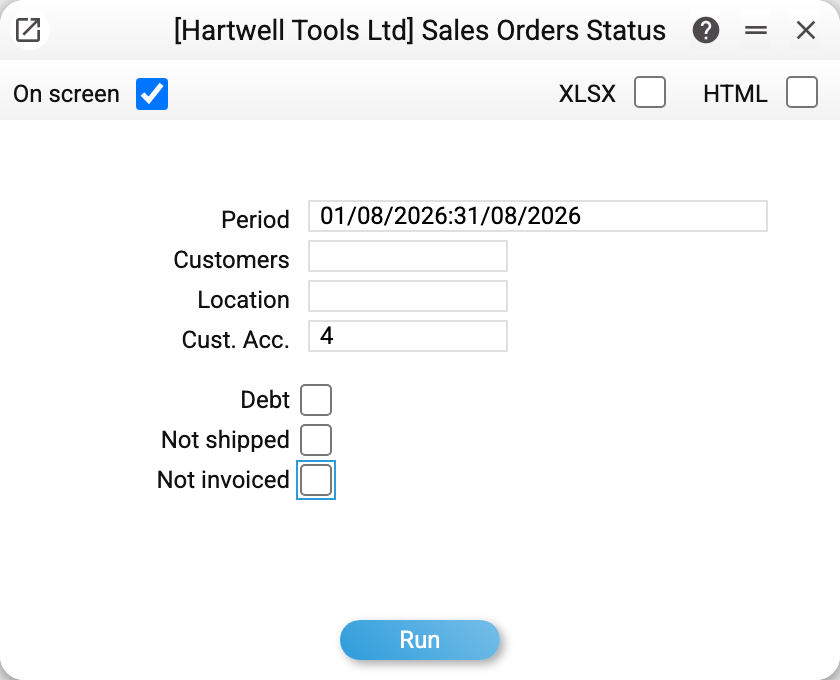
The report can run for a period — producing many such cards — but its element is the point check: type the number into "Cust. Acc." and leave the period empty (with a number set, the period is ignored).
A worked example
Order No. 4 for Stockport Shopfitters Ltd:
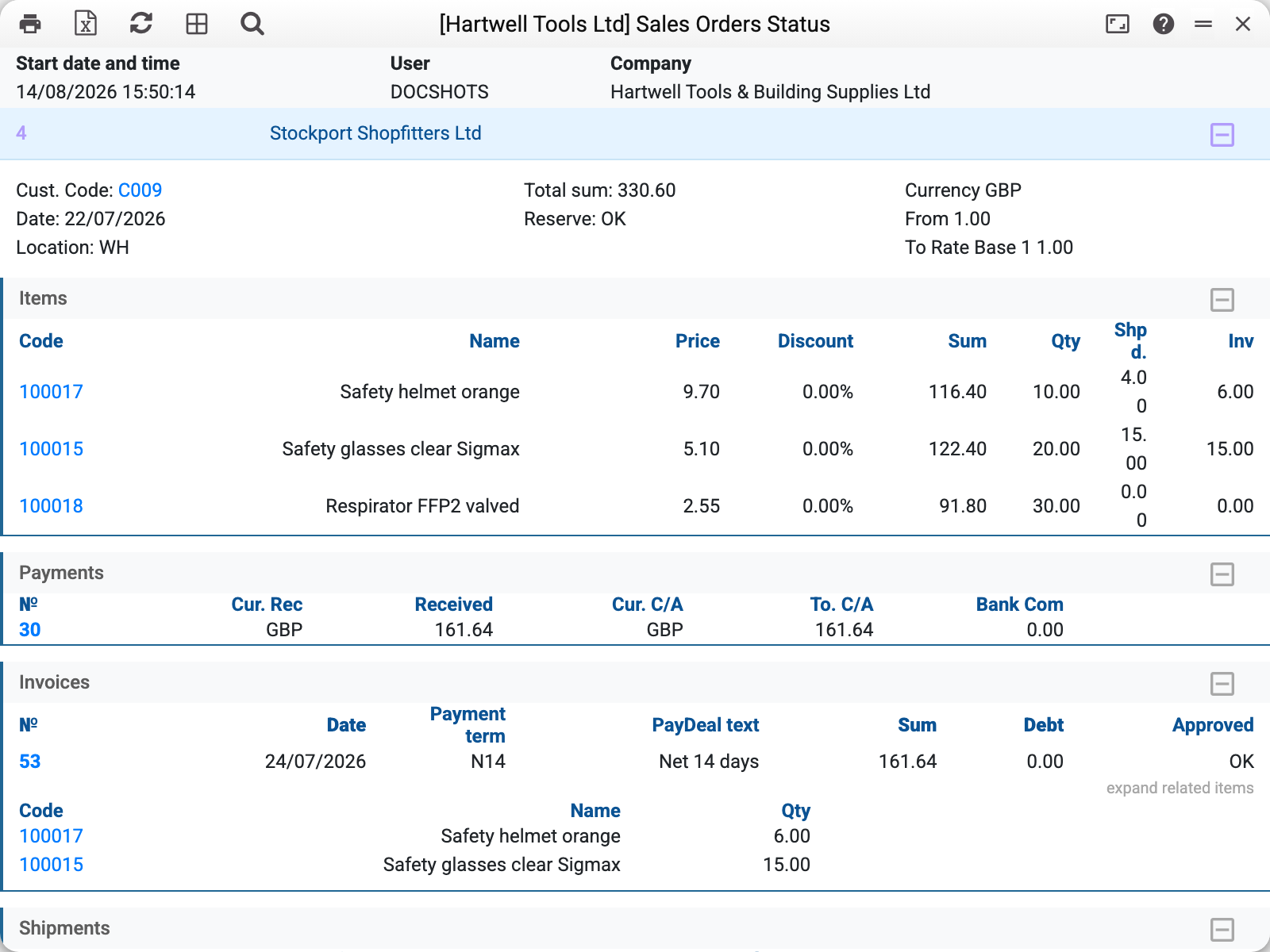
Blocks top to bottom:
- Header: customer, date, stock, currency, reservation state;
- Items — order lines with the three key columns: quantity ordered, shipped, invoiced. Fully closed lines show equal numbers; waiting lines keep zeros;
- Invoices — with lines, amount, OK flag, debt and the payment terms (code and description): invoice No. 53 for 161.64, debt 0;
- Payments — what closed it: payment number, amount, currency. This includes invoice payments, prepayments allocated to the invoice, and payments linked directly to the order;
- Shipments and Returns — with lines as well;
- Tasks — if tasks were raised on the order: type, state ("Completed"/"Pending"), dates and assignees. No tasks — no block.
Points worth knowing
- The "Shpd." column counts only confirmed shipments. Until at least one shipment of the order carries the OK flag, the column deliberately stays at zero — drafted but unconfirmed documents do not count as fulfilment.
- Cost in lines (where present) is visible only to roles with the "Show cost price" action — see the sales reports.
- Returns show the per-unit cost — handy for checking at what value the goods came back to stock.
- The cost of shipments and returns is in the base currency, even when the order is in another one: the base currency code is in the column label ("Cost, UAH").
- The "Debt" / "Not shipped" / "Not invoiced" checkboxes behave exactly as in the neighbouring report: off by default, combined with OR, and an empty result means "no such orders". As there, all invoices of the order are listed, unapproved ones included ("No" in the "Approved" column).
Parameters
| Parameter | What it does |
|---|---|
| Period | Order dates — when no number is set |
| Customers | Orders of one customer |
| Location | Orders with this stock |
| Cust. Acc. | The order number; with it the period is ignored |
| Debt / Not shipped / Not invoiced | Same filters as in the Sales Orders Report |
Common situations
Paid invoices are not shown. The "Debt" checkbox is ticked — the invoice block then lists unpaid invoices only, so a fully paid invoice "disappears" together with its block. Untick "Debt": by default all three checkboxes are off (the frames in this article are taken that way).
"Shpd." is zero although a shipment is listed. Look at its OK flag: the document is drafted but not confirmed, so it does not count.
A payment amount differs from the invoice. If the invoice was partially closed by a prepayment, the report shows exactly the part allocated to this invoice — the rest of the prepayment may be waiting for other invoices.