Prom Creation of New Customers
The rules by which a Prom buyer becomes a customer card in ERPJS. When "Prom: update orders" brings an order from a person the database has never seen, it creates the contact itself — and this setting says with which attributes.
Where to find it: Modules → Prom → Settings → Prom Creation of New Customers
Walkthrough
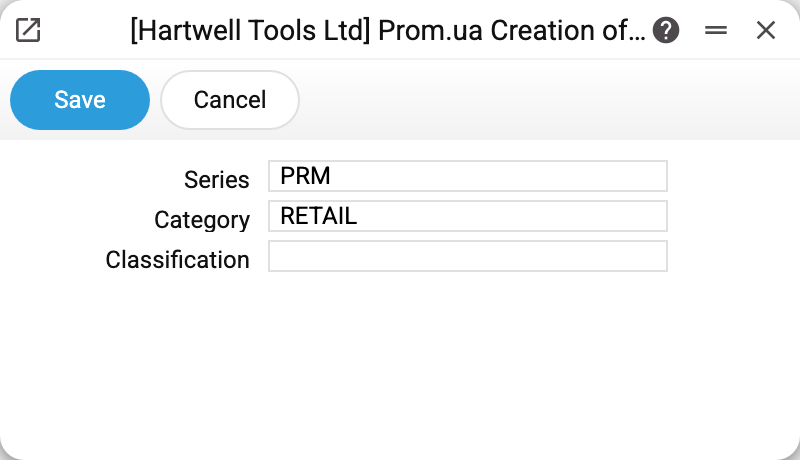
- Series — the prefix of the new contact's code. The code is SERIES + the buyer's phone (last 10 digits): with the demo series
PRM, a buyer at 067 123 45 67 becomes contactPRM0671234567. The series separates marketplace customers from manually created ones and lowers the risk of codes colliding — but does not rule it out (see below). - Category — the customer category the new card gets:
RETAILin the demo. Through the category new buyers immediately inherit its price list and other rules. - Classification — an optional contact classification; empty in the demo.
How the maintenance searches and creates
Before creating anything it honestly looks for an existing customer among the cards marked "Customer" — five tries in order:
- by the "series + phone digits" code (its own format);
- by the "series + phone as Prom sent it" code (codes used to be built this way);
- by the card's main phone;
- by the additional phone;
- by email.
Found — the order lands on the existing card, nothing is created. Not found — a new card: the code by the formula above, the name as "Last First" of the buyer, phone, email, category and classification from here.
Worth knowing
- Fill this setting BEFORE the first run of "Prom: update orders": customers created with an empty series get a code of the bare phone (
0671234567), and changing the series later will not rename them. - The code of a new card and the search by code follow one rule: the last 10 digits of the phone. So the same number written differently ("+38 (067) 123-45-67" and "0671234567") leads to the same card the service created. In the card's phone fields the service looks for the number as Prom sent it — a card entered by hand with the number written differently may not be found.
- The service does not create a buyer without a phone: the order goes to the card with the same email if there is one, otherwise it is skipped (a line in the server log). The service never searches by an empty phone or email, so an order will not stick to a random card that has no phone.
- The service finds a closed card too. A new order of a buyer whose card is closed is not accepted — "Customer "…" is closed!": this order is not loaded, "Prom: update orders" names it in a warning, and the others are imported. For it to load, the card is reopened.
- The code may collide with a card that is not a customer (for example, a vendor whose code is the same digits): the search does not see that card, and a new one with the same code cannot be created — the run breaks off with an error.
Common situations
One buyer — two cards. Usually they ordered first with a phone, then with only an email (or another number). Merge manually: re-link the documents to one card. Do not close the redundant card while the buyer may order again with its phone or email: the service finds a closed card too, and the new order does not load (see above).
New customers have no price list. Check that "Category" is filled and that the price list is attached to the category itself — a new card gets only the category, everything else flows from it.