Stock Revaluation
The goods are still on the location, but they are no longer worth that much. A stock revaluation changes their cost without touching the quantity.
Where to find it: Modules → Stock → Registers → Stock Revaluation
It is the only document that can do that: the quantity stays exactly as it was, only the amount the stock is valued at changes. A depreciation removes goods, a movement carries them along with their value, and a revaluation works on the price alone.
You need it in two cases. The goods got cheaper — they sat too long, a newer series came out, the purchase rate moved — and keeping them in the books at the old price overstates the value of the stock. Or the other way round: costs that should have been part of the cost price never made it there.
The document lives in the Stock module and is created by hand.
What approval does
- changes the cost of the item on the location: all its batches on that location merge into one at the new cost — after approval there is no breakdown by batch any more;
- leaves the quantity alone — what was there is still there;
- posts a transaction for the difference: it goes to the account in «Diff. Account», and the value of the stock changes by the same amount: on approval the system checks the lines against the balance.
A worked example
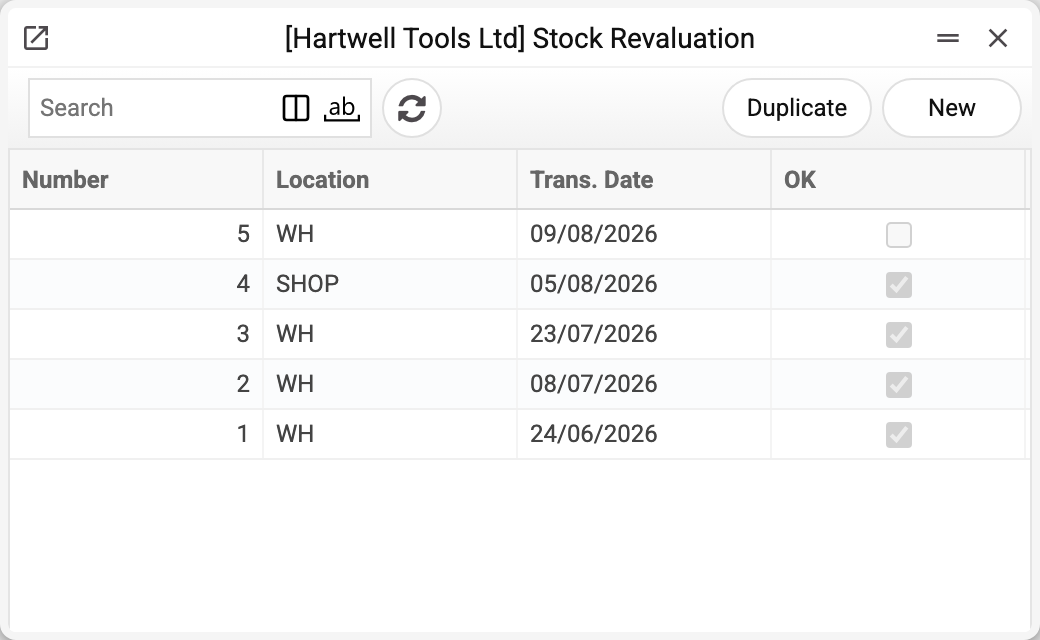
The journal shows the number, location, transaction date and approval. No. 5 is not approved yet — it will change the stock value only when posted. We will take No. 2 of 08/07/2026.
Wood screws sat too long, and keeping them at the old price is no longer defensible.
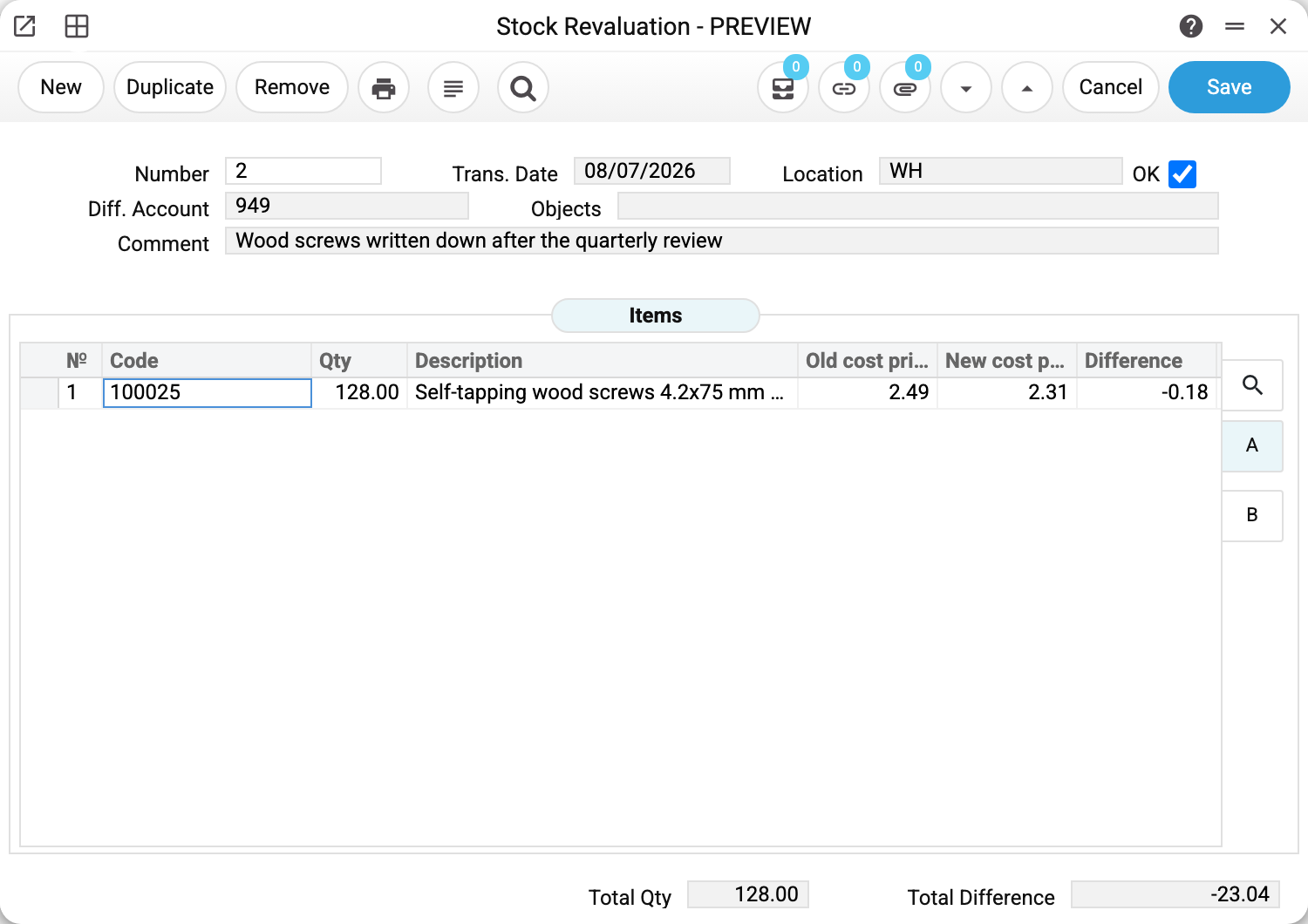
In the header:
- «Location» WH — where the goods being revalued lie. To revalue several locations, leave the header location empty — then the document holds lines for every location where the goods are. Do not change the location in a line (tab B) while the header location is filled: the quantity and the old cost stay those of the header location, while the line's location is what gets revalued. And if you change the header location, lines with another location disappear;
- «Diff. Account» — where the write-down lands. The account decides how the difference shows up in the reporting;
- «Trans. Date» 08/07/2026 — the date of the transaction. What gets revalued is the balance lying on the location at the moment of approval: shipments posted later take the new cost even with an earlier date, while those already posted keep the old one;
- «Comment» — the justification. It answers why the price changed, and that question will certainly be asked.
The line holds three figures, and they read left to right as a story:
- «Old cost price» 2.49 — the average unit cost over the whole balance of the item on the location; it fills in when the item is chosen and does not update by itself afterwards;
- «New cost price» 2.31 — what it will be worth;
- «Difference» −0.18 — how much one unit got cheaper. A minus is a write-down, a plus is a write-up.
At the bottom — «Total Qty» 128.00 and «Total Difference» −23.04: one hundred and twenty-eight screws at −0.18. That is the amount that goes into the transaction.
What changed after approval
There are still 128 screws on the location. But they are now worth 295.68 instead of 318.72, and 23.04 went to the difference account. When these screws go to a customer, the shipment will carry a cost of 2.31 — so a revaluation also changes the future profit on the sale.
What the document posts
The transaction has three rows (a row with a zero amount is not written: if the old cost was zero, there are two), and together they tell the same story as the document line: what the goods were worth, what they are worth now and where the difference went.
| Account | Dr | Cr | What it is |
|---|---|---|---|
| 201 | 295.68 | the new value of one hundred and twenty-eight screws | |
| 201 | 318.72 | the former value, taken off the books | |
| 949 | 23.04 | the difference, moved into expenses |
Note that the stock account appears twice — at the full new amount and the full old one, not as a single difference. The account balance ends up the same, but the transaction shows what the difference is made of.
Where the accounts come from
The difference account stands in the header, but it arrived there by itself — on creation the document takes it from the «Account Usage» setting, the «Stock» tab, the «Revaluation difference account» field; 949 «Other operating expenses» in the example. You can change it, and sometimes you should: writing down stale goods and correcting a mistake in a receipt are different events. On a write-down the account goes to the debit, that is, into expenses; on a write-up the difference lands on the credit side and increases the value of the stock. The document works out the sign from the figures in the lines.
The stock account is not shown in the document — it is resolved on approval, line by line, in this order:
- the item card;
- the item group;
- the location card (the location named in the line, or the one from the header if the line is empty);
- the «Account Usage» setting → «Stock» → «Cost Items Acc.».
Within one triple the stock account is always the same — triples are built by account (see below); in the example the document has one line, so there is one triple.
Hence the grouping rule: rows are collected by stock account and analytical objects, each such combination gets its own triple, and the difference goes to the difference account with the same objects. If the document holds different accounts or different objects, there will be several triples, each with its own difference. The total on the difference account still matches the «Total Difference» field, but the breakdown by rows may not look like the one in the document card.
There will be no transaction if the difference is zero on every stock account (and for every set of objects). Goods with different stock accounts can be revalued up and down in one document: the transaction records both, even when they cancel out in total. There will be no transaction either if the «Stock Revaluation» box is cleared on the «Logistics» tab of the «Records from Subsystems» setting — the document is then approved with no transaction and no warning.
How to work with it
1. Create the document
Stock module → «Stock Revaluation» register → «New».
2. Fill in the header
The location (from the user card, if it is set there), the date (today) and the difference account (from the setting) are already filled in — check them and add a comment with the justification. Without a difference account the draft saves, but it cannot be approved.
3. Fill in the lines
Item and the new cost. «Qty» and «Old cost price» fill themselves in and are read-only, «New cost price» starts equal to the old one, the difference is calculated. An item with no balance on the header location comes in with a zero quantity — there is nothing to revalue; with an empty header location such an item does not get into the document at all. With an empty header location the document holds a line for every location with a balance, and such a line cannot be removed — saving refuses with «Not all stock balances are included in the revaluation!»
4. Approve
OK and save. If anything has come onto the location or left it in the meantime, the system will not approve the document: the quantity in the line no longer equals the balance. Choose the item in that line again, and the quantity and the old cost are refreshed. The stock is revalued, the difference is in the books.
How to be sure the document is right
- The new cost is entered per unit, not for the whole batch. Check it against the «Difference» column: that is per unit too, and the total at the bottom must agree with the quantity.
- The sign of the difference matches the intent: a write-down is a minus, a write-up is a plus.
- The location in the header is where the revalued goods lie.
- Each item stands in one line per location: the system will not approve the same item repeated on the same location.
- For serial-numbered goods the line has a number: the system will not approve the document without it. «Qty» and «Old cost price» are brought in for that number, and only it is revalued; for several numbers use a line each.
- The difference account is agreed with the accountant: a revaluation affects the financial result of the period.
- The comment explains why the price changed. This is the document people come back to asking «on what grounds».
Common situations
You need to change the quantity, not the price. A revaluation cannot do that. A shortage is a depreciation, a surplus is taking goods on stock, a location mistake is a movement.
The cost was already zero in the receipt. A revaluation fixes that: you set the correct price and the difference goes to the account. But it is better to find out why the goods receipt went through with a zero, otherwise the story repeats.
The goods lie on several locations. With the header location filled, the document revalues that location; with it empty, every location holding a balance, one line each. A location left out of the document keeps its old cost — and the price will drift apart between storage places.
An approved document needs correcting or deleting. Not while OK is set. A correction is refused with «Remove the OK flag first to make changes to an approved document», a deletion with «This item cannot be deleted! Remove the OK flag before deleting».
Revalued, and now you want it back the way it was. Removing OK takes two role permissions: «Can remove OK» and «Can unconfirm stock documents»; by default there is neither. Without the second, saving refuses with «You cannot unapprove a warehouse document! You need the canUnOkStockDock permission. Contact the administrator». And only while the revalued goods have not gone anywhere: once they are even partly shipped, moved, written off or revalued again — «Items on the document list have already been shipped, moved, or written off». The usual way is a counter-revaluation to the former price; both stay in the books.
Field reference
Header
| Field | Description |
|---|---|
| Number | Document number, assigned automatically |
| Trans. Date | The date of the transaction; the balance at the moment of approval is what gets revalued |
| Location | Storage place of the revalued goods |
| Diff. Account | The account the difference goes to; required for approval |
| Comment | Justification for the revaluation |
| Objects | Analytical objects of the document |
| OK | Approval: changes the cost and posts the transaction |
Item lines
| Field | Description |
|---|---|
| Code, Description | The position and its name |
| Qty | Balance of the item on the location at the moment it was chosen; read-only |
| Old cost price | Average unit cost of that balance at the moment the item was chosen; read-only |
| New cost price | Unit price after the revaluation |
| Difference | Change in the price of one unit |
Document totals
| Field | Description |
|---|---|
| Total Qty | Quantity of revalued goods |
| Total Difference | The transaction amount — the stock value changes by this much |