Item Histories
The warehouse audit trail: every movement of every unit — receipts, shipments, transfers, write-offs. The system maintains it, and it is what answers "where did this cost price come from".
Where to find it: Modules → Database Maintenance → Registers → Item Histories
A worked example
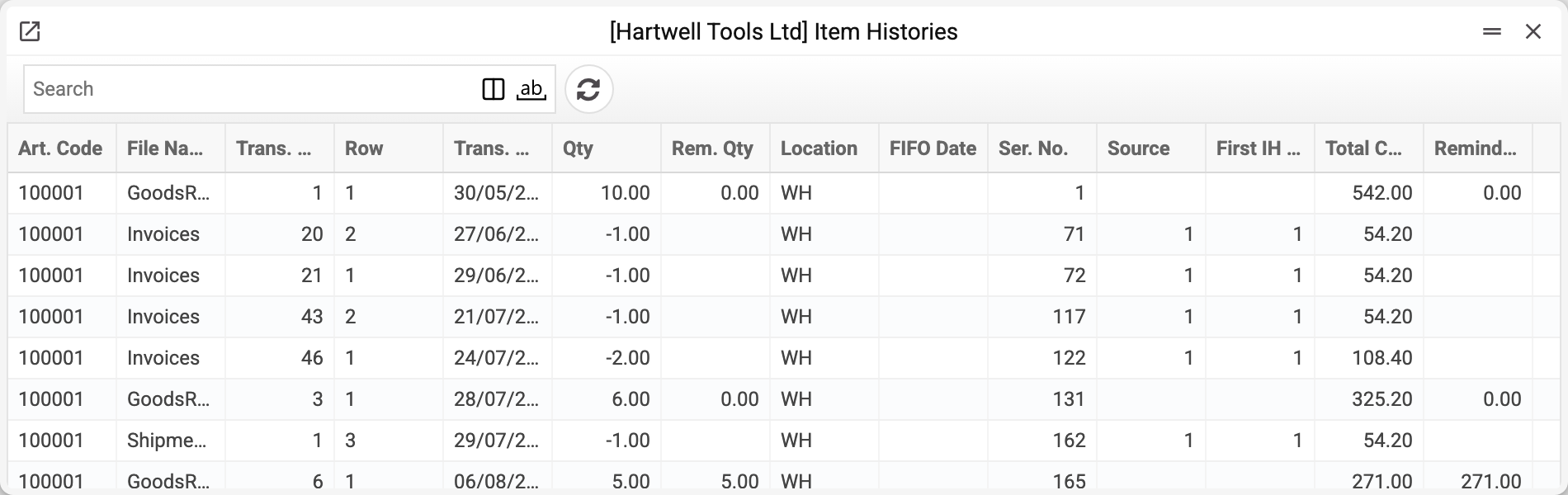
A row is one event: number, item, location, source document, date, Qty and Remaining Qty. "Remaining Qty" is how much of this receipt is still unused now, not the location's balance after the movement: every later shipment reduces it on the receipt the goods were taken from. It will not show the balance on a past date — for that, add up the "Qty" of the movements up to the date, skipping the stocktake rows: they hold the counted quantity, not a movement, and their "Update stock" box is clear (that is how the stocktake and the location report count it). Beside it, the cost: the batch's total and the part still unconsumed; these columns and the card's cost fields are visible only to those whose role allows "Show cost price".
The key idea: a receipt row lives until everything on it has been eaten. A shipment reduces the balance of a specific receipt rather than an abstract quantity on the shelf.
Why FIFO is visible here
Cost of goods sold is computed batch by batch: the earliest receipt is consumed first. This register is that list of batches — with dates, remaining quantities and each one's price. When a report's cost price looks wrong, the answer is always here: which receipts were drawn on, and at what price.
For serialised items the row is tied to an individual unit as well.
Typical situations
A record cannot be edited although the role has full access to the register. This is by design: the cost of every later write-off depends on these rows, so they are written by document posting and services. Only a role with its own row allowing the «Can change item history» action can change a row by hand; full access to the register and the all-actions row do not open it.
A shipment's cost looks odd. Find the item and see which batches were consumed: an old expensive batch produces a high cost.
The balance in statuses is not what you expect. Add up the batch balances here — the totals must match.
A row with zero remaining. The batch is fully consumed; it stays for history and recalculations.
Where a row came from. The row card menu → "Open document" opens the document that wrote it: a goods receipt, an invoice, a production and so on (if you are allowed to view its register).
Where to look next
- Item statuses — the summary balances per location.
- Serial balance — tracking individual units.