Report Definitions
This is where you build your own financial reports: a profit and loss statement in the exact structure your owners are used to, a management balance sheet, revenue comparisons across currencies — any form you need. A definition is the report's blueprint: a list of rows with rules for where the figures come from. The Financial Report Builder prints it: one definition — one form, runnable for any period.
Where to find it: Modules → Nominal Ledger → Registers → Report Definitions
The fixed statutory form with hard-wired accounts is a separate report, Financial Result; the builder, by contrast, knows nothing about your chart of accounts and prints exactly what you define.
Worked example
The demo database ships with the PNL definition — a profit and loss statement:
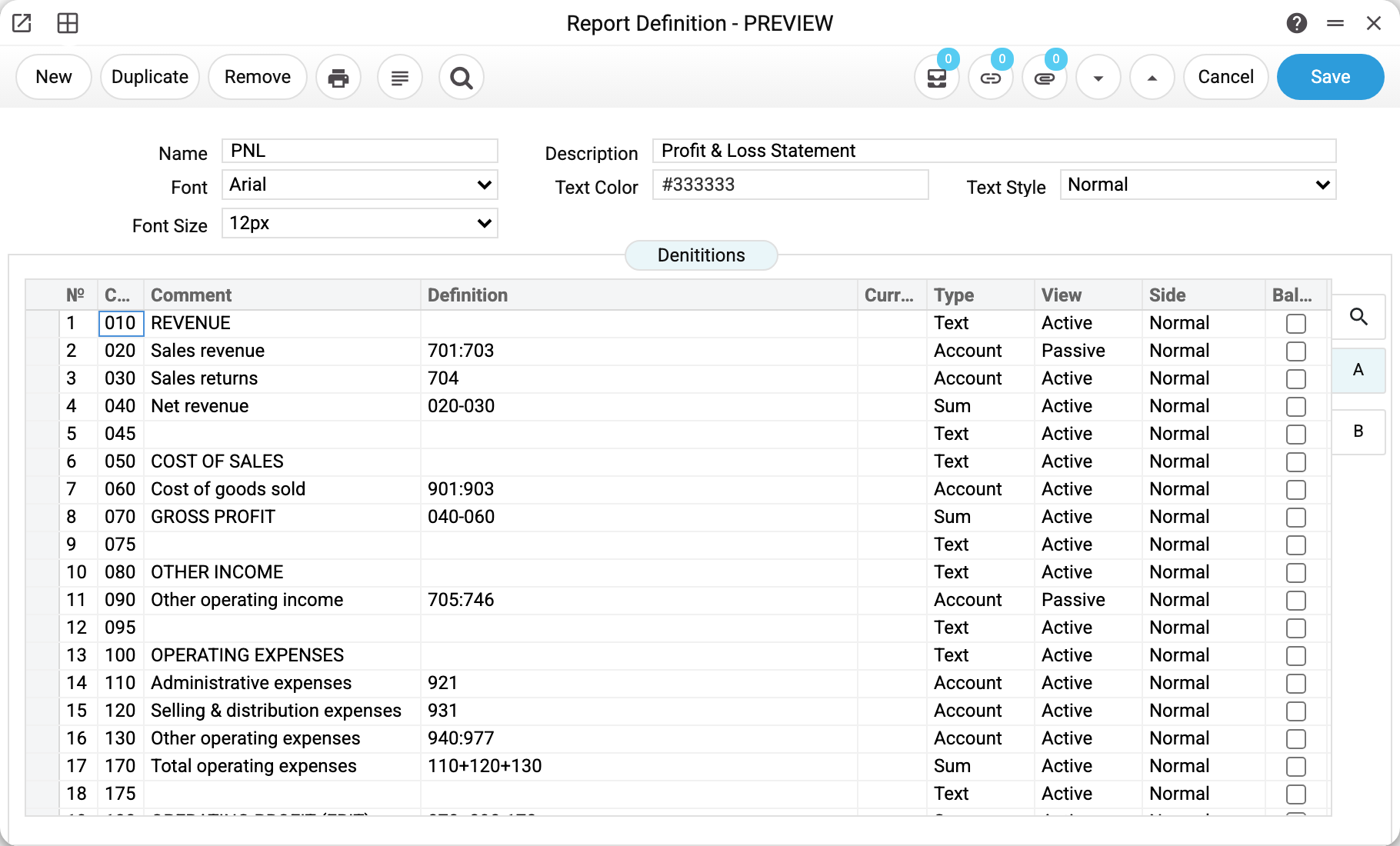
Every row of the future report has a code, a type and a definition:
| Code | Row | Type | Definition |
|---|---|---|---|
| 010 | REVENUE | Text | — (section heading) |
| 020 | Sales revenue | Account | 701:703 |
| 030 | Sales returns | Account | 704 |
| 040 | Net revenue | Sum | 020-030 |
| 060 | Cost of goods sold | Account | 901:903 |
| 070 | GROSS PROFIT | Sum | 040-060 |
| 090 | Other operating income | Account | 705:746 |
| 110 | Administrative expenses | Account | 921 |
| 130 | Other operating expenses | Account | 940:977 |
| 170 | Total operating expenses | Sum | 110+120+130 |
| 180 | OPERATING PROFIT (EBIT) | Sum | 070+090-170 |
| 220 | NET PROFIT FOR THE PERIOD | Sum | 180-200-210 |
Reading it: row 020 collects the turnover of accounts 701 through 703; row 040 is not accounts but arithmetic over other row codes (row 020 minus 030); row 010 is just a heading. Any form is built from these three row types.
The definition language
For an "Account" row you list accounts:
701— a single account, exactly this number (sub-accounts 7011, 7012 are not included);701:703— a range: every account of the chart whose number, as text, lies between 701 and 703. Numbers are compared character by character, not as numbers: 7011 and 7021 fall into the range, 7031 does not (as text it comes after 703);70:79will not take 790–799. To catch the sub-accounts of the upper bound too, widen it:701:7039;801:851,904,911— a comma-separated list, ranges and singles can be mixed;361.WAREHOUSE1— account with an object after the dot: only that object's transactions land in the row. An object goes with a single account only, never with a range.
A number missing from the chart of accounts is simply not found by a range, while a single such number stops the report with "Account doesn't exists:" followed by the number. A malformed entry — two dots, two colons, an object in a range — passes the save, and the report refuses with "Bad definition in code" and the row code.
For a "Sum" row — a formula over row codes: 070+090-170. The builder looks a code up first among the account rows that made it into the report (with a comment and a definition), then among sums already calculated — those with a lower code — so a sum may build on another sum defined above it. The code is matched literally: 020 and 20 are different codes to a formula.
"Text" — section headings and blank spacer rows; the definition field stays empty.
Sign, side and balance
- View decides the sign when "Side" is "Normal": Active = debit minus credit (expenses, assets), Passive = credit minus debit (income, capital). If a revenue row prints negative, it is almost always missing its "Passive" flag. In a row with the "Balance" flag "View" does not apply: the sign comes from the account type on the card — Asset and Expense give debit minus credit, Liability, Equity and Income give credit minus debit.
- Side forces one side of the transactions only: Debit takes the debit sum, Credit the credit sum, and "View" then does not apply. "Normal" takes both sides with the sign set by "View". An account row with an empty "Side" prints zero, so pick "Normal" explicitly.
- Balance (checkbox) switches the row from period turnover to the balance: the report prints two columns — at the beginning of the period and at the end. Off for P&L-style reports, on for balance-sheet forms (see the demo "Balance" definition).
- Currency on a row restricts it to transactions in one currency, and the row's amounts print in that currency, not in the base one. The demo definition "ІН_ВАЛ" compares revenue and receivables in EUR, UAH and base currency this way — three rows with identical accounts and different currencies. A sum row adds the figures of rows as they are, so rows in different currencies are not combined into one sum.
- The system places the report's column headers itself, there is no checkbox for it: above the first row (in the demo — "REVENUE") and above every row where the "Balance" flag differs from the previous row.
Formatting
Page B of the grid sets each row's text colour, font, text style and font size; the fields above the grid format the column headers and give the default style to rows that have nothing set on page B. In the demo, sections are bold blue, key totals green, and the final "NET PROFIT FOR THE PERIOD" is larger. Not decoration for its own sake: in a long report the eye lands exactly on the totals.
Common situations
A sum row prints zero or "not everything". The formula mentions a code that does not exist (a typo, or the row was recoded), the code of a sum further down (with a higher code), or a code written differently (020 instead of 20). The builder does not complain about such codes — it silently skips them. Check the formula against the code column.
A row is missing from the report. An account or sum row without "Comment" or "Definition", and a row without "Type", do not reach the report — the save gives no warning.
The definition will not save. The refusals on save:
- Field "Short Name" must be filled! — the name is required;
- "Report definition with this name 'PNL' exists! Report definition name PNL" — the name is unique within the company, ignoring case: "P&L" and "p&l" are the same name;
- Code "…" must be a number — a row code must be a number; on save the rows are ordered by code as numbers and renumbered;
- There should be no repetitions in the "Code" field — two rows share a code;
- "Currency '…' is not set" — the row's currency is missing from the currency register.
Zeros in the report despite real turnover. If the report window specifies one currency and the definition row another, the row deliberately prints as zero. An account row with an empty "Side" prints zero as well.
The balance sheet does not balance. Check the "Account type" on the cards of the depreciation, capital and liability accounts: in rows with the "Balance" flag the sign comes from there, and the definition row's "View" does not apply.
Fields
| Field | Purpose |
|---|---|
| Name, Description | The name typed into the report window (unique within the company; the report looks it up literally, case-sensitive), and a human-readable label |
| Font, Text Color, Text Style, Font Size | Column header formatting and the rows' default style |
| Grid, page A | Code, Comment (row text in the report), Definition, Currency, Type, View, Side, Balance |
| Grid, page B | Text Color, Font, Text Style, Font Size of an individual row |