Accounts
The chart of accounts: the reference every posting and every financial report lean on. An account card defines more than the name — the account type tells the reports which side its "normal" balance lives on, "Closed" keeps new postings off the account, and "Check entry side" warns about an entry on the wrong side.
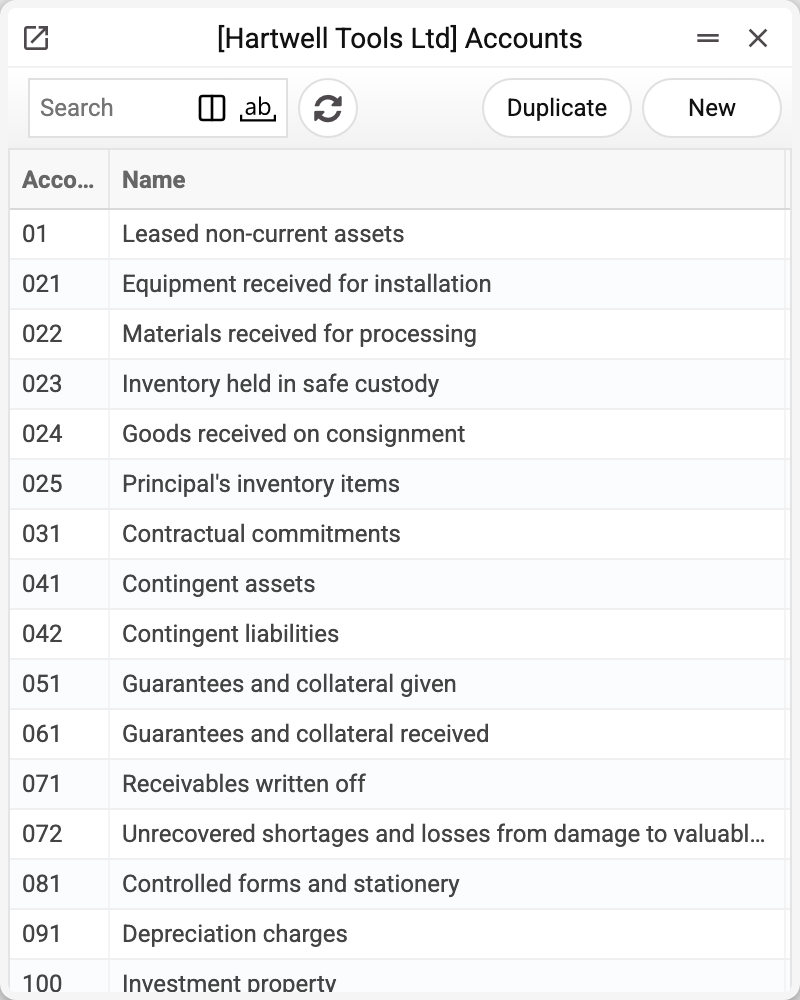
Where to find it: Modules → Nominal Ledger → Registers → Accounts
Worked example
Account 361 "Trade receivables — domestic customers":
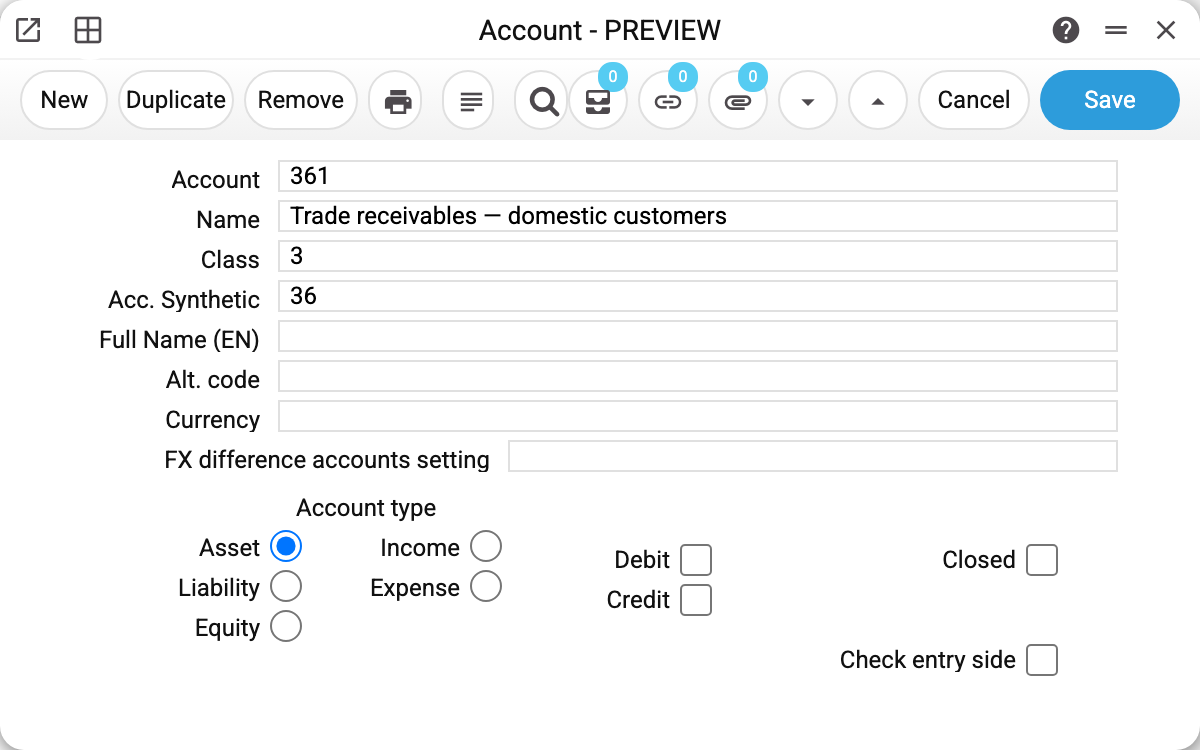
- Account type — Asset: the normal balance is debit; the Analytical Balance learns from here whether to subtract credit from debit or vice versa. In the P&L the sign of a line comes from its "View" and "Side" in the report definition; the account type counts there only in lines with the "Balance" flag (balance on a date).
- Full Name (EN) — the English label printed by the "Eng version" option of the Analytical Balance.
- The demo chart is the standard Ukrainian one: class 3 "Funds and settlements", class 7 "Income", class 9 "Expenses" and so on.
Where and how it is used
The account appears in every row of Transactions; an account with movement cannot be deleted. The account type (Asset/Liability/Equity/Income/Expense) sets the balance sign in the Analytical Balance; the Debit/Credit flags set the normal side, and "Check entry side", when a transaction record with the account on the wrong side is saved, sends a notification with the account number ("Unusual invoice amount: 361") — the record is still saved. The check covers records saved in the Transactions window or through the API; the postings a document makes when it is posted are not checked. "Closed" hides the account from new postings without touching history. The currency on the card is a single code from the currency list; the system does not forbid postings to this account in another currency.
Fields
| Field | Purpose |
|---|---|
| Account, Name | The code (as used in postings) and the label |
| Account type | Asset / Liability / Equity / Income / Expense — the balance sign in the Analytical Balance (in the P&L — only in "Balance" lines) |
| Debit / Credit | Normal-balance flag of the respective side |
| Check entry side | Warns about a transaction record on the unnatural side; does not block it. Document postings are not checked |
| Closed | The account no longer accepts postings |
| Currency | The account's currency — one code from the currency list; postings in another currency are not forbidden |
| Class | The chart section from Account Classifications; used by graphs |
| Synthetic Account | Which synthetic total it belongs to |
| Full Name (EN) | English label for reports |
| Alt. code | Alternative account code; the Trial balance shows it as a separate column when its "Alt. code" box is ticked |
| FX difference accounts setting | A set from FX difference accounts settings: which gain and loss accounts take this account's exchange difference on currency revaluation in the "Closing periods" document and in payment postings. Empty, a closed set or an empty side of the set — the general accounts from Account Usage |
Print variables
Values available in this document's printed form templates. How to write a variable in a template — see Print Forms.
Header fields:
| Variable | What it holds |
|---|---|
| Acc_No | Account |
| Acc_Comment | Name |
| AccClass_No | Class (code) |
| AccClass_Comment | Class (name) |
| AccSyn_No | Synthetic Account (code) |
| AccSyn_Comment | Synthetic Account (name) |
| CurCode_No | Currency (code) |
| CurCode_Comment | Currency (name) |
| Acc_Debit | Normal debit balance |
| Acc_Cred | Normal credit balance |
| Acc_Close | Account closed |
| Acc_Type | Account type spelled out (asset, liability, equity, income, cost) |
The records the document refers to through its form fields (location, customer, currency…) also expose the rest of their variables — code and name are already listed in the tables above, the rest is described in the register's article:
- Currency — Currency Codes (
CurCode_*)
Common situations
An income account shows negative in a report. In the Analytical Balance, check the account type: if an income account is marked "Asset", the report subtracts the wrong way. In the P&L the sign of a line comes from the report definition: check the line's "View" and "Side" — the account type does not affect it (except in "Balance" lines).
"The account is used in documents" — it already has postings or forward balances. Close it with the "Closed" flag: history stays, new operations stop.
An account won't delete: «A record of «Account» is used in: VAT!» An account can be deleted only while it is not recorded anywhere: in settings (Account Usage, VAT, payment methods and others), in directories (item groups, locations, income/expense items…), in document rows and headers — unposted ones too — and in a row of type "account" of a report definition (a range "A:B" does not block it). Otherwise the setting could no longer be saved, a document would post to an account that does not exist, and the P&L would fail to build. Remove the account from the place the refusal names; if the account is no longer needed, mark it «Closed».
The account cannot be found by the list search. If records were loaded bypassing the system (direct DB import), the search index is empty — the Update Full Search Text maintenance with the Accounts register (that is what goes into its "Register" field) rebuilds it.