Locations
A location is where the goods are. Every movement in the system has one: a goods receipt puts stock into a location, a shipment takes it out, a stock movement carries it from one to another. Without a location a balance does not exist — it is always "so many, in such-and-such a place".
Where to find it: Modules → Stock → Registers → Locations
The second, less obvious role: a location is the handiest place to set the inventory account.
A worked example
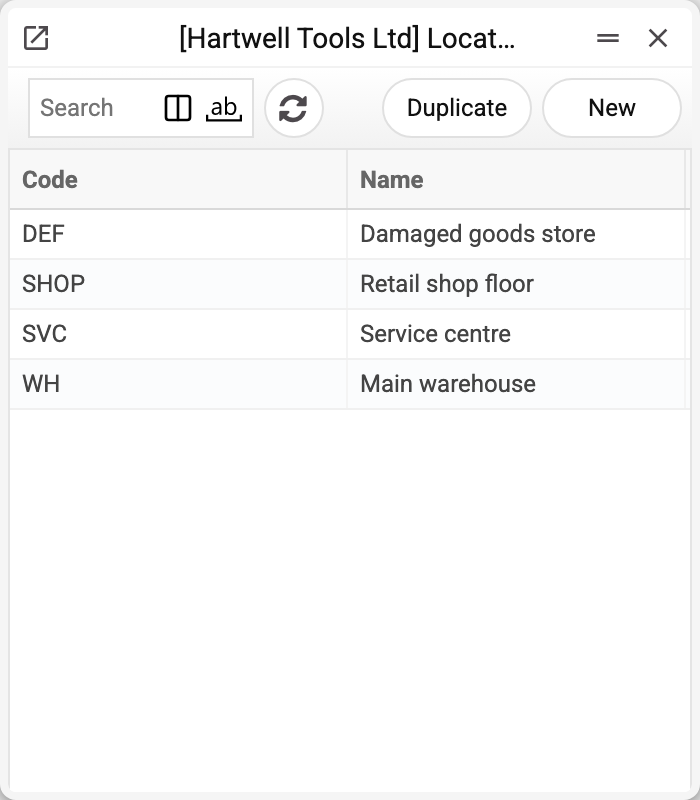
The English demo company keeps four: WH — the main warehouse, SVC — the service centre, SHOP — the retail shop floor, DEF — the damaged goods store.
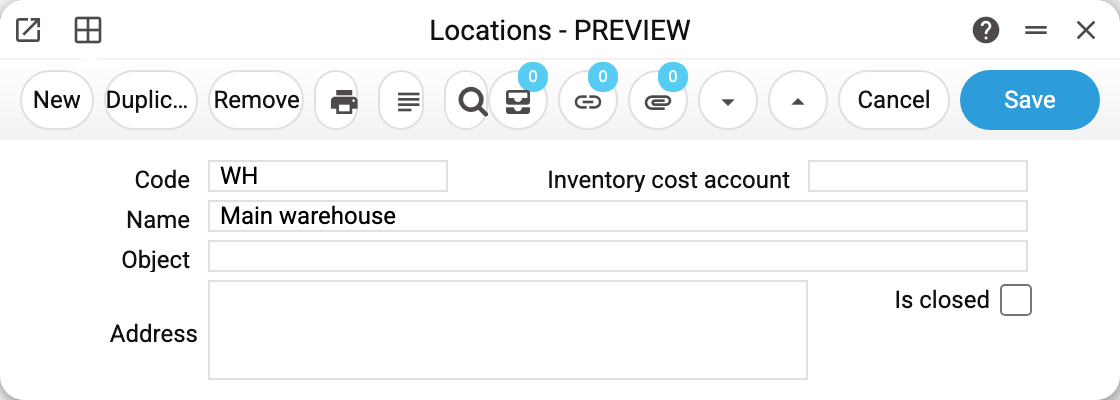
The card holds only a few fields:
- Code and Name — what documents and reports show;
- Inventory cost account — the ledger account for stock kept here;
- Object — the location's analytic dimension. Stock documents pick it up on their own, and that is how it reaches the posting. If you change the location on an existing document, check the objects: in a goods receipt, customer invoice, sales order and both returns they are rebuilt from the new location and the counterparty, and objects added by hand are dropped; a shipment and a depreciation drop the old location's objects on save and add the new location's (objects added by hand stay); in a revaluation the old location's object stays — fix the objects yourself. In a movement the posting itself adds the locations' objects (the source location's to the credit, the destination's to the debit), so do not enter them in the movement header;
- Address — goes into a consignment note created from a shipment or an invoice, and into the "Inventory Accounting Form";
- Is closed — the location cannot be chosen as the "Main warehouse", and the goods receipt, revaluation, internal order and quotation price list pick lists stop offering it. Other documents still offer and post a closed location, so the flag is not a ban. History stays intact.
The location's account is the field that matters
The system looks for a posting account down a chain and takes the first level that is filled in:
item card → item group → location → the general "Account Usage" setting
The Ukrainian demo companies use exactly this level: their goods and scrap warehouses post to 281 "Goods in stock", while the spare-parts and service locations post to 207 "Spare parts" — even though not a single item card carries an account. In the English company the locations are left without accounts, so the chain falls through to the general setting.
It is the simplest way to split the accounting: not by kind of product but by where it is kept. If the same item may sit both in the shop and in the service centre, the account follows wherever it was put.
Typical situations
A location closes. Tick "Is closed" — the location disappears from the goods receipt, revaluation, internal order and price list pick lists while reports for past periods stay correct. Shipments, invoices, stock movements and other documents still offer it and save with it — do not pick it there yourself. The system will not delete a location that has movements against it — nor one that is still referenced: by a document (unposted too), a user card, "Main warehouse", integration settings, a rental item card or a pool transfer. The answer says where — for example, «A record of «Location» is used in: Rental items!».
"The stock is missing" — but it isn't. The usual cause is looking at the wrong location. The location report shows the balance of one place; the item status report shows the split across all of them at once.
Service locations are a separate story. Customer devices taken in for repair do not sit in these locations but in service locations, and they travel by service movements.
Where to look next
- Location report — what is in a location on a given date;
- Stock movements and the stock movement report — transfers between locations;
- Items/Services, item groups — the upper levels of the account chain;
- Account Usage — the last level.
Print variables
Values this record adds to printed form templates — its own and those of the documents that refer to it.
Record variables:
| Variable | What it holds |
|---|---|
| Loc_Code | Warehouse code |
| Loc_Acc | Warehouse account |
| Loc_Name | Warehouse name |
| Loc_Objects | Warehouse objects |