Alert Status
A tiny reference for calling customers back: did the person actually learn the state of their order. In a service order the call result goes into the «Alert Status» field, and the orders list has a dedicated column for it — showing at a glance who has not yet been told their repair is ready.
Where to find it: Modules → Service Orders → Registers → Alert Status
The register lives in the Service Orders module.
A worked example
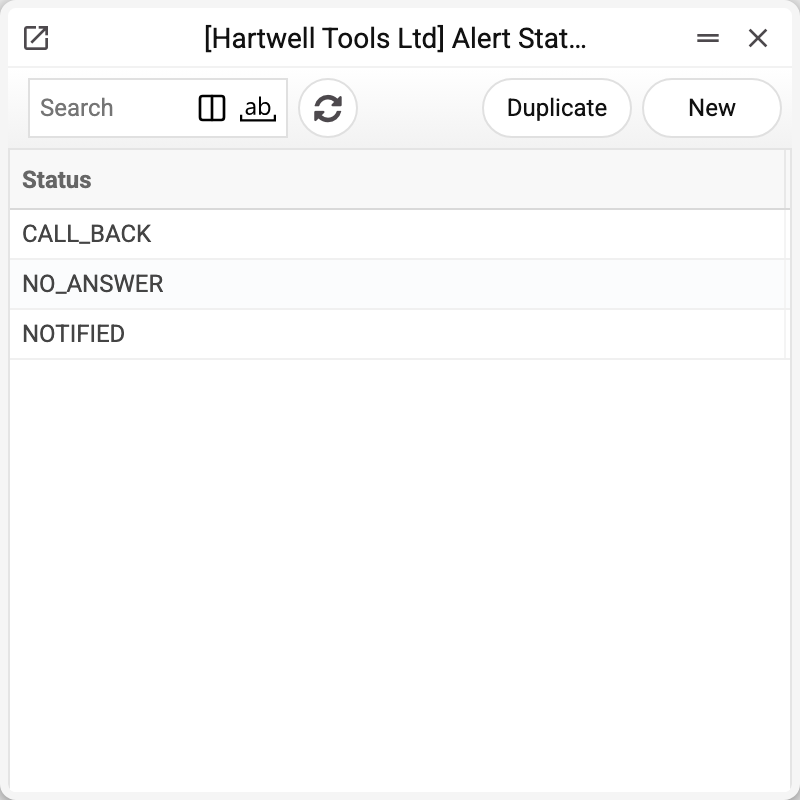
The demo set is three working call states: NOTIFIED (the customer knows), NO_ANSWER (did not pick up), CALL_BACK (asked to be reminded later). A record is a single «Status» field; a set for your own process takes a minute to build. The status is stored in capital letters, however it was typed. In the order the status field is also turned into capitals, but it is not checked against the list: a status typed by hand that is not in the list is saved as is — so pick the status from the list. A saved status cannot be renamed ("Can't change code"): orders store its text, so for another name create a new status.
A status cannot be deleted: «A record of «Alert Status» is used in: Service Orders!» A status can be deleted only while no service order carries it: otherwise the order would keep a status the register no longer has. If you no longer need a status, keep it in the list and don't pick it in new orders.
It is the operator's manual mark — the automatic SMS about an accepted/ready/cancelled order (see the orders article) do not touch it: an SMS may go out, while actually reaching the person is a separate matter.
Field reference
| Field | Description |
|---|---|
| Status | The alert state name — the record's only field |