Service Item Histories
The same as item history but for other people's equipment: a trail for every device taken in for repair.
Where to find it: Modules → Database Maintenance → Registers → Service Item Histories
A worked example
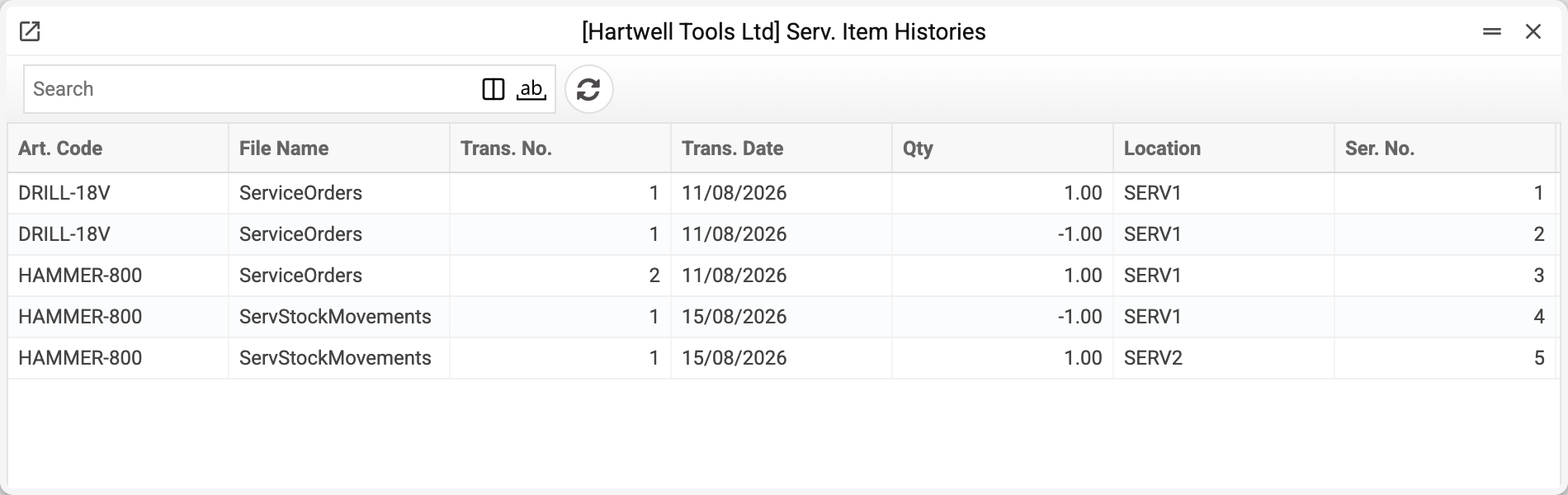
A row is an event on a customer's device. The list shows the number, item, location, document, date and quantity. The record's «Serial» field (not in the list) holds not the device's factory serial but the service order number together with the item code — that is how every movement is tied to its order. The record does not hold the customer: whose device it is shows in the service order it was taken in on.
That is what separates this register from the warehouse one: the goods are not ours, and the main question is whose they are; the order answers it.
Why keep it separately
A customer's device cannot sit on the ordinary warehouse: it is not our asset, it has no cost price and it must never reach sellable stock. Yet its whereabouts must be known exactly: taken in, handed to an engineer, sent to another workshop, returned to the owner.
Hence the mirror trio in the module: history, statuses and serial balance — the same logic without the money.
Typical situations
A customer asks where their device is. Open the «Service Item History Report» — it shows where the device is now.
The device was returned but still shows as in service. «Gave out» (or «Gave w/o paym.») is not ticked in the service order: there is no separate handover document, the checkbox records the movement.
No rows for an order. «Device accepted» is not ticked in the order — without it the device never reaches the intake location.
Where to look next
- Service item statuses — where things are now.
- Service serial balance — unit-level tracking.