Waybill
A consignment note — the document for goods in transit. It states what is travelling: how many places, of what weight and size, to whom and how. For Nova Poshta this is the document an express waybill is created from, and the waybill's number and status live in its header.
Where to find it: Modules → Stock → Registers → Waybill
A TTN is rarely started from scratch (creating a new one from the TTN list is switched off): it is created from a shipment with the "Create a waybill" button or from a customer invoice with the "Create TTN" button, which brings the recipient details and the source document reference along. Only an invoice with no order number and with the "Update warehouse" box ticked can create one; for an invoice made from an order the system points to the shipment: "Creation of TTN is available from Shipment".
Menu: Modules → Stock → Registers → Waybill.
A worked example
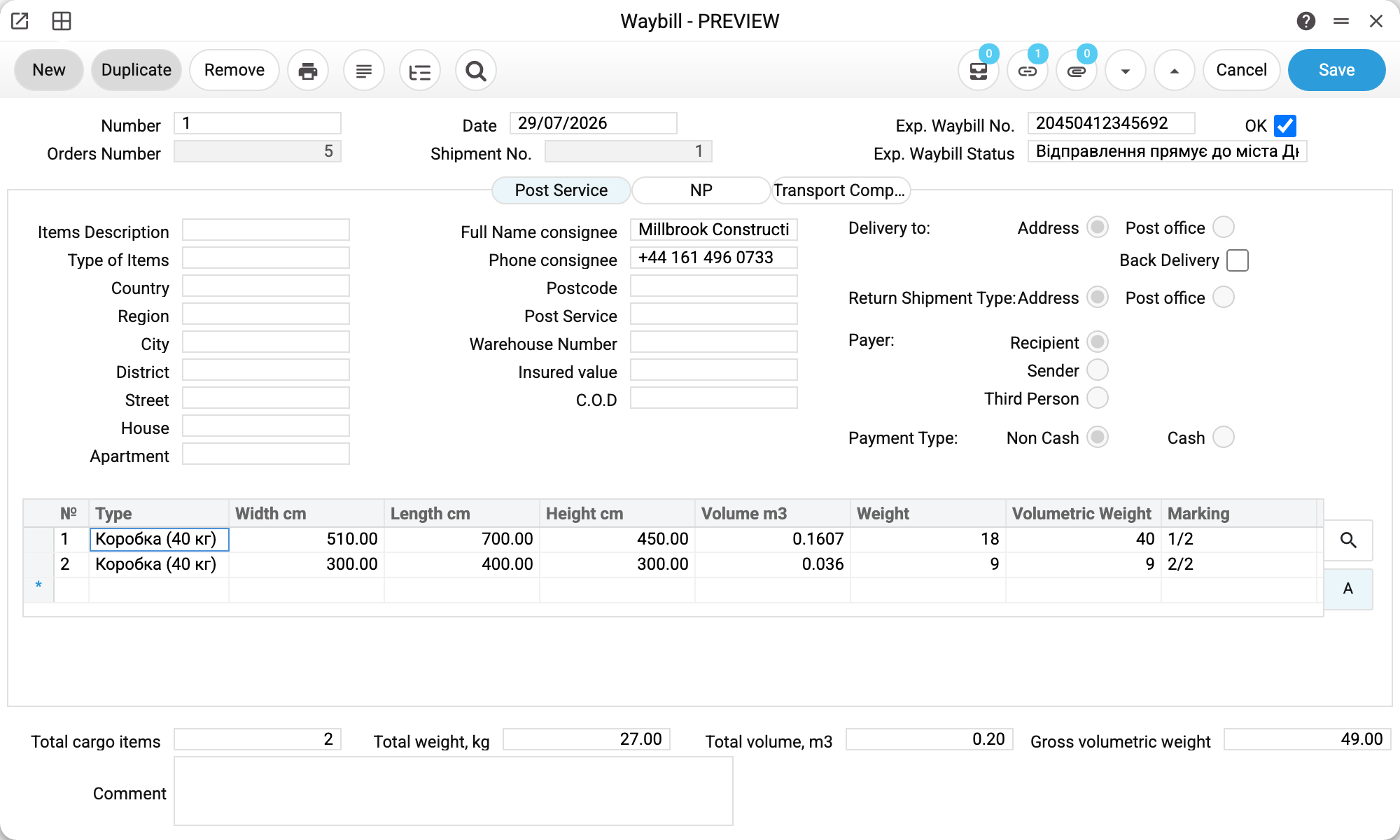
The header: Number 2, Date 31/07/2026, and next to them the Orders Number 19 and Shipment No. 11 — you can see what the document grew out of. On the right is what Nova Poshta returned: Exp. Waybill No. 20450412345690 and Exp. Waybill Status "Відправлення прямує до міста Львів". The OK flag confirms the document: after it the header and the cargo can no longer be changed (the status and the comment stay editable), and the TTN cannot be deleted — "You cannot delete a confirmed TTN!". The flag can be cleared by an ordinary edit. In the sales order list the order's truck icon is grey while its TTN is not confirmed and green after OK.
Below are three tabs:
- Post Service — delivery by ordinary post: address, postcode, branch, declared value, cash on delivery, payer and payment type;
- NP (Nova Poshta) — the express waybill details (see below);
- Transport Company — the carrier, vehicle, driver and weights for ordinary road transport.
The matrix holds the places of cargo. Two of them here: a 510×700×450 mm box weighing 18 kg and a 300×400×300 mm box weighing 9 kg, marked "1/2" and "2/2". The totals underneath: 2 places, total weight 27 kg, volume 0.1967 m³, gross volumetric weight 49.
The volumetric weight exceeds the actual one, and that is normal: the carrier charges by the greater of the two. Two light boxes "weigh" 49 kg by their dimensions instead of 27. A place's volumetric weight is its volume in m³ × 250: the first box alone "weighs" over 40 kg that way — above Nova Poshta's per-place limit (below), so the system would not create a real express waybill with such a place.
The "NP" tab
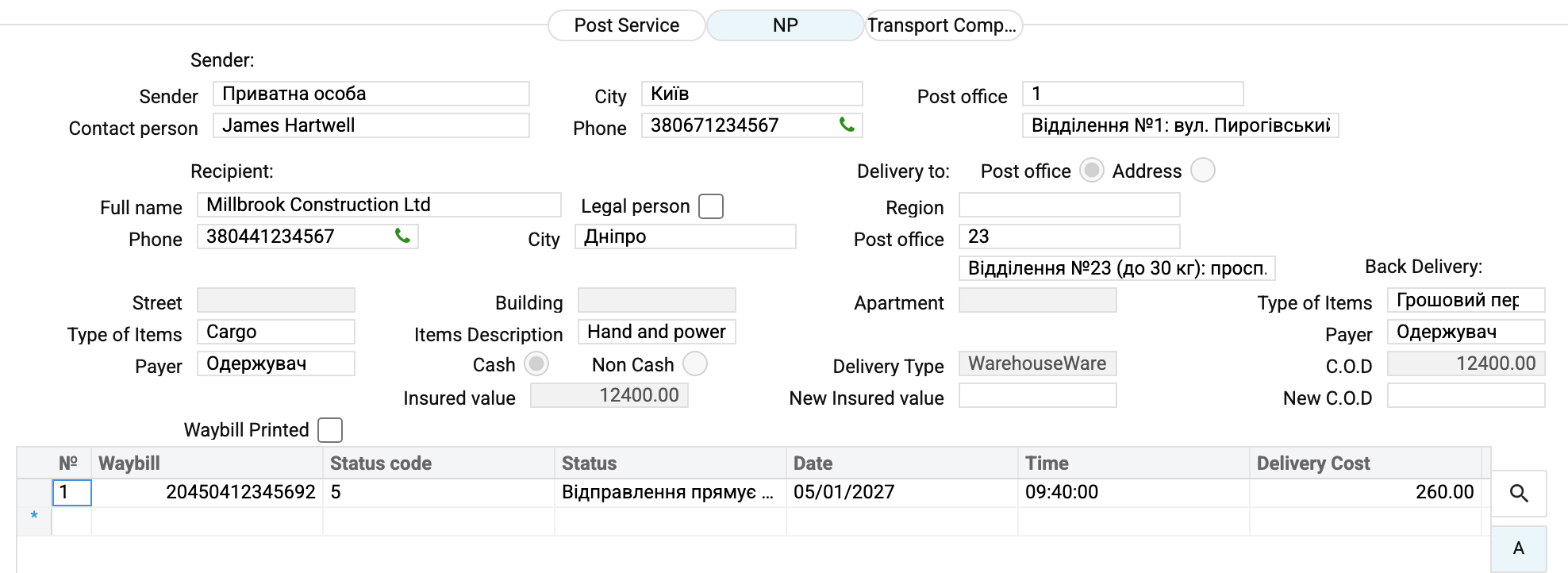
This is what goes into the express waybill:
- Sender — the cabinet card, contact person and phone, city and branch of departure;
- Recipient — name, phone, city and branch; the "Legal person" flag switches between a company and a private person. It is ticked by itself when the customer card in the "Consignee" field has a registration number: the recipient at Nova Poshta then becomes the organisation with that EDRPOU code. If the flag is set but the consignee's card has no EDRPOU code (or no consignee is specified), creating the waybill is refused with «Legal person: the customer card has no EDRPOU code — fill it in or clear the checkbox!»; when creating it again, the refusal comes before the existing waybill is deleted, so that waybill stays. A private recipient's name must hold at least a first and a last name and no digits;
- cargo — type, description, payer, payment type, declared value;
- Back Delivery — the cash-on-delivery amount, the cargo type and the payer of the return leg;
- Delivery Type is set by the system itself from the "Delivery to" switch: "Post office" gives
WarehouseWarehouse, "Address" givesWarehouseDoors(street, building and apartment are then required). The parcel always leaves from a branch.
The matrix at the bottom is the waybill history: number, status code and text, date and time, delivery cost. Its first row appears the moment the waybill is created; after that the status service keeps it fresh.
The Nova Poshta buttons
The document menu offers four actions:
| Action | What it does |
|---|---|
| Create express waybill (NP) | sends the data to Nova Poshta and receives a number. If the TTN already has a waybill, it first deletes that one at Nova Poshta and then creates a new one — with a new number |
| Print Express waybill (NP) | the printable waybill form |
| Print Express waybill (NP) on Zebra | the same for a label printer |
| Delete express waybill (NP) | cancels the waybill at Nova Poshta and clears the number and status |
Before creating, the system checks the data. The sender, recipient and cargo fields on the NP tab must be filled in — the window names an empty one: "To create a waybill, you must fill in the field: …". The cargo matrix cannot be empty, and every place needs a weight (or volumetric weight) and all three dimensions, otherwise creation stops with a message. Nova Poshta's limit applies whatever the payment type — no more than 30 kg per place, counting the larger of the actual and volumetric weight; heavier cargo is split into places.
On success the system writes the waybill number into the TTN header, the status and a row into the history. Only creating the waybill from a shipment also writes the number into the sales order; creating it from a TTN leaves the order alone.
A waybill can be deleted while Nova Poshta has not yet accepted the parcel. After acceptance the service refuses, and cancellation has to happen in the Business Cabinet.
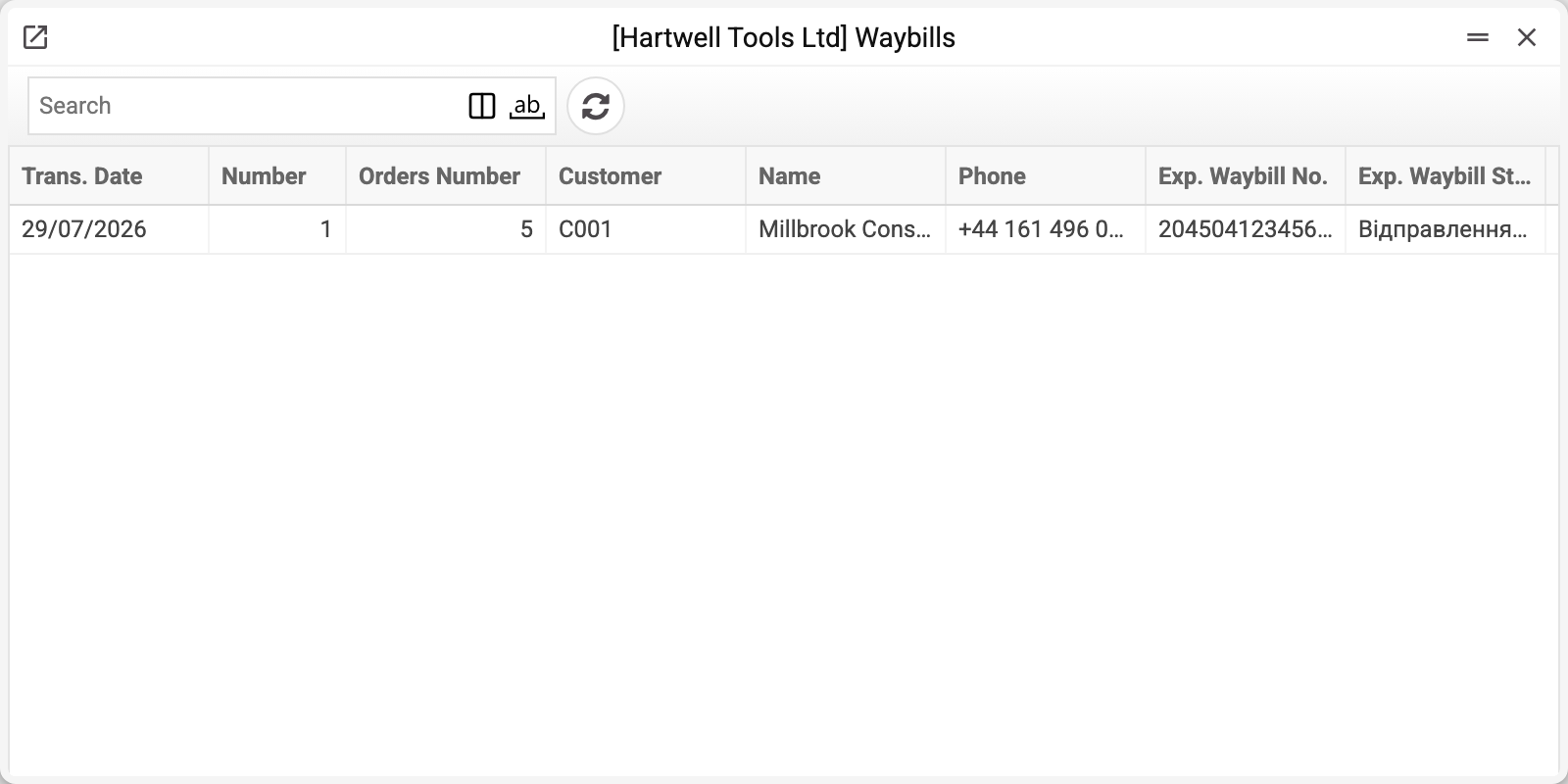
Where the data comes from
- Recipient, order and shipment or invoice come from the document the TTN was created from.
- From a shipment the TTN takes over all of its Nova Poshta data: sender, recipient, declared value, cash on delivery and cargo places. If the shipment already has an express waybill, the TTN gets its number, status and history. When the shipment has no delivery address chosen, the default sender from NP Setting only fills what is empty: it becomes the Sender if the shipment has no sender with a city and branch, and fills an unset payer and cargo type. What was chosen in the shipment the TTN does not overwrite.
- From an invoice there are no cargo places — the matrix is filled in the TTN. The sender comes from NP Setting → the Nova Poshta cabinet card, and the declared value and cash on delivery equal the invoice total (converted to the NP Setting currency when the currencies differ).
- Cities and branches are chosen from NP Cities and NP Warehouses, the cargo type from NP Cargo Types.
- The waybill number comes from Nova Poshta. Nova Poshta reports the delivery cost once — when the express waybill is created; the status is written by the NP button and the "Nova Poshta waybill status update" service, and the service does not update the cost. The header status can be corrected by hand even on a confirmed TTN; the delivery cost in the history is read-only in the window.
Common situations
- "Package weight is required in package matrix". A row in the matrix has no weight. Fill in the weight or the volumetric weight of every place.
- "Maximum weight per seat is 30 kg". The carrier's limit whatever the payment type, by actual or volumetric weight: split the cargo into several places.
- The waybill was created but the order shows no number. A TTN does not write the number into the order — only creating the waybill from a shipment does, and only when that field is still empty: an existing value is never overwritten.
- "Phone" went blank after the contact person was changed. The phone is taken from the chosen contact on this same sender's card. If the sender cannot be told apart — the company has several Nova Poshta cabinets with the same name and the contact is on both — or the Contact person field is cleared, "Phone" is cleared too, so another person's number never reaches the waybill. Pick the sender in the Sender field from the list again (the cabinet's first contact person and their phone come in) or type the phone by hand.
- The status does not change. It is refreshed by the service; check that it runs on a schedule, and remember that final statuses (collected, refused, deleted) never change again.
- The "Delivery to" and "Back Delivery" switches on the "Post Service" tab are informational. They are stored with the waybill, but the system acts on none of them. What reaches the express waybill is the choice on the NP tab: "Post office / Address" there fills the Delivery Type field, and that value travels to Nova Poshta as the service type. When a waybill is created from a document, the delivery type comes from the customer's delivery-address card, or from the shipment when there is none. This is deliberate: the tab is meant for other carriers, and those integrations do not exist yet.
- About the demo screenshots. The public demo has no live Nova Poshta key, so the waybill number in the example is a stand-in: the real one arrives from the service at the moment of creation.
Nearby
- Shipments — the document a TTN is most often created from
- Nova Poshta — the cabinet card with the key and the sender
- Waybill status update — the service that tracks shipments
- Carriers — the reference book of transport companies for the "Transport company" tab