Closing periods
The document that ends a month, a quarter or a year. The three service operations an accountant performs at period end are gathered in one window: revalue foreign-currency balances, close income and expenses to the financial result accounts, and carry the profit or loss to account 44. Each is switched on by its own checkbox and creates its own transaction dated with the document date.
Where to find it: Modules → Nominal Ledger → Registers → Closing periods
Walkthrough
Closing February 2027 in the demo (the demo company keeps its books in GBP):
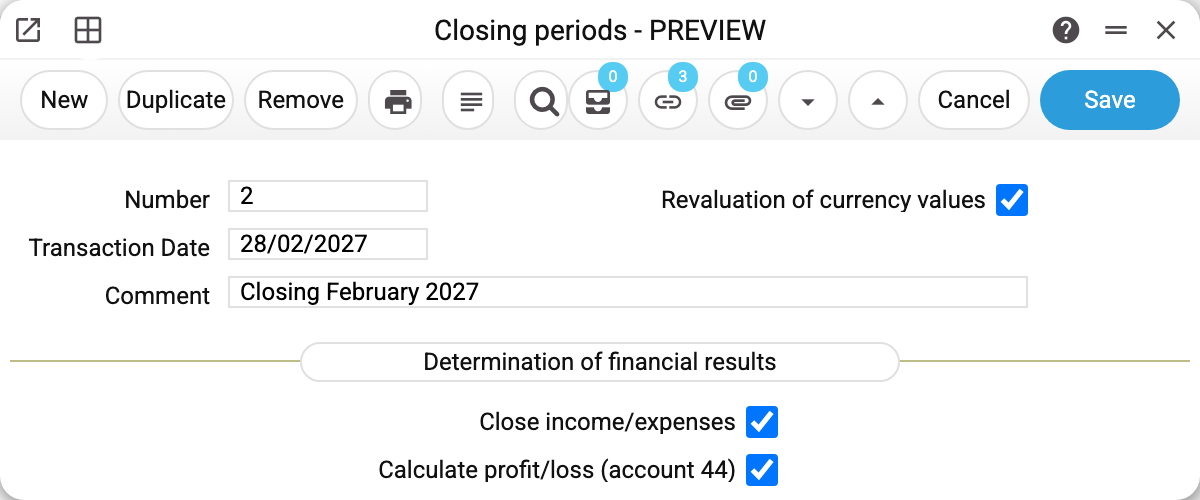
The window holds only the number, the transaction date, a comment and three checkboxes. The date is the key field: it selects the rate for revaluation, balances are computed up to it, and every generated transaction carries it.
A new document gets the last day of the current month as its date and a comment naming that month. Changing the date in the window builds the comment again for the new month and overwrites one typed by hand, so write your own comment after setting the date.
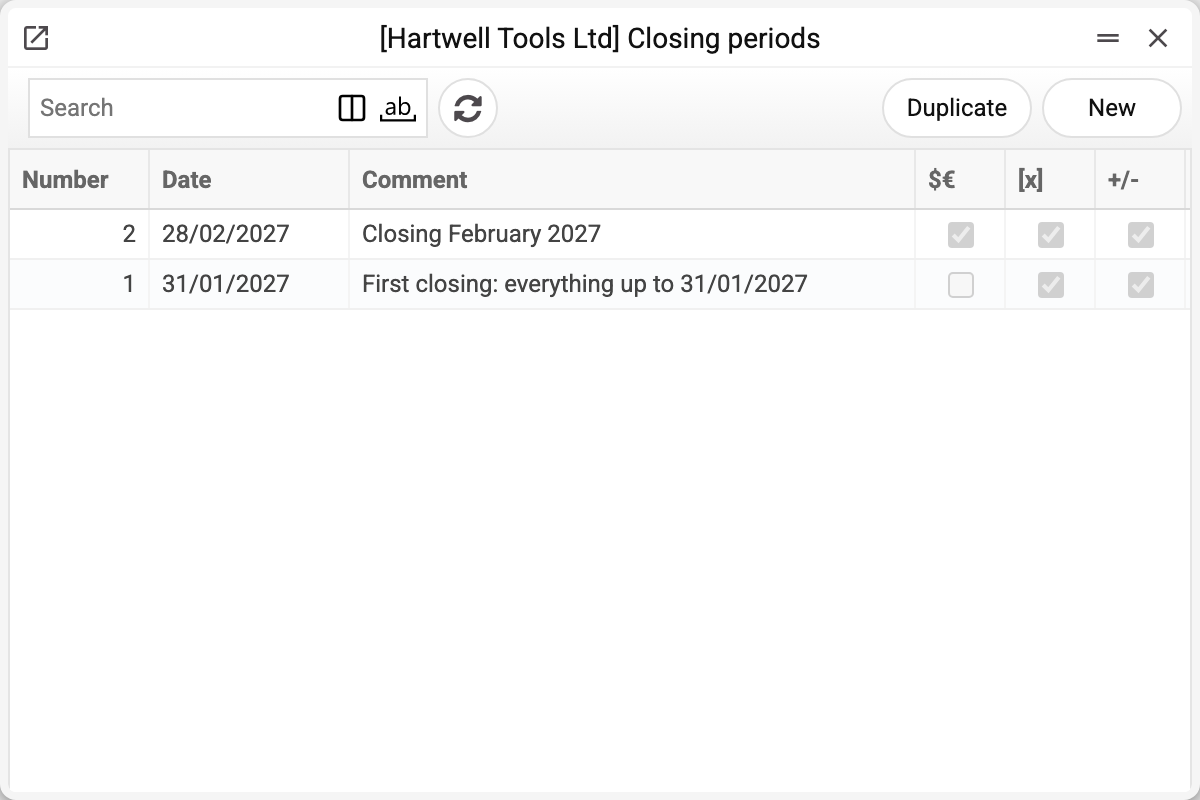
The last three columns of the list are those same flags: $€ revaluation, [x] closing income/expenses, +/- profit and loss. The demo has two documents: No. 1 of 31/01/2027 — the first closing, without revaluation; No. 2 of 28/02/2027 — a full February closing.
The three operations and their transactions
They run in exactly this order — revaluation first, because its exchange gains and losses have to be closed to the financial result as well.
1. Revaluation of currency values. Every monetary balance in a foreign currency is recomputed at the rate on the document date, and the difference against the booked amount goes to the exchange gain/loss accounts. In February the EUR rate rose to 0.873:
| Dr | Cr | Amount | What was revalued |
|---|---|---|---|
| 312 | 714 | 3.00 | EUR on the currency account (1 000 EUR: from 0.870 to 0.873) |
Assets (cash, customer debts) produce income when the rate rises; liabilities (supplier debts) produce expenses.
2. Closing income/expenses. The balance of every result account is carried to "its" financial result account — the pairs come from Accounts reconciliation:
| Dr | Cr | Amount | Account |
|---|---|---|---|
| 714 | 791 | 3.00 | exchange gains |
| 791 | 921 | 2 005.00 | administrative expenses (depreciation 2 000 + bank fee 5) |
| 791 | 942 | 10.00 | losses on currency purchase |
Income and expense accounts are now zeroed, and the whole result sits on 791.
3. Profit and loss. The balance of each financial result account (791–794) is closed to account 44: a debit balance is a loss, a credit balance is a profit.
| Dr | Cr | Amount |
|---|---|---|
| 442 (accumulated losses) | 791 | 2 012.00 |
The check: 2 015.00 of expenses less 3.00 of income = 2 012.00 of loss for February. A profit would produce the mirror posting — Dr 791 / Cr 441.
Balances are cumulative, not per month
This is the key mechanic: closing computes balances as of the document date from the very beginning, not the turnover of one month. It works out as "per month" only because the previous closing already zeroed the result accounts — that is, closing consecutive periods gives you the monthly figures automatically.
So the first closing in a database sweeps up absolutely everything accumulated (in the demo that is document No. 1 of 31/01/2027 — trade, payroll and services of every earlier month), and each subsequent one takes only the new period. Skip a month and the next document closes both at once.
A skipped month cannot be closed or revalued later with a separate document — the program does not allow it. That month's balance has already been taken by the later month's transaction, and the earlier operation would count the same part a second time: the exchange difference or the income/expense closing would double. So an operation of a month can be neither ticked nor unticked while a later month has a posted operation at the same place in the chain or further; the refusal names the number and date of the later document. If the earlier month really has to be posted, first untick the operations in the later documents, starting from the latest, post the earlier month, then tick the later ones again in date order.
Where the data comes from
- The "result account → financial result account" pairs — the Accounts reconciliation setting. An account missing from the pairs is not closed and simply keeps its balance.
- Accounts 791–794 and 441/442 — Account Usage, the "Closing periods" tab: four result accounts (operating, financial, other activities, extraordinary events), "Retained earnings" and "Uncovered losses".
- The revaluation rate — Exchange Rates: the latest rate dated no later than the document date.
- What gets revalued — every account with foreign-currency turnover or foreign-currency opening balances, except those listed in Non-Monetary Accounts (goods, fixed assets, prepayments — whatever is carried at historical cost). An account marked "Debit only" is excluded only when its balance is a debit — a credit balance is revalued; "Credit only" is the other way round; an account with no side marked is excluded entirely. Income and expense accounts are not revalued: the next operation, closing of income and expenses, clears them.
- The exchange difference accounts — first the FX accounts set named on the account's own card; when it is absent or closed, the "Foreign Exchange Income/Expense" pair from the "Debtors" tab of the same "Account Usage" setting.
- Analytical objects when income and expenses are closed: closing splits an account's balance across its objects and closes each with its own row, and the object mask strips the types that do not belong. The objects stay on the side of the account being closed only — the financial result account gets the amount without objects. Currency revaluation carries no objects: the exchange difference is posted for the account as a whole, not split by object.
Common situations
A document with no flag at all is saved as a draft: it has no transactions. It can be corrected, deleted, or have the needed flags ticked later.
"Currency assets have already been revaluated in the period!" (same for closing accounts and for profit/loss). The check looks at the other documents of the same calendar month. If one of them has already closed income/expenses or calculated the profit, no flag can be ticked in any other document of that month — not even for an operation not yet done; a revaluation in another document blocks only a second revaluation. So do all of a month's operations in one document: correct the existing one instead of creating a second.
Need to redo a closing. Untick the flag — the operation's transaction is deleted completely. Fix the data and tick it again. A document with no flags left can be deleted; if the ticked operations have transactions, deletion is refused and asks to untick all the operations in one save first.
The operations form a chain: revaluation → closing of income and expenses → profit/loss, each calculated from the earlier ones already posted. So an earlier operation can be neither unticked nor ticked while a later one is posted: the save is refused and names the flag to untick first. To redo the revaluation, untick "Calculate profit/loss (account 44)" first, then "Close income/expenses" (or all three flags in one save), fix the data and tick the flags again. A later one may be ticked in the same save as the earlier one: it is calculated after it. The same rule holds when a month's operations are spread over two documents: an earlier one cannot be unticked while another document has a later one posted, and the refusal names its number and date.
"Uncheck the operations of the document first: their postings are dated 28/02/2027 and are not moved to a new date by themselves!" The document date is an input of every operation: it gives the rate and the balances, and dates the transactions. While at least one operation is posted, the date cannot be changed. Untick the flags (this can be the same save as the date change) and tick them again — the transactions are then made on the new date.
The number of a document with posted operations cannot be changed. Unticking a flag looks for the transaction by the document number, so while operations are posted the program does not accept a new number — not even in the same save that unticks the flags. If you need another number, untick the operations and save first, then change the number and tick the flags again.
"Empty matrix!" when calculating profit/loss. The result accounts (791–794) have a zero balance on the document date — there is nothing to move to account 44: income and expenses are not closed yet, or the profit has already been moved. The whole save is rolled back, the other flags are not posted either. Tick "Close income/expenses" together with the profit, or untick the profit.
"Enter object of type …" when closing income/expenses. The account being closed requires an object of that type (object type control), and part of its balance has no such object — or the object mask stripped it. Closing refuses, and the whole document is not saved with it. Spread the balance over objects of the required type or correct the mask.
Closing missed part of the expenses. The account is not in Accounts reconciliation — that list is exactly what gets closed.
Revaluation created nothing. Either there are no foreign-currency balances on that date, or every currency account is listed as non-monetary.
"Exchange rates are not filled in!" with a currency code and a date. A currency with a balance has no rate on or before the document date — the revaluation refuses, and if closing and profit are ticked in the same document, they are not done either. Enter the rate and save the document again.
The profit differs from the Financial Results report. The report works per period and over its own set of accounts, while closing uses cumulative balances as of a date. A discrepancy usually means the previous period was never closed.