Fixed Assets
A card index of long-lived property that loses value gradually: vehicles, buildings, equipment. Each card is one object with an inventory number, a purchase value and a depreciation model. The card itself makes no postings: bookkeeping movements come from two services — commissioning and monthly depreciation — while the card accumulates their result in the residual value.
Where to find it: Modules → Fixed Assets → Registers → Fixed Assets
Video walkthrough: Fixed assets in ERPJS step by step — buying a van, the asset card, commissioning, depreciation.
Walkthrough
The demo database vehicle — inventory number 20_1, purchased for 250,000:
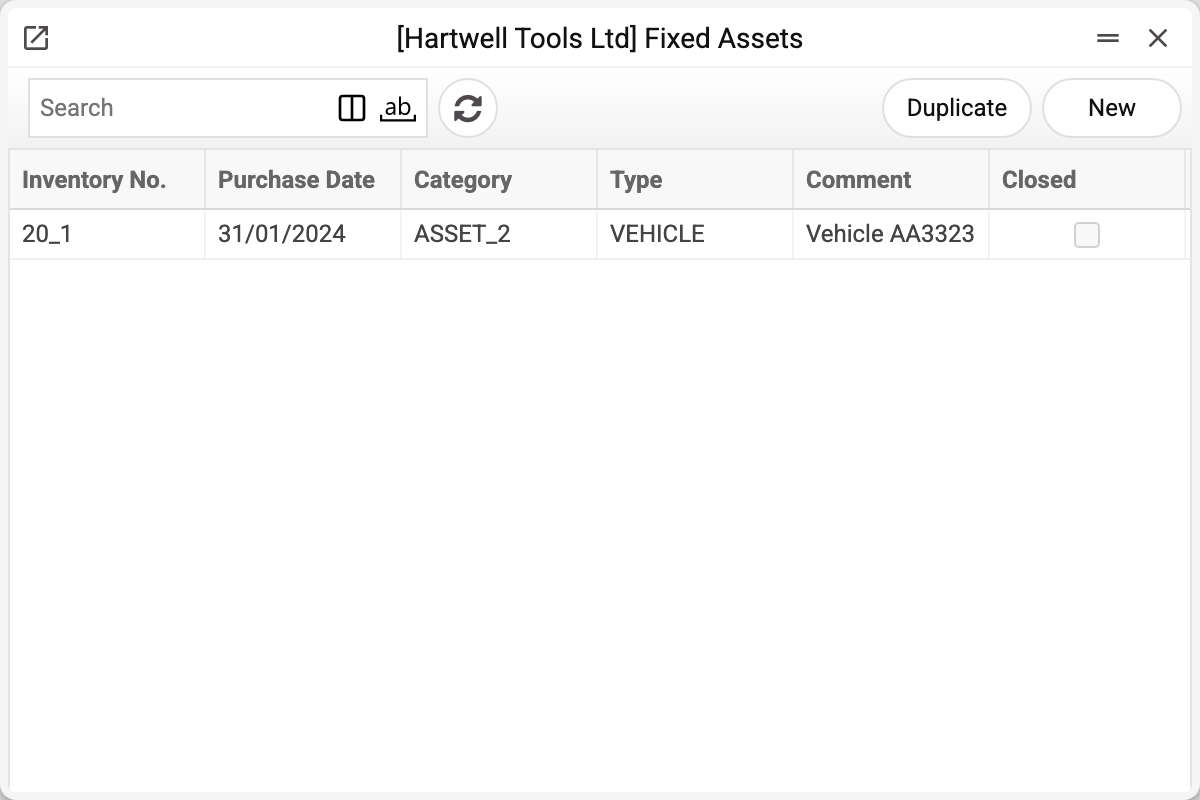
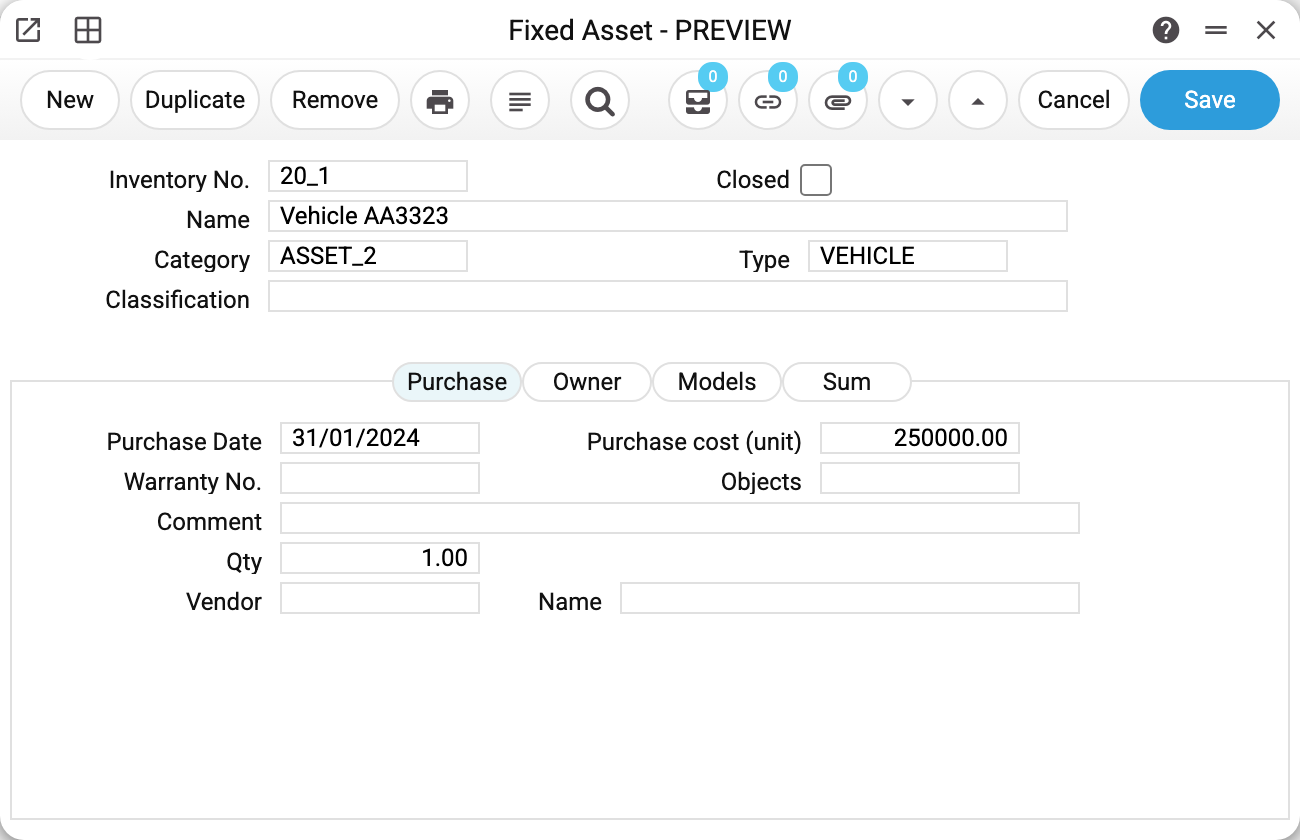
- Header: inventory number, name, category ASSET_2 and type VEHICLE. The category is a template: pick it and the type and model fill in automatically. The type means accounts: commissioning and depreciation use it to know where to post (for vehicles in the demo: balance 105, accumulated depreciation 131, expense 921).
- The "Purchase" tab: date 31/01/2024, unit cost 250,000, quantity 1, the vendor.
- The "Models" tab: depreciation model 5 — "5 years straight-line" — and the "Used with" date 31/01/2024, stamped by commissioning. The "Model 2" column serves parallel (e.g. fiscal) books: its own model and its own "Used with" date.

- The "Sum" tab: residual value 237,499.99 and "Depreciation date" 30/04/2024 — depreciation was charged three times (February–April) at 4,166.67 = 250,000 ÷ 5 years ÷ 12 months; the date is read-only, maintained by the depreciation service. Next to them are "Residual value (model 2)" and "Depreciation date (model 2)": the same for model 2.

The links icon in the toolbar (5) holds every transaction of the object: purchase, commissioning, three charges. The "FA status" item of the window menu (the menu button on the left of the header) opens the object's dossier with the same events as a list.
Lifecycle
- The card — by hand (the "New" button) or via the "Fixed asset creation" service from vendor invoice rows. Mandatory: inventory number (no spaces, commas or colons), name, category, type, purchase value and date, model.
- Commissioning — a posting from capital investments (152) to the type's balance account (105); the card receives "Used with". Each model is commissioned separately — with its own posting and its own date.
- Depreciation — monthly: Dr the type's expense (921), Cr accumulated depreciation (131); the residual value shrinks and the "Depreciation date" moves forward. Models 1 and 2 are charged separately, each from its own residual value.
- Disposal — a sale or a write-off: the document removes the object from the balance sheet. The card closes by itself (the "Closed" flag) when the asset's total balance reaches zero: posted disposals have written off its whole quantity — in one act or in the last of several partial ones. Un-posting returns the balance and opens the card again. While anything of the card is left, it stays open.
Fields
| Field | Purpose |
|---|---|
| Inventory No. | Unique object code; no spaces, commas, colons |
| Name, Comment | How the object appears in lists and reports |
| Category | Asset category — a template for type and model |
| Type | Asset type — the set of posting accounts |
| Classification | Extra classification (optional) |
| Department | Asset department — where the object lives |
| Purchase: date, unit cost, quantity, vendor | Original acquisition data |
| Models: Model 1/2 | Depreciation models; the second one serves parallel (e.g. fiscal) books |
| Used with | Stamped by commissioning — each model has its own, in the model's column |
| Sum: residual value, depreciation date | Written by commissioning and depreciation under model 1. The date is not hand-edited; the residual value can be corrected, but such a correction makes no postings. The "Depreciation 100%" and "Declining Balance" methods charge from the new residual; "Straight Line" keeps charging from the original cost, and the new residual only changes when the charges end and the amount of the last one |
| Sum: residual value (model 2), depreciation date (model 2) | The same for model 2: written by commissioning and depreciation under model 2 |
| Objects | Analytics for the object's postings |
| Closed | The object is disposed of — depreciation no longer charges it. Commissioning does not check the flag: a closed card not yet commissioned under the chosen model gets commissioned |
Print variables
Values available in this document's printed form templates. How to write a variable in a template — see Print Forms.
Header fields:
| Variable | What it holds |
|---|---|
| FixA_No | Inventory No. |
| FixA_Comment | Name (Inventory No.) |
| Cat_No | Category (code) |
| Cat_Desc | Category (name) |
| Class_No | Classification (code) |
| Class_Desc | Classification (name) |
| FixA_Closed | Closed |
| Typ_No | Type (code) |
| Typ_Comment | Type (name) |
| FixA_PurDate | Purchase Date |
| FixA_WarrantyNo | Warranty No. |
| FixA_Comment2 | Comment |
| FixA_Quantity | Qty |
| FixA_Vendor | Vendor |
| FixA_Purchase_cost | Purchase cost (unit) |
| OBJ_No | Objects (code) |
| OBJ_Comment | Objects (name) |
| FixA_Vendor_Name | Name — "Vendor Name" field |
| FixA_Department | Department (code) |
| FixA_Emp_No | Employee |
| FixA_Name | Department (name) |
| Dep_No | Model 1 (code) |
| Dep_Desc | Model 1 (name) |
| FixA_UserFDate | Used with |
| FixA_EndDate | End Date |
| FixA_Residual | Residual value |
| FixA_Fiscal | Fiscal value |
| FixA_Depreciation_data | Depreciation date |
| FixA_Mod2_No | Code |
| FixA_Mod2_Desc | Description |
| FixA_Emp_Email | Responsible person's e-mail |
| FixA_Emp_FName | Responsible person's first name |
| FixA_Emp_LName | Responsible person's last name |
| FixA_Expl_Acc | Account |
The records the document refers to through its form fields (location, customer, currency…) also expose the rest of their variables — code and name are already listed in the tables above, the rest is described in the register's article:
- Category — Asset Categories
- Type — Asset Types
- Objects — Objects
- Model 1 — Depreciation Models (
Dep_*)
Common situations
Depreciation "skips" the object. Usual causes: not commissioned under this very model (empty "Used with" in its column), the "Closed" flag is set, that model's residual value already reached the "Fiscal value", or the model's period (month, quarter…) has not passed since its previous charge.
Residual value does not match the trial balance on 105/131. The card is not the books, only their mirror: if postings were edited by hand in Transactions, the card knows nothing about it. Compare the card's linked history against the depreciation account's postings.
The inventory number will not save. It contains a space, comma or colon — these characters are forbidden (the number lives inside links and histories, separators break it).
The inventory number will not change. Once the card is saved, the number cannot be changed: depreciation history, transactions, write-offs and rentals refer to it. The system refuses: "Can't change code".
One record for ten identical chairs. That works: "Qty" 10, depreciation runs on value × quantity. But disposing of half the chairs is easier with individual cards — enter a batch as separate cards when partial write-offs are likely.
The card will not delete. Only a card that nothing has happened to in the books yet can be deleted. A commissioned one is refused («It is not possible to delete an entry with a completed commissioning date») — first run the «Delete asset commissioning» maintenance. One with depreciation charged gets «This fixed asset cannot be deleted»: first the «Delete Last Depreciation» maintenance removes the charges. A filled «End Date» also blocks deletion («Unable to delete entry with end date filled depreciation») — clear it in the card. Nor will the system delete a card a document refers to — a «Disposal of fixed assets» row (even of a document not yet approved) or a rental object: «A record of «Fixed Assets» is used in: Disposal of fixed assets». Remove the card from the document first.