Open Prepayments
Money a customer has already handed over but has not yet received goods or services for. While the amount sits here it is our liability to them, not revenue.
Where to find it: Modules → Database Maintenance → Registers → Open Prepayments
A worked example
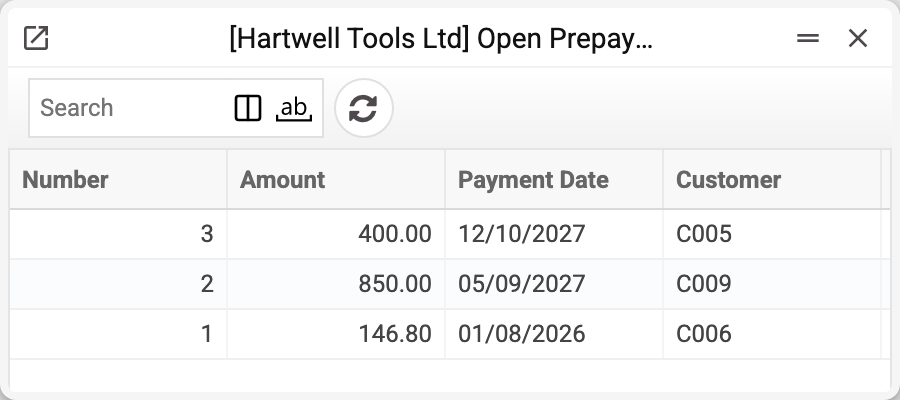
A row is one prepayment with its unused balance: number, customer, amount. The system creates and clears the rows: a row appears when a payment with a prepayment is posted, and the balance is reduced by an application in an invoice and by a minus payment row carrying the same prepayment number. Only a role with the action "Can change open invoices, prepayments and payment histories" may edit or delete a row by hand; everyone else can only view it.
The life of a prepayment
- The customer pays in advance — a row appears for the full amount.
- An invoice is issued and the prepayment applied — the balance drops and the event lands in the prepayment history.
- Part of the money is refunded to the customer, or the prepayment is used in another payment — a row of a Payments document with this prepayment number and a minus amount also reduces the balance and also lands in the history. The system will not let it take more than is left: "The payment amount exceeds the balance on the prepayment".
- The balance reaches exactly zero — the row disappears.
- OK is removed from the invoice, or from the payment that reduced the balance — the balance returns by the same amount; if the row had already gone, it reappears.
The difference from Open Invoices is fundamental: there the customer owes us, here we owe the customer.
Why accounting cares
A prepayment is not income. Until the goods ship, the money remains a liability, and this register shows how large it is. It also tells a salesperson the customer has already paid: worth a glance before chasing money.
Typical situations
The customer insists they paid but the invoice is still open. The money is probably here and was never applied.
The balance is smaller than the payment. Part of it has been applied or refunded — the details are in the history.
The prepayment is not needed. It is refunded by a Payments row with this prepayment number and a minus amount: the balance falls, and at zero the row goes.
Another customer's prepayment. Only its own customer can use a prepayment. An invoice that applies someone else's prepayment is not posted: "Prepaid customer does not match invoice customer". A minus payment row carrying another customer's prepayment number is not posted either — the refusal names the row and the customer the prepayment belongs to.
OK cannot be removed from the payment that brought the prepayment in. While part of the prepayment is applied in an invoice or used by another payment, the system refuses: "The payment amount exceeds the balance on the prepayment". First remove OK from the documents that used it — then the balance equals the payment amount again.
A balance below zero. Applying more than is left is normally refused: "Prepayment amount exceeds prepayment balance". If the balance still went below zero (for example, two documents posted at the same moment), the row stays open with a minus: it disappears only at exactly zero. Removing OK from such an invoice returns exactly what it took.
Where to look next
- Prepayments Histories — where the money went.
- Open Invoices — the debt in the other direction.
- Open Vendor Prepayments — the same, but our money held by a supplier.