SMS Notification
This setting wires up an SMS gateway (order status messages go through it too) and describes when a message goes out to a customer: an appointment reminder and an SMS right after an online car-wash booking.
Where to find it: Modules → System → Settings → SMS Notification
A worked example
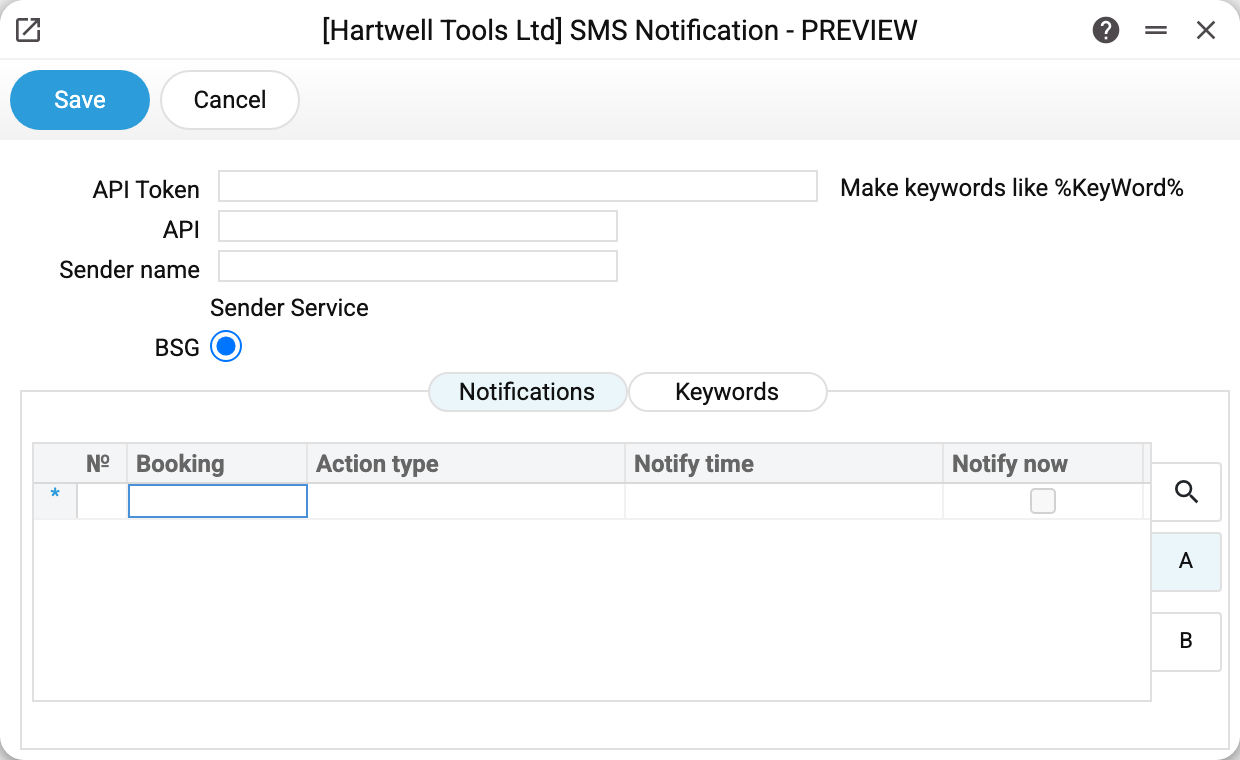
At the top, BSG gateway access: the API token and the sender name the customer sees instead of a number (TurboSMS and Atompark take their signature from their own settings cards). The API field is not read by the sending code.
Next to them sits the "Sender Service" switch — who actually sends the SMS. There are four options: Automatically, BSG, TurboSMS, Atompark.
"Automatically" means "the first one configured": TurboSMS is tried first, then BSG with the token above, then Atompark. That is how the system behaved before the choice existed, so nothing changed in databases where the switch was never touched.
Pick an operator explicitly and you get exactly that one — no silent fallback to a configured neighbour. If the chosen operator has no settings filled in (TurboSMS and Atompark each have their own settings card, BSG uses the token on this page), the mailing service does not stay silent: it reports "The chosen SMS sender service is not configured" and names the operator. Order notifications are not sent in that case, and the reason goes to the server log.
The Notifications tab is a table of rules: for which booking and task type to send an SMS, with what text and when. Notify time is a time of day, not a lead time before the visit: every day at that time reminders go out for tomorrow's tasks. Each row sends its reminder at its own time with its own text: two rows of the same task type with different times give two different SMS, each at its hour. A row with Notify now ticked is not part of the scheduled reminders. If one task type has two rows with the same time, one SMS goes out with the first row's text. Notify now sends the SMS at once only after a booking on the car-wash online booking page (the booking card's Design field is WashUp), and only when the booking card has Action type for SMS notification filled in: the booking creates a separate task of that type and the SMS is about it. The regular online booking page and a task created in the window send no immediate SMS; the car-wash Telegram bot, which could do it too, is disabled now. The message goes to a customer whose card has Notify customer ticked and a phone number filled in.
The Booking column does not pick tasks by booking: it switches a task type on. A scheduled reminder goes out only for task types that stand in the Action type for SMS notification field of one of the table's booking cards; a row whose type is not there sends nothing, and the task's own booking is never checked.
The Keywords tab holds the substitutions. The hint on the right shows the syntax: %KeyWord% is how a customer name, appointment time or task number is dropped into the message. Only fields of the Actions register are substituted: a row with another register is saved, but its keyword stays in the SMS as is.
What to know about the gateway
Texting costs money and runs through an outside service, so:
- the sender name usually has to be registered with the operator in advance;
- the token is a password: don't pass it around in chat apps;
- keep the text short: a long message is billed as several.
Typical situations
Messages are not arriving. Check the settings of the operator doing the sending (for BSG — the token on this page, for TurboSMS and Atompark — their own cards) and the balance with the provider — the system only hands the message to the gateway. A customer with no phone number gets no SMS at all.
%KeyWord% shows up in the text. The keyword is spelled differently from the keywords register, it is not there at all, or its row names a register other than Actions.
Sending has to stop for a while. The reminders of this page are switched off here: remove the rule rows and save — the scheduled sending jobs are deleted. Service order status messages and manual messages ignore these rules: they are switched off by the Sent flag in the SMS text settings. The token is not a switch: with Automatically the message goes through another configured operator (TurboSMS, Atompark). A set token is shown in the field as a mask: leave it as is — the token stays; clear the field — the token is erased on saving.
Where to look next
- Company information — the rest of the system parameters.