Document statuses and the icons in the list
The word "status" means three different things in the system, and mixing them up is common. There is the "OK" mark: is the document approved or still a draft. There is the "Statuses" column with icons — it shows not the document itself but what has already been done with it further down the chain. And there is the service order status, which the technician switches by hand.
This article is about the first two: they are visible in the list of any document, and they are what people ask about when they see coloured icons and a red exclamation mark.
The "OK" mark — approved or draft
In the list this is the "OK" column with a checkbox. Ticked — the document is approved: goods were written off or received, postings were created, the debt was calculated. Empty — a draft: it exists, you can see it, but it does not affect the accounts yet.
Hence a simple rule for reading a list: rows without a tick do not appear in reports and do not affect stock. "The document is there but the report does not show it" is most often explained by exactly this.
How to clear the mark and put the document back into work — How to reopen a document for editing.
The "Statuses" column
The column exists in two lists — Sales Orders and Purchase Orders. Other registers do not have it: it answers a question that only makes sense for an order — how much of what was promised is already done.
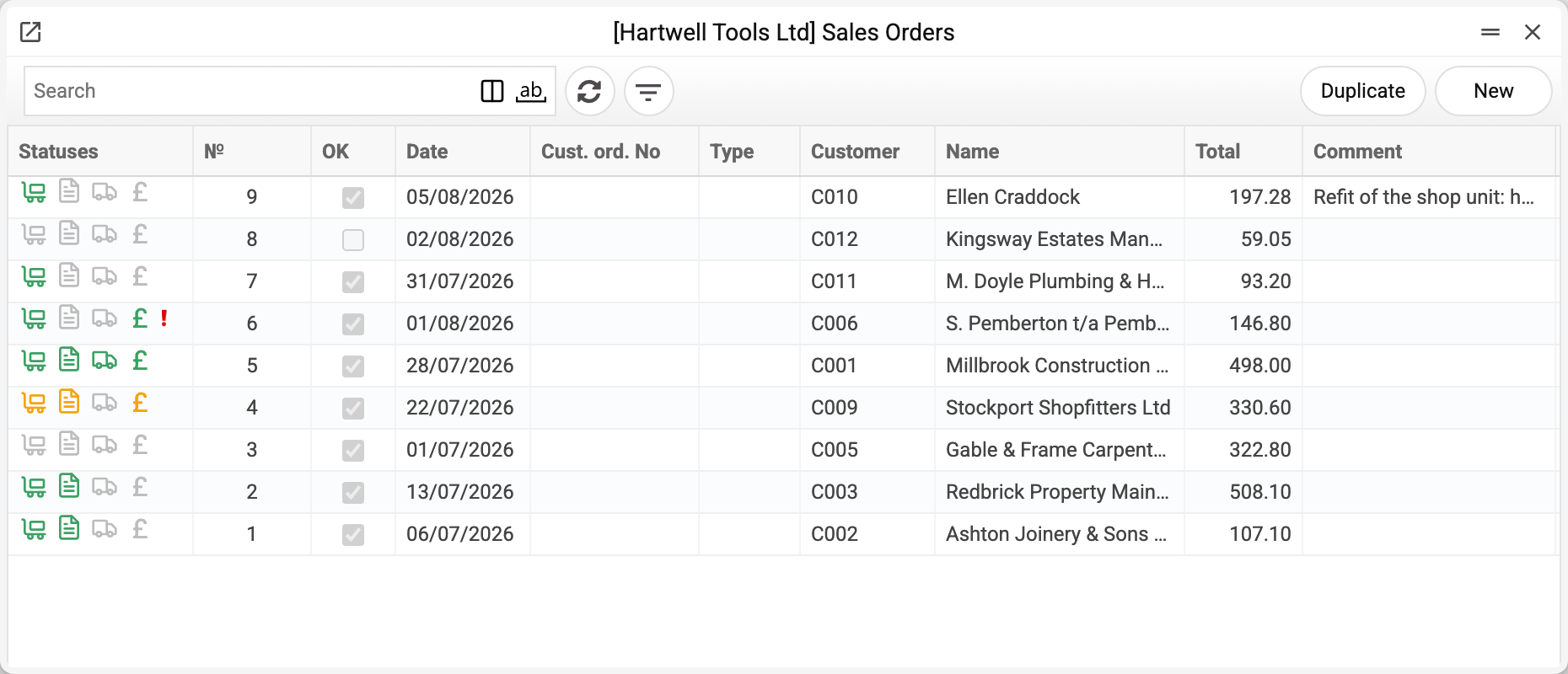
Four icons run from left to right, each about its own stage of the deal:
| Icon | In sales orders | In purchase orders |
|---|---|---|
| Trolley | shipment | goods receipt |
| Document sheet | invoice | vendor invoice |
| Truck | waybill | customs clearance and additional costs |
| Currency symbol | payment | payment |
The colour reads the same way for all four:
| Colour | What it means |
|---|---|
| Light grey | no document of that kind exists for the order |
| Dark grey | the document exists but is not approved (in sales orders — also after a return or a credit note, see below) |
| Orange | partially done: only part was shipped, invoiced or paid |
| Green | fully closed |
That way a row of the list replaces a report: a green trolley and a green currency symbol mean "shipped and paid", a grey trolley next to a green sheet means "the invoice was issued but the goods have not left yet".
Payment is judged more strictly than the rest: the currency symbol turns green when all payments are approved and their total matches the order total. If an approved payment is for a smaller amount, the colour stays orange even when that single payment is perfectly correct. The exception in sales orders: if an invoice with a "Cash" type payment term is approved for the order, the currency symbol is green straight away.
The red exclamation mark
The fifth icon does not always appear. A red exclamation mark at the end of the column means the order has an open prepayment — the customer paid in advance and there is nothing to offset the advance against yet, no invoice for that amount exists. In purchase orders the same mark means the reverse: we paid in advance, and there is no vendor invoice for that amount yet.
It is not an error and not an overdue warning. It is a reminder: the customer's money is sitting in the system as an advance. As soon as an invoice for the matching amount is issued for the order, the prepayment closes and the mark disappears on its own. All such advances are collected in the Open prepayments register.
In the screenshot above the mark sits on order No. 6 of customer C006 for 146.80 — a prepayment was received against it and no invoice exists yet.
The reverse does not hold: an advance without a mark is possible too. If a payment was accepted "from the customer" in general, with no reference to a particular order, there is nowhere for the system to put the mark — such an advance is visible only in the prepayments register.
What is not a status
The "Closed" mark in an order record is a human decision, not a calculation: the order will not be fulfilled any further. It is set when the customer dropped the remainder or the purchase was called off. It does not affect the icons.
The "Reserved" mark holds goods for this customer so they are not sold in another order. It has nothing to do with fulfilment.
Service order statuses — "On diagnostics", "To be agreed", "Under repair", "Ready" — are switched by the technician manually as the repair proceeds. They are described in a separate article: Creating a service order.
When the icons show the wrong thing
The icons are a derived value: the system works them out from follow-up documents every time you open the list. So a discrepancy almost always means not a "broken status" but an unexpected document nearby:
- orange instead of green — one of the rows was shipped or invoiced for less than ordered; check the related documents;
- dark grey with the shipment ready — the shipment exists but is not approved (no "OK");
- turned grey after green (sales orders) — an approved return from customer or a credit note appeared: the system counts the net figure, a return reduces the completed quantity, and the trolley or the sheet turns dark grey even though the documents are approved (a sheet the credit note cleared completely turns light grey).
If you are sure the documents are in order yet the order row still looks open, the order status may have fallen behind after an import or an edit made outside the interface. For that there is the Sales orders statuses service, where you enter the number of the specific order and run the recalculation.
Common situations
"The order is paid but the currency symbol is orange." The payment total does not match the order total — usually because of rounding, a partial payment, or a payment linked to the wrong order.
"The red exclamation mark stays after the invoice." The invoice is for a smaller amount than the prepayment, or it is not approved. The remaining advance is visible in Open prepayments.
"The invoice list has no icon column." That is by design: the icons show the fulfilment of an order, and an invoice is itself one of the results. Look for them in the sales orders list.
"All rows show grey icons although work is going on." The follow-up documents are created on their own rather than from the order — then the system has nothing to link them to and nothing to count.