Cleanup attachments
A housekeeping operation that finally erases files marked for deletion long enough ago.
Where to find it: Modules → System → Maintenances → Cleanup attachments
A worked example
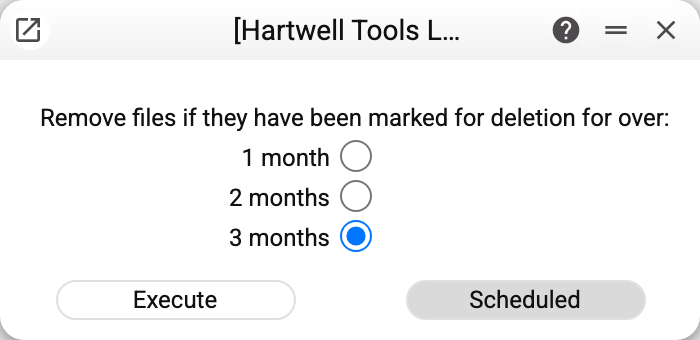
One choice — how long a file must have been marked: one, two or three months ("3 months" is preselected). That is the entire configuration; "Execute" runs it once, and only in the current company: files of other companies in the database are left alone. The "Scheduled" button of this operation is greyed out: regular cleanup already happens without anyone's involvement — a system task on the server erases, once a week (Wednesdays at 4:00), files marked more than two months ago, in every company of the database. That period is set in the server settings, not in this window.
Why deletion happens in two steps
When someone deletes an attachment from a document, the file does not vanish at once — it is only marked (see Attachments). The reason is simple: deletions are often mistakes, and changing one's mind is routine.
This service closes the second step: anything marked for longer than the chosen period is erased for good — both the record in the Attachments register and the file itself in storage, freeing space. Files are removed one by one: if a record cannot be deleted, the service moves on and at the end shows the warning “Attachments not deleted: …” with a line for each such record (the first 10); the record itself stays marked until the next run.
!!! warning "After the run the file is gone" A marked file lives a little over two months: once a week the system cleanup erases everything marked more than two months ago, whatever period is chosen here. A manual run can only shorten that time — with "1 month" it erases everything in the current company marked more than a month ago. So a short period belongs only where storage is genuinely tight.
Typical situations
Storage is full. The main reason to run it; pick a period and go.
A file was deleted by mistake. While two months have not passed since it was marked and nobody has run the cleanup with a shorter period, the attachment can still be restored.
No space was freed. Files younger than the chosen period are untouched — try a shorter one. Files marked in another company of the database are removed by a run from that company.
Where to look next
- Encrypt or decrypt attachments — the neighbouring operation on the same files.