The first month. Part 2: the first cycle
The database is filled in and the opening balances are entered — that is where part 1 ends. Now comes the full circle: buy goods, put them into stock, sell them and collect the money. It is worth walking the first circle deliberately, because from then on it repeats hundreds of times, and a mistake built in now gets copied every time.
One rule explains most of the system's behaviour:
in the buy-and-sell circle a receipt and a shipment move stock, an invoice creates a debt, a payment moves money.
Orders — both customer orders and purchase orders — move neither stock nor money. They exist to record an intention and to tie the documents together.
Outside this circle six more documents change the balance: stock write-off, stock movement, stocktake, return from customer, return to vendor and production. The first cycle does not need them, but when you see stock moving without a receipt or a shipment, look for it among them. And there is one more exception inside the circle — an invoice with the "Update warehouse" flag (see below).
First half: purchasing
The purchase order
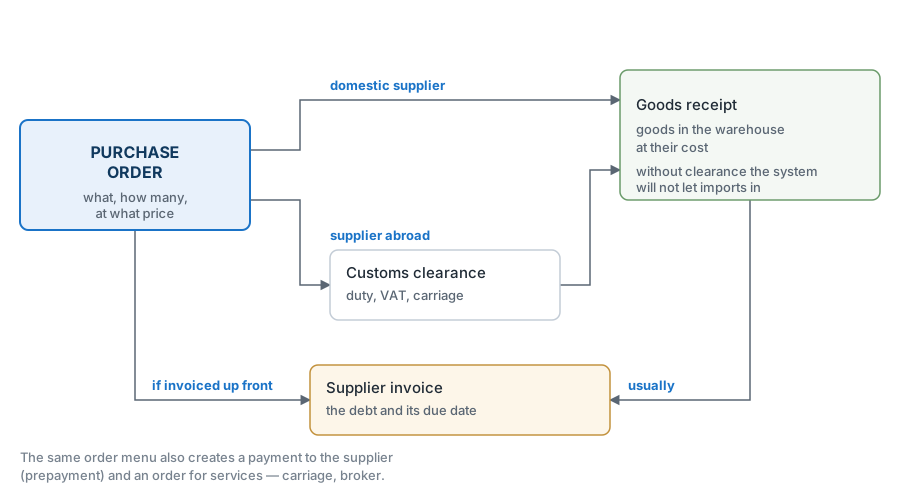
It is a convenient place to start, though it is not compulsory: a receipt can be entered without an order. But an order gives you two things you would not have otherwise: you can see what is already ordered and on its way (which counts when a customer asks "do you have it?"), and every later document is created from it, carrying the rows across.
A purchase order does not change the balance. The goods are not here yet.
The goods receipt
The goods receipt is the moment the goods appear. It puts the quantity into the warehouse from the header and records the cost price of every position; the order gets the received quantity and stays open until everything arrives.
It is the cost price from the receipt that later goes into the shipment and into the posting — so the price on the receipt has to be the real one.
Additional costs
If delivery, duty or a broker's fee are added to the vendor's price, they are calculated by Add Costs, and this has to be done before the goods receipt: the receipt is created straight from Add Costs, and the goods go into stock with the full cost price. Goods already received are not revalued by Add Costs afterwards — the shipment will take the cost price the goods were received at, and the profit in reports will be overstated.
The vendor invoice
The vendor invoice creates the debt: from this document on, we owe money. The first move when figures disagree is to compare the invoice total with the receipt total — the goods may have arrived at one price and been billed at another.
In the invoice journal there is a coloured marker to the left of the number, and it answers the question "who has to be paid today": red means the due date has come (the invoice turns red on that very day) or passed, yellow that it has not come yet or no due date is set, green that the invoice is closed. A grey marker means the vendor is blocked; a draft invoice has no marker at all.
The payment to the vendor
A vendor payment clears the debt. One document can close several invoices, or pay in advance — then the amount sits as a prepayment waiting for an invoice.
Checking the first half
Open the purchase order journal and look at the "Statuses" column: four icons show what has happened to the order — goods receipt, vendor invoice, additional costs, payment. Light grey means "no such document", dark grey — "exists but not approved", orange — "partly", green — "closed". The purchase is complete when the receipt, the invoice and the payment are green. The additional-costs icon turns green only when additional costs are booked for the whole ordered quantity; in a purchase without additional costs it stays light grey, and that is normal (see Document statuses and the icons in the list).
In between: what happened to the stock
Three questions worth asking before the first sale:
- how much is there — the item status: quantity per warehouse, plus how much is already promised to customers and how much is on its way from vendors;
- how much is free — reserves: "Available" = stock minus what is reserved for orders. What you promise a customer is the available figure, not the physical balance;
- at what price — the cost price on the receipt; if it is zero, the costs have not been spread yet or the price on the receipt was left empty, and the sale will show the wrong profit.
Second half: selling
The quotation
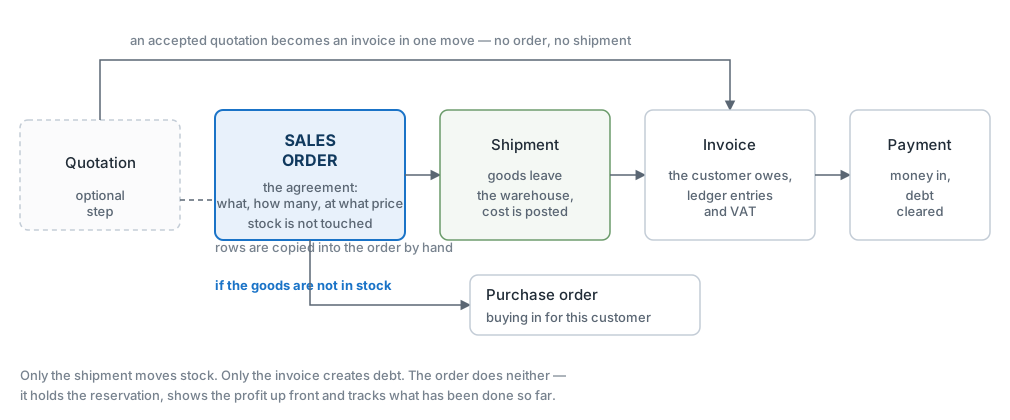
A quotation is an optional first step: the price you named the customer, valid for a limited time. An order is created from it and the rows carry over by themselves.
The sales order
A sales order records what the customer wants and at what price. It does not touch the stock, but it can reserve goods: what is reserved stops being available for other orders, even though it physically stays where it is.
Payment terms come from the customer's card — the due date on the invoice is calculated from them.
The shipment
In the scheme with shipments, the shipment is the only document that reduces the balance. On approval it closes batches by FIFO and writes their cost price into the rows, releases the reserve on what has left, and records in the order how much has been fulfilled. There are no sales prices in it: a shipment is about goods, not about money. The only amounts in it are cost amounts — the "Cost" and "Total" columns on a separate tab of the rows, visible only to those allowed to see cost prices.
The customer invoice
The invoice creates the customer's debt and the due date. The order of steps can be broken — an invoice may be issued before the shipment — but remember that until the shipment the goods have not left the warehouse, however many invoices have been written.
The exception is selling without shipments. If "Write off warehouse by invoice" is ticked in the Invoice Setting, every new invoice gets the "Update warehouse" flag and writes the goods off itself on approval. No shipments are made then: otherwise the goods would be written off twice.
The payment
A customer payment increases the balance in the bank or the till. What it settles is decided by the payment row, not by the shipment. With an invoice selected, it clears that invoice's debt even if the goods have not left yet. With a prepayment number or "Generate prep No." ticked (that is how "Create payment" on the order fills it), the amount becomes an open prepayment: our debt to the customer rather than revenue. Such an order is marked with a red exclamation mark in the sales order journal, and the amounts are listed in the «Open Prepayments» register.
Checking the second half
The same "Statuses" column in the sales order journal: the trolley is the shipment, the sheet is the invoice, the lorry is the waybill (TTN), the currency symbol is the payment. The deal is closed when the trolley, the sheet and the currency are green and there is no red exclamation mark. The lorry turns green only from a posted waybill: if you do not issue waybills, it stays light grey. Dark grey here means more than an unposted document: after a posted return from the customer or a credit note, the trolley or the sheet turns dark grey too.
Making sure the circle closed properly
- Goods: the balance dropped by exactly what was shipped, and the cost price in the shipment equals the one from the receipt.
- Money: the customer's debt is cleared by a payment, the vendor's debt by a vendor payment; no red markers are left in the invoice journals for closed deals.
- Books: the trial balance shows movement on the stock, settlement and revenue accounts; the sale went into revenue and the cost price into expenses.
If the stock account shows no movement although the goods have physically gone, look for three causes: the document is not approved; the accounts are not set — in which case posting stopped at account usage; the shipments flag is cleared in the "Records from Subsystems" setting — then shipments are posted without a single ledger entry, silently.
Mistakes of the first circle
Sold more than there was. You looked at the balance instead of "Available": part of the stock was reserved for another order.
The profit came out too high. Add Costs was entered after the goods receipt: the goods went into stock without duty and delivery, the shipment took that incomplete cost price, and this cannot be fixed retrospectively — only reversed and posted again.
There is an invoice but no goods. The invoice was issued before the shipment and taken as proof that stock had changed. It had not: in the scheme with shipments only a shipment moves the balance (the exception is an invoice with "Update warehouse", see above).
The payment did not clear the debt. The payment row carries a prepayment number or "Generate prep No." instead of an invoice, so the money went in as a prepayment. Check what the amount is tied to: an invoice or a prepayment. A row with neither an invoice nor a prepayment number will not save: "Enter your invoice or prepayment number".
An order stayed open forever. Less arrived than was ordered, and nobody closed the remainder. Such an order hangs at "partly" — it is closed by hand once it is clear the rest is not coming.
What comes next
Part 3: closing the month — payroll, depreciation, closing the period and reporting.