Open Vendor's Invoices
The mirror of open invoices: not what is owed to us but what we owe — supplier invoices that have not been paid.
Where to find it: Modules → Database Maintenance → Registers → Open Vendor's Invoices
A worked example
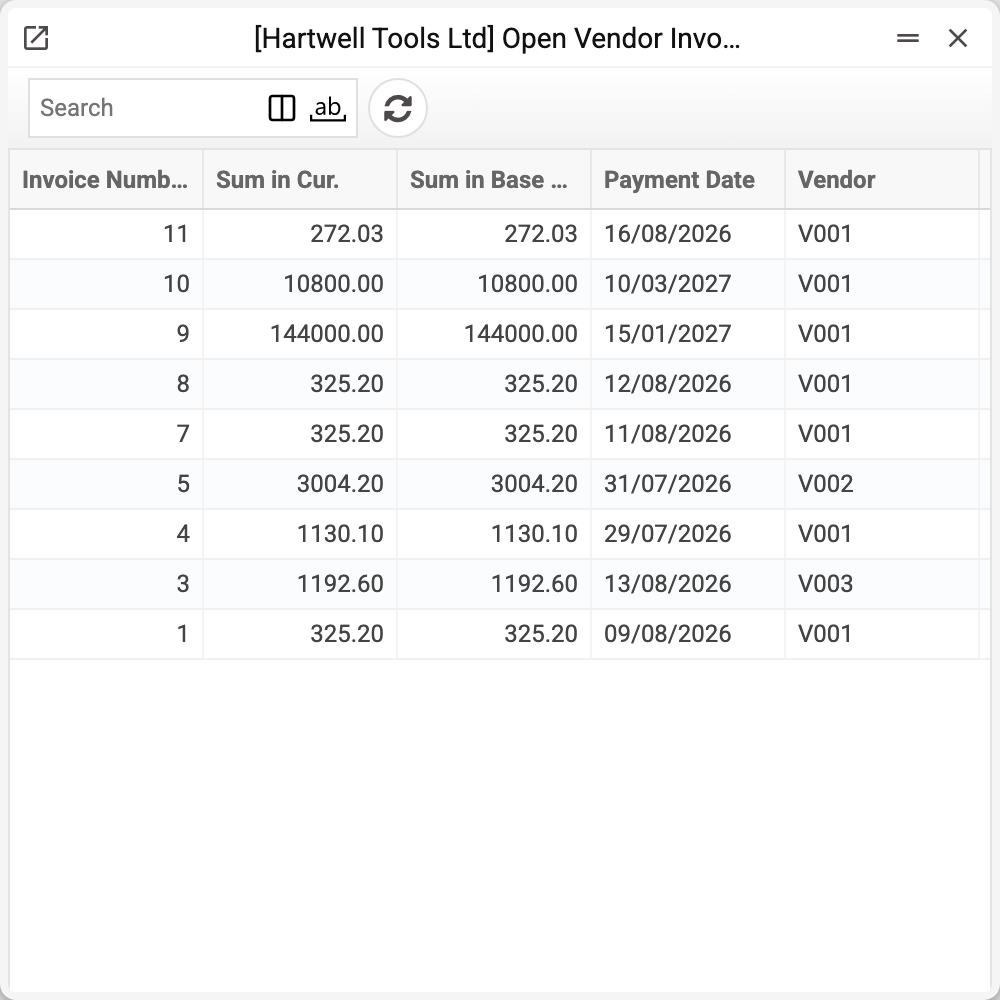
The row reads the same way: invoice number, supplier, outstanding amount and due date. Only the direction of the debt differs.
What it gives the finance team
It is the backbone of the payment calendar. "How much must we pay this week" is answered not by trawling incoming invoices but by looking here: everything unpaid is already gathered into one list with dates.
The system maintains it: post a supplier invoice and a row appears; post a payment and it shrinks or goes; reverse the payment and it returns. A cash invoice and an invoice fully covered by a prepayment never get here: there is no debt on them. The amount in the row is the balance, in the invoice currency and in the base currency. Only a role with the "Can change open invoices, prepayments and payment histories" action can edit the records by hand.
Typical situations
Paid, but the row is still there. The payment is unposted, or it carries no invoice number.
The amount does not match the invoice. Part of it is already paid — the balance is what remains.
The invoice vanished without a payment. Either a credit note for the full amount was posted against it, or its OK was removed. Offsetting a vendor prepayment does not remove a row: the prepayment is applied in the invoice before approval, and an invoice fully covered by it never gets here at all.
A row with a minus. This is a credit note without a "Cred. Inv" — it becomes a row of its own, with its own number and a negative amount — or a credit note against an invoice that had already been paid by then. Such a row is not a debt but an amount in the supplier's favour; the payment calendar does not show it.
Agreed to pay later than the due date. Do not change the due date in the invoice — the invoice window menu → "We plan to pay…" and the new date. The payment calendar puts the invoice on it; the invoice and its due date stay as they are (Expected payment dates).
Where to look next
- Open vendor prepayments — money already paid in advance.
- Open invoices — the same from the customer side.