Transaction correction history
The trail of accounting corrections: what an entry (transaction) looked like before each of its corrections. A snapshot lands here when a change to the transaction record itself is saved; reposting a document does not edit its entry but deletes it and creates it anew, so it leaves no snapshot. The system maintains it — it can be neither edited nor deleted by hand.
Where to find it: Modules → System → Registers → Transaction correction history
A worked example
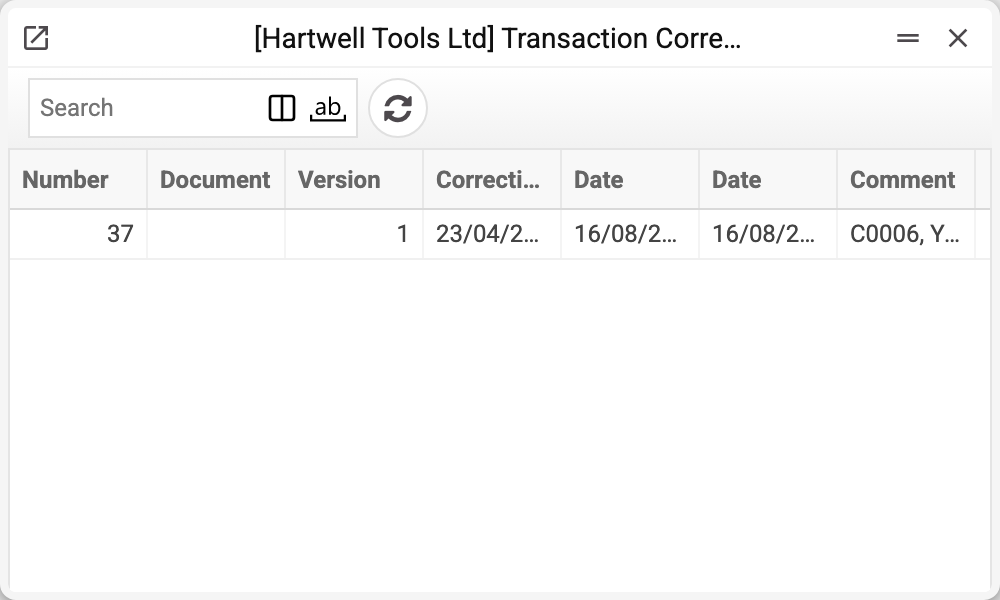
A row holds the correction version, the entry number and its document, the author (login and name), the date of the change, the entry's own date, debit and credit amounts, the difference and a comment.
!!! note "Two dates" The list has two date columns: "Creation date versions" — when the version of the entry that landed in the row was saved, and "Date of recording the operation" — the date of the entry itself. In the record window the same fields are labelled "Correction Date" and "Date"; the correction history report names them as the list does.
The version is the key field: it turns individual rows into a history. The first correction is version 1, the second version 2, and each one stays put.
Why it matters
Correcting an entry is routine, but an audit needs more than the current figures — it needs the path to them. "Why was the March figure different from today's" has no answer without this register.
So the history is neither cleaned nor edited: its value lies precisely in being immutable.
A record of this register opens for viewing only: its rows cannot be deleted and "Save" is disabled. Only a user whose role allows the "Can change Transaction Correction History" action (an action row on the "General permissions" tab of the role; its code is canChangeTransCorrectHistory) can change or delete a record. It takes a row for this very action: the general "all actions" row does not grant it. By default nobody has it except the system user. The records of a transaction disappear on their own only when the transaction itself is deleted.
Typical situations
Report figures changed retroactively. Find the entry number — what it looked like before each edit is visible here. A row's author and date are those of the state saved in the version; who made the edit itself shows in the next version or in the entry itself.
An auditor wants a justification. There is no separate field for the reason of a correction: the "Comment" on the row is the comment of the transaction itself in that version. An explanation typed into the entry's comment while editing it shows in the next version or in the entry itself.
No rows for a document. The entry was never corrected — perfectly normal. Or the document was unposted and posted again: unposting deletes the entry and, with it, its whole correction history, and the new entry starts its history from scratch.
Where to look next
- Correction history report — the same information in a readable form.
- Transactions — the ledger entries themselves.