Serial Number Range for Items
When someone creates an item card and leaves the code empty, the system invents one. The rules it follows live here: which range to take the number from, how many leading zeros to add, which prefix to glue on and whether to calculate a barcode check digit.
Where to find it: Modules → Stock → Settings → Serial Number Range for Items
Rules are set per item group — that is why spare parts and goods end up with codes of different shape.
A worked example
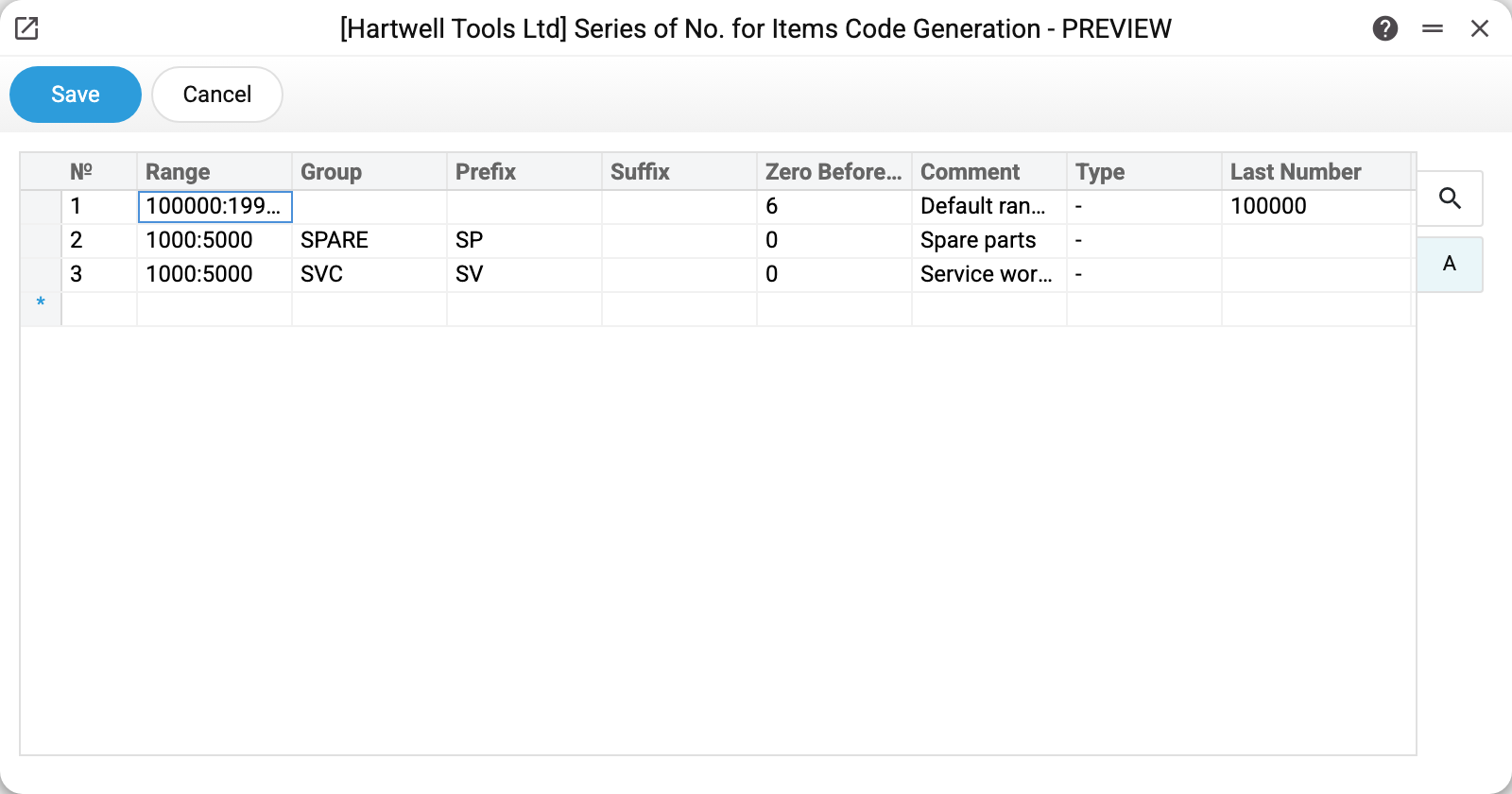
The demo company has three rules:
| Range | Group | Prefix | Zeros | Last number | Resulting code |
|---|---|---|---|---|---|
| 100000:199999 | (empty) | — | 6 | 100000 | 100000 |
| 1000:5000 | SPARE | SP | 0 | — | SP1000 |
| 1000:5000 | SVC | SV | 0 | — | SV1000 |
The first row is the default rule: no group is given, so it applies to every group without a row of its own. This is where codes like 100001 for the drill come from — a number from the range padded to six digits.
The second and third rows are dedicated rules for spare parts and service work. Create a card in the SPARE group with no code and the system issues SP1000: the rule's prefix plus the first free number from the start of the range, since "Last Number" is still empty.
What the system does when it looks for a code
- It looks for a row whose Group equals the card's group.
- If there is none, it takes the row with an empty group (there can be only one: a second row with an empty group is not saved — "The groups must be different").
- If there is no such row either, no code is generated at all and the save fails on the mandatory "Code" field. An empty setting therefore means "codes are typed by hand".
- Once a rule is found, it takes the number following "Last Number" (empty — the start of the range) and skips upwards past numbers that already have a card. On reaching the end of the range it scans once more from the start of the range up to the last issued number: the code of a deleted card is issued again only when everything above is taken.
- It pads the number with zeros to the required width, glues the prefix and suffix on, and writes the number used into the Last Number column.
The Type column changes the last step. For EAN8 and EAN13 the system calculates the barcode check digit itself and sets the number of zeros itself (7 and 12) — "Zero Before Char" does not need filling by hand, the value is overwritten on save. For type - (an ordinary code) the prefix and suffix apply and no check digit is calculated.
One group, one row: the system will not save two rows for the same group and reports "The groups must be different".
Typical situations
Codes start from the wrong number. Check the range and the "Last Number" column: the next code is the first free number after it. To make generation continue from another number, change "Last Number" — the next one issued will be one higher.
A new group needs its own format. Add a row: group, range, prefix. Leave the default rule alone — it keeps serving the remaining groups.
"No more numbers in range for item codes". The range is exhausted: every code between its start and end is taken. Widen the range in the "Range" column or add a dedicated rule for that group.
I want the codes to be barcodes. Set the type to EAN13 and pick a range with enough digits. The item code then is a valid barcode in itself and can go on the label without a separate field.
Where to look next
- Item card — where the code is shown and where it lands.
- Serial number range — the neighbouring setting about numbers of individual units, not to be confused with card codes.
- Barcodes — a separate register for items with more than one barcode.