NP Cities
The list of settlements Nova Poshta delivers to. Every delivery address starts here: you pick the city first, and only then does the system offer its branches.
Where to find it: Modules → Nova Poshta → Registers → NP Cities
The book is filled by the data download service — nothing is typed in by hand.
Menu: Modules → Nova Poshta → Registers → NP Cities.
A worked example
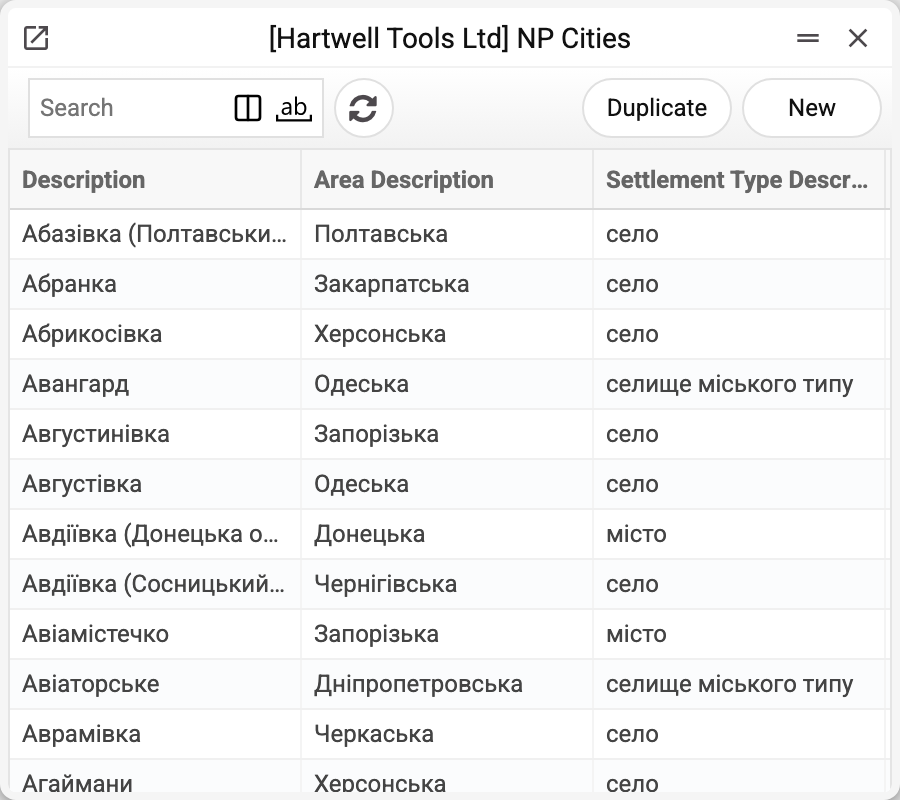
The book opens as a list, and that is all there is: the records have no card, and clicking a row opens nothing. That is deliberate — there is nothing to edit here, the data comes from Nova Poshta.
The list has three columns. Look at the two Avdiivkas in the example: one is a town in the Donetsk region, the other a village in the Chernihiv region. Same name, different places on the map. The city picker in a document shows only the name and the region — not the settlement type — and only the name lands in the document field. So identically named cities are told apart not by the pick itself but by the recipient's "Region" field in a shipment and a TTN: when a city of that name exists in several regions and "Region" is empty, the system asks you to choose it. A filled-in "Region" also narrows the recipient city picker to the cities of that region — the same in a customer's address and a sales order. The sender's city has no such field.
The record itself holds more than the list shows: every name is stored in two variants, Ukrainian and Russian. That is how Nova Poshta returns them — and it is the Russian variant that goes into the "City" field of the cabinet card when you choose "Get counterparty data" in its menu.
The demo database holds over eight thousand cities, so the search box beats scrolling.
Where the data comes from
- The book is filled by the "Nova Poshta" service — by a full run or with the "Download Cities only" checkbox.
- A fresh list replaces the old one within your company — only when Nova Poshta returned it; if it refused or did not answer, the old cities stay and the service warns "Nova Poshta data were not updated, the previously loaded records are kept: …". Manual edits do not survive the next successful run.
- Each company keeps its own copy: cities loaded in one company are invisible to another until the service is run there too.
- The exception is a book opened to several companies through register sharing: a subscriber company sees the master company's cities, and the download service refuses to run there, saying the register is shared from another company and only that company runs this maintenance. Such a book is updated from the master company.
Where it is used
- Customer Addresses — the delivery city on the address card
- Sales Orders, Shipments, TTN — the recipient's city on the Nova Poshta tab
- Nova Poshta — the city of departure on the cabinet card
- Shipments, TTN — the sender's city: filled in from the cabinet card when the sender is chosen. By its name the system finds the sender's city code in this book for the express waybill
Fields
| Field | Description |
|---|---|
| Description, Description Ru | The city name in Ukrainian and Russian |
| Area Description | The region's name |
| Area | Nova Poshta's code of the region |
| Area Description Ru | The region's name in Russian |
| Settlement Type Description | City, village, urban-type settlement |
| City ID, Ref | Nova Poshta's internal codes |
Print variables
Values available in this document's printed form templates. How to write a variable in a template — see Print Forms.
Header fields:
| Variable | What it holds |
|---|---|
| NPCtDesc | Description |
| NPCtSetTypeDesc | Settlement Type Description |
| NPCtArDesc | Area Description |
Common situations
- The city you need is missing. The book is a snapshot from the last download. Run the service with "Download Cities only": if Nova Poshta has opened delivery there, the city will appear.
- Several cities share a name. For the recipient in a shipment or TTN, fill in the "Region" field — that is what tells identically named villages apart. The sender's city is kept as a bare name, so for a sender whose city name is not unique the system may take the identically named city from another region.
- A document field shows the city in Russian. That is what the service returned: the book keeps both names, and some fields are filled from the Russian variant.
- Creating the waybill fails with "Sender city not found in Nova Poshta directory". The sender's city is looked up here by its Ukrainian name, while "Get counterparty data" puts the Russian one on the cabinet card. When the two differ (Київ — Киев), the city is not found. Pick the city on the cabinet card again with the magnifier, then choose the sender in the document again.
Nearby
- NP Warehouses — the branches of the chosen city
- NP Areas — regions
- Nova Poshta data download — the service that fills the book
- Nova Poshta — the cabinet card