Leave Application
A leave application answers three questions: who, when and how many days. The system keeps track of the fourth — how many are left.
Where to find it: Modules → Human Resource Management → Registers → Leave Application
A worked example
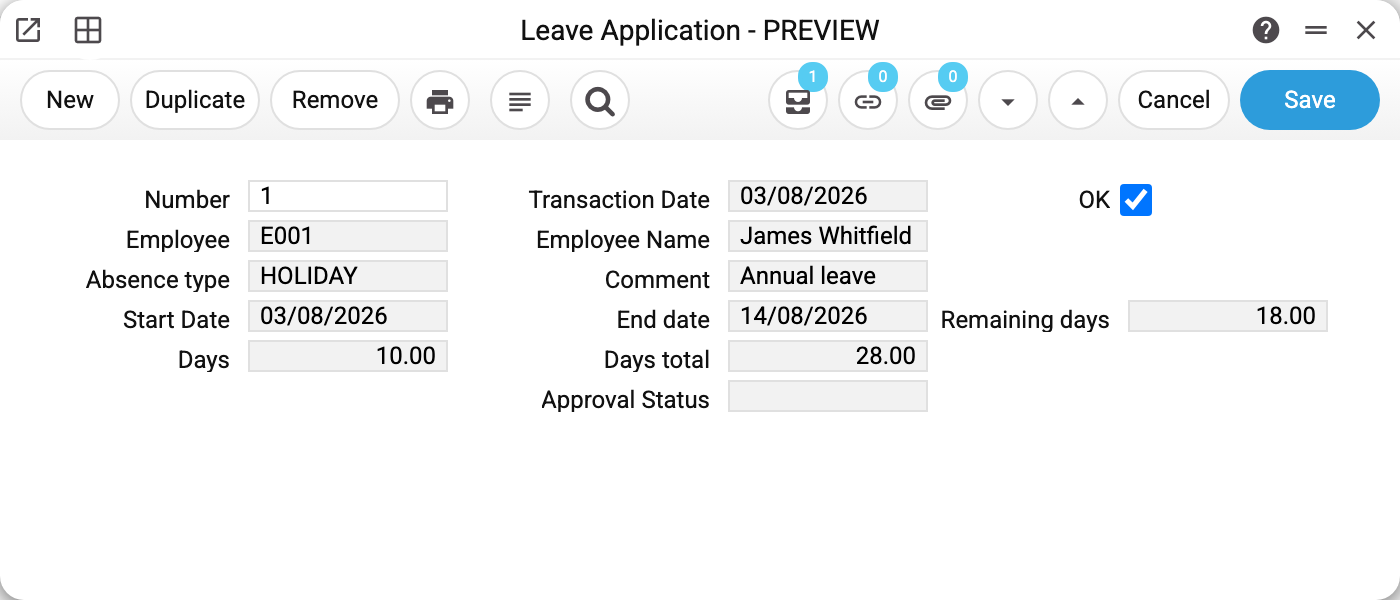
Application No. 1: employee E001, absence type HOLIDAY, from 03/08/2026 to 14/08/2026, comment "Annual leave", OK ticked.
The three figures are the heart of the document:
- Days 10.00 — what this booking uses up;
- Days total 28.00 — how many days of this type the employee has built up by today: the annual entitlement from the leave scheme of the contract in force, accrued pro rata from the contract's start date, less the applications of this type already approved;
- Remaining days 18.00 — what is left afterwards.
A two-week span comes to ten days rather than fourteen because weekends do not count as leave — that is the working-days pattern named in the scheme.
"Approval Status" holds the manager's decision where an approval flow is in use.
Where the entitlement comes from
The chain runs: the contract in force → leave scheme → the row for that absence type → days per year. So in a company with two schemes — one for the office, one for the workshop — the same absence type can carry different entitlements.
The contract in force is an approved one (OK ticked), with a start date no later than today and an end date no earlier than today (an empty end date means open-ended; a terminated contract is in force up to its end date); if there are several, the one with the latest start date (on a tie, the higher number). "Days total" accrues from that contract's start date. A draft contract (without OK) is not taken into account.
Absence type is not free text: the choice offers the types from the rows of leave schemes, and the application accepts only a type that stands in at least one scheme (otherwise — "Absence type "…" was not found"). No rows in the schemes — the application cannot be filled in.
Typical situations
The application won't save: "Employee '…' is not found!". The employee field holds a code that is not among the employees. Pick the employee from the list in the field or create the employee card; matching the code to a user login does not help here — the login is only used to fill in the employee when the application is created.
More days were counted than expected. Check the working-days pattern and the holiday calendar: the scheme has switches for whether to take them into account.
"Days", "Days total" and "Remaining days" are not calculated. The employee has no contract in force: the contract is not approved yet (the application does not see a draft), has ended (its end date is before today), or starts after today. Approve the contract and check that it names a leave scheme — the application will then count the days.
Unpaid leave or time off in lieu is needed. Those are separate absence types in the scheme, each with its own entitlement.
Remaining days went negative. That happens when more leave is taken than the entitlement allows: the system does not block it, it shows the minus.
Where to look next
- Leave scheme — where the entitlement comes from.
- Working days and holidays — what does not count as a leave day.
- Employee contract — where the scheme is assigned.
Print variables
Values available in this document's printed form templates. How to write a variable in a template — see Print Forms.
Header fields:
| Variable | What it holds |
|---|---|
| LeaveApplication_OK | Approved (yes/no) |
| LeaveApplication_SerialNumber | Number |
| LeaveApplication_Employee | Employee |
| LeaveApplication_AbsenceType | Absence type |
| LeaveApplication_StartDate | Start Date |
| LeaveApplication_Days | Days |
| LeaveApplication_Transaction | Transaction Date |
| LeaveApplication_EmployerName | Employee Name |
| LeaveApplication_Comment | Comment |
| LeaveApplication_EndDate | End date |
| LeaveApplication_DaysTotal | Days total |
| LeaveApplication_ApprovalStatus | Approval Status |
| LeaveApplication_RemainingDays | Remaining days |