Payroll Calculation Setting
The rates register may hold a dozen records. This setting tells the system which one plays income tax, which the second withholding and which the employer's contribution. Without it a calculation has no idea what to deduct.
Where to find it: Modules → Human Resource Management → Settings → Payroll Calculation Setting
A worked example
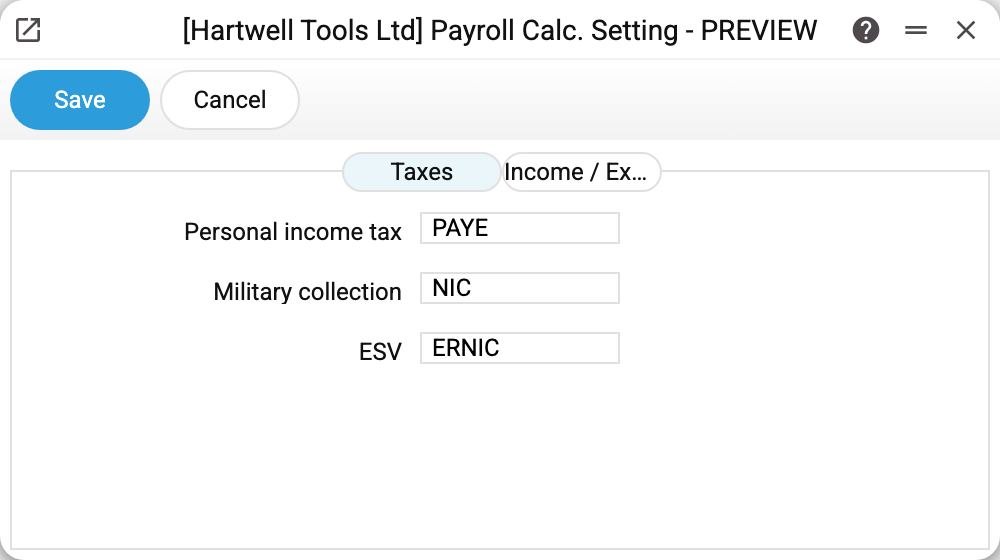
The Taxes tab holds three code fields:
| Role | Code |
|---|---|
| Personal income tax | PAYE |
| Second withholding | NIC |
| Employer's contribution | ERNIC |
Each field references a record in the rates register; that is where the calculation reads the percentage and the account from.
The second tab, Income / Expense Items, sets the corresponding cash-flow article codes: which article covers the wage payment, the advance and the tax transfer. An empty article makes the calculation's "Create payout" button (for taxes, "Create tax payments") refuse and ask for it. By the tax articles, approving a Cash Out document also refuses to pay a calculation's tax beyond what was accrued. The same tab holds the Claim objects in accruals checkbox: with it, a Cash Out document created by "Create payout" gets the object from the employee card in its row (tax payments do not).
Roles, not names
The field labels follow Ukrainian practice — "military collection", "ESV" — but they are really three roles: income tax, second withholding and employer's contribution. A company under different legislation puts its own codes in the same slots, as the demo British company does with PAYE and the two National Insurance records.
Typical situations
A calculation will not approve. One of the three fields is empty — the refusal is "The «…» rate code is not specified in the payroll calculation setting". A refusal about an account — "The «…» rate has no financial account" — means something else: the code was found, but its record in the rates reference has no financial account. Both refusals happen only when the calculation makes postings (payroll is switched on in Records from Subsystems). Without postings there are no such refusals: the document approves even with an empty field, and the tax of an empty code becomes 0 — the calculation window only warns about it.
A rate changed. Leave the setting alone — it points at a code, and the system picks the version by date.
One more deduction is needed. There are exactly three slots, and the calculation matrix has two withholdings — income tax and the military levy; there is no column for a fourth one. "Other additions" will not stand in for it: that is an accrual — it raises the row's sum, and the taxes with it. (The exception is a document of the "Vacation pay" type, which the window no longer offers but which can arrive by import: there the row recalculation computes no taxes at all.)
Where to look next
- Payroll taxes — where the percentages live.
- Payroll calculation — where the setting takes effect.