Service Serial Balance
Unit-level tracking of customers' equipment: which device, with which serial number, and where it is right now.
Where to find it: Modules → Database Maintenance → Registers → Service Serial Balance
A worked example
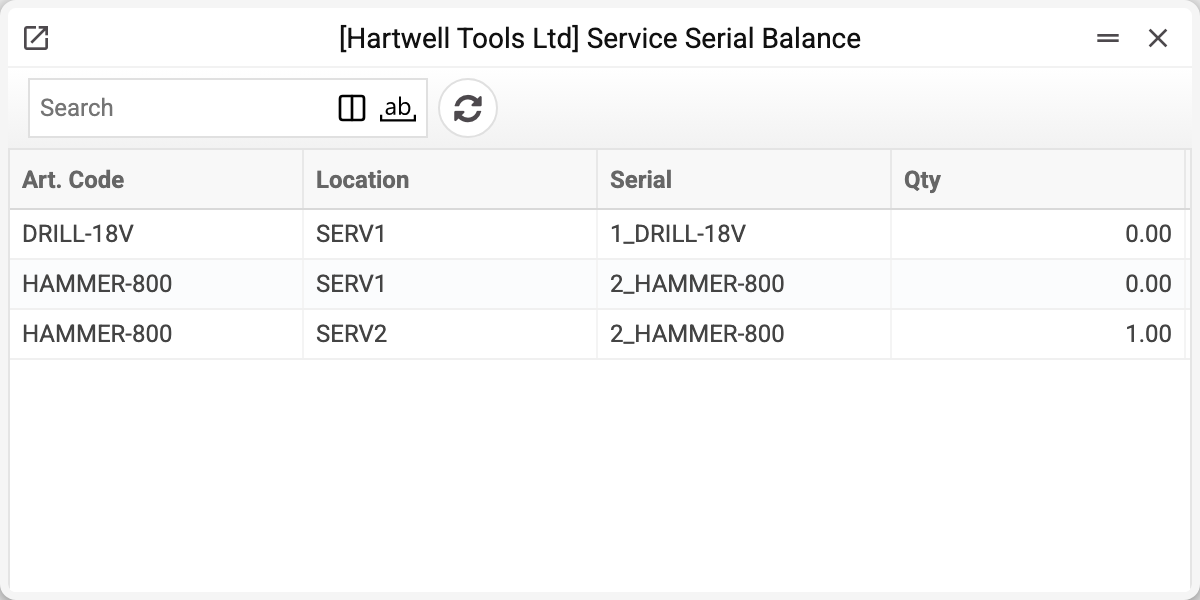
A row is an individual unit: Art. Code, Location, Serial and Qty. No cost price — the device is not ours. "Serial" here is not the device's factory number but the service order number and the item code joined by an underscore: 2_HAMMER-800 is the device of order No. 2. The row appears when the order marks the device as received, a service stock movement moves it between locations, and handing it back to the customer brings the quantity to 0 — the row stays.
Why a workshop needs it
The workshop's question is never "how many drills do we have" but "where exactly is Ivanenko's machine". Model and quantity do not help: ten identical vacuum cleaners sit in for repair and are very easy to mix up.
That is why the record is keyed by the order number: it finds the device on the shelf, and it proves the customer got their own item back.
Typical situations
A device with no factory number. Not a problem for this register: the row is tied to the order, not to a factory number.
The number is listed but the shelf is empty. Check the history: the last row shows where it moved. A row with quantity 0 means the device has left this location: it was handed back or moved (then another location has a row of the same number with quantity 1). A movement marked "Sent" but not yet "Accepted (OK)" means the device is on the way, and quantity 1 is nowhere.
Two rows with the same number. That is the same device in different locations: after a transfer the old location keeps the row with quantity 0 — on the screenshot 2_HAMMER-800 has 0 in SERV1 and 1 in SERV2.
Issuing is refused with "This device (…) is out of stock …" although the device is there. First check "Giving location": the device must lie at exactly that location. If the location is right and the row here stands under another code, the device code was changed in an old order after acceptance. Put back into the order the code the device is recorded under (the refusal shown when you try to change the code names it) — and the issue goes through.
Where to look next
- Service item history — the device's movements.
- Serial balance — the same for our own goods.