Xlsx Import
The universal load of Excel data into any register. The main tool of initial setup: the chart of accounts, contacts, items and exchange rates go in as a file of hundreds of rows, not one by one. The same mechanism serves mass editing: dump a directory with the export, fix it in Excel, load it back.
Where to find it: Modules → System (the item is present in other modules too) → Maintenances → Xlsx Import
Walkthrough
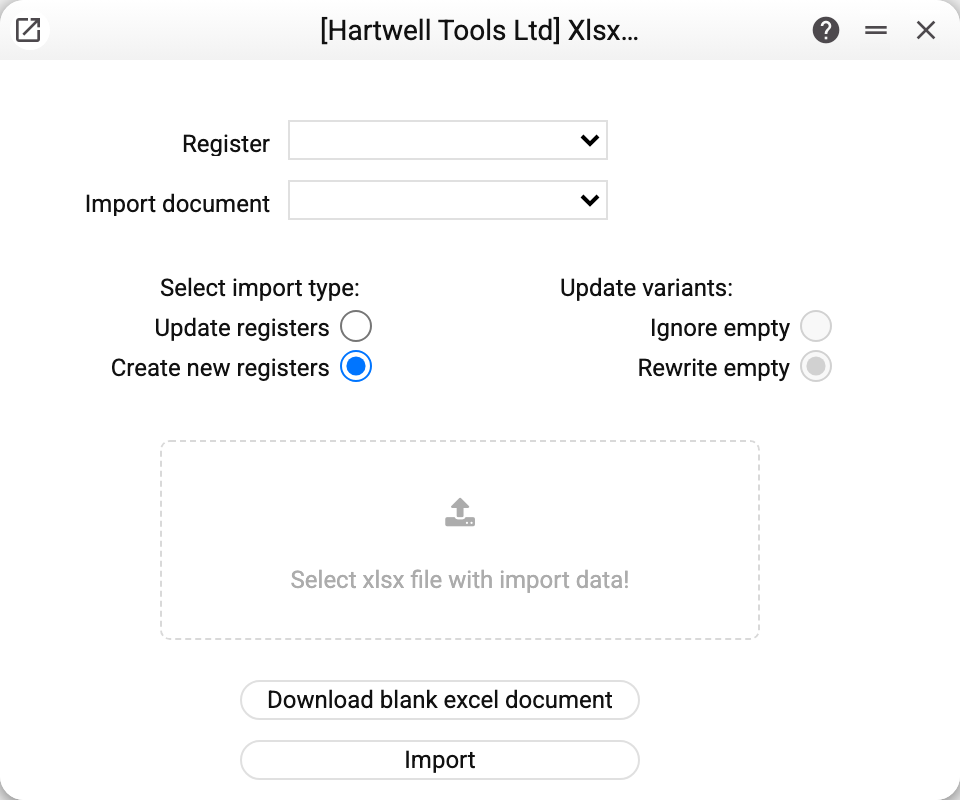
Top to bottom:
- Register — where to load; the list shows the active module's registers that you are allowed to view;
- Import document — the format definition: which file columns map to which register fields. Definitions live in the system Imports register; the demo ships ones for exchange rates, accounts, account classes and several for contacts and for items;
- Select import type: "Create new registers" — every file row becomes a new record; "Update registers" — the system finds existing records and updates their fields;
- for updates, one more choice about empty file cells: "Rewrite empty" (an empty cell erases the stored value; fields with a non-zero default value, such as "Product type", are left alone — to change one, write the value in the cell) or "Ignore empty" (empties leave the stored value alone);
- "Download blank excel document" — the blank button: returns an .xlsx with the correct header row for the chosen definition. The safest start: take the blank, fill it, load it;
- the file picker and the run.
When finished, the system shows "Import results": how many rows were written successfully (created or updated, depending on the import type), how many errored, the total, and the error texts. Empty file rows are neither counted nor written.
Worth knowing
- Without an import definition the maintenance cannot work — both the blank and the file parsing are built from it. If a register has no definitions, the list is empty: one must be added to the Imports register (Modules → System → Registers → Imports) — how to write it is described there.
- File headers must match the definition literally — columns are found by the first-row names, not by position. A column absent from the definition stops the import with the error "Column "…" from the file is not described in the import document" — remove the extras from the file.
- Values are checked against field types: text in a number column, a malformed date or an empty required cell stops the parse, naming the exact cell.
- Save errors of individual rows (say, a duplicate code) do not stop the import — such rows land in the statistics as rejected while the rest loads.
- Rights are those on the register itself. Creating needs the right to create the register's records, updating — the right to change them. The import is not available when logged in as a cash register. Registers that only their own operations fill cannot be imported into.
- Create and update go the window's way: the same register checks and actions as on saving, and the change history. A row a rule refuses lands among the rejected, the others are written: a file can get refusals on individual rows (a closed card, an empty required field), which are fixed and uploaded again. A large file runs slower because each row is checked on its own. Import does not create a new user: the password is set in the window, and the row gets the refusal «Specify a password!». An update needs at least one key (primary) field in the import definition: the record is looked up by it, and a row with no matching record is rejected ("No record found for the key: …"). An update does not change the code of a stored directory record or a user's login.
- What the import never writes. The whole file is refused before any row is read if the import definition has a column that is not a register field, a column with document rows (a table), a protected field (keys, tokens, passwords, the record's company) or a field your role cannot view (cost, for example). Some fields the import does not write because the window judges them by a right (the service order number in a worksheet): an empty cell in such a column is skipped, a value refuses the row.
- User cards and roles are judged by the window's rules. A user card's role is required and must exist in "Roles": an empty role gives "Role must be filled in!", a missing one a refusal naming its code. The code of an existing role cannot be changed by import. Such rows land among the rejected while the rest loads.
- An empty cell of a new row gives the field's default value, just like a column that is not there: an empty product type gives "Stockable", an empty "Notify customer" is on. An explicit 0 in the file is stronger. Values a new window works out itself (rate, accounts, number) are not filled in by the import. A set has the "Free" type: state it in the file, otherwise the row gets the refusal «The type of set must be "Free"!».
- Only the window checks the phone format. The number length and the "+" sign from the "Phone Number Config" setting are judged by the window's field; the import does not check a number against this format. The required phone and the ban on a duplicate number apply to the import too.
- The import does not post documents. Creating puts rows into the database with no stock movement and no postings, so the import refuses any column that posts a document: the posting flag ("OK"), the status column in the Production and Production operations registers (the "Started" and "Finished" statuses move stock), the flags of the Closing periods register. The import does not set or clear the "OK" flag in other registers either. If the import definition has such a column, the whole file is refused before any row is read — on create and on update alike. Load the documents as drafts and post them in the window.
- For directories with numbering series (items, contacts) the import continues the series: on create, a record with an empty code gets a number from the configured range. A contact with no range, or with the range used up, is rejected.
Common situations
"Import document" is empty. The chosen register has no import definitions. Importing is not forbidden — the parsing rules are simply missing; a definition must be created (see above).
"Column "…" is required, but cell … is empty". Some row has the mandatory column empty — the message names the cell.
"The import cannot post or unpost documents: remove the column "…" from the import document". The import definition has a column for the posting flag or a posting status. Remove it from the definition (and from the file) — the documents load as drafts, and you post them in the window the usual way, which moves the stock and makes the postings.
"The import cannot set or remove the "OK" flag: remove the column "…" from the import document". The import definition has the "OK" column of a register where it is set and cleared only by saving in the window. Remove the column from the definition.
"The import cannot write document rows: remove the column "…" from the import document". The import does not load document rows (the table) — only headers. Rows are entered in the window together with the document.
The update wiped fields I did not mean to touch. "Rewrite empty" was selected while those file cells were empty. Re-import with the fields filled — and use "Ignore empty" from then on.
How many rows can it take? The maintenance is built for whole directories — hundreds and thousands of rows in one file.