How to reopen a document for editing
You made a mistake in an approved document — wrong quantity, wrong location, wrong date. The fields are not editable and the window title says "PREVIEW". To fix it, the document has to be unapproved: the "OK" mark must be removed.
The operation is ordinary and intended, but not harmless: removing OK cancels everything the document has already done in the accounts. That is why the right to do it is granted separately and not to everyone.
What the "OK" mark does
While "OK" is not set, the document is a draft. It sits in the list, you can see it, but it has no effect on the accounts: no goods moved, no postings exist, no debt appeared.
The "OK" mark puts the document into force. Depending on the document type the system does different things: writes goods off or receives them, creates postings in the general ledger, closes a debt, changes the order status, appends the payment history. From that moment the document data is part of the accounts — and it cannot be changed on the fly, otherwise stock and postings drift away from the document.
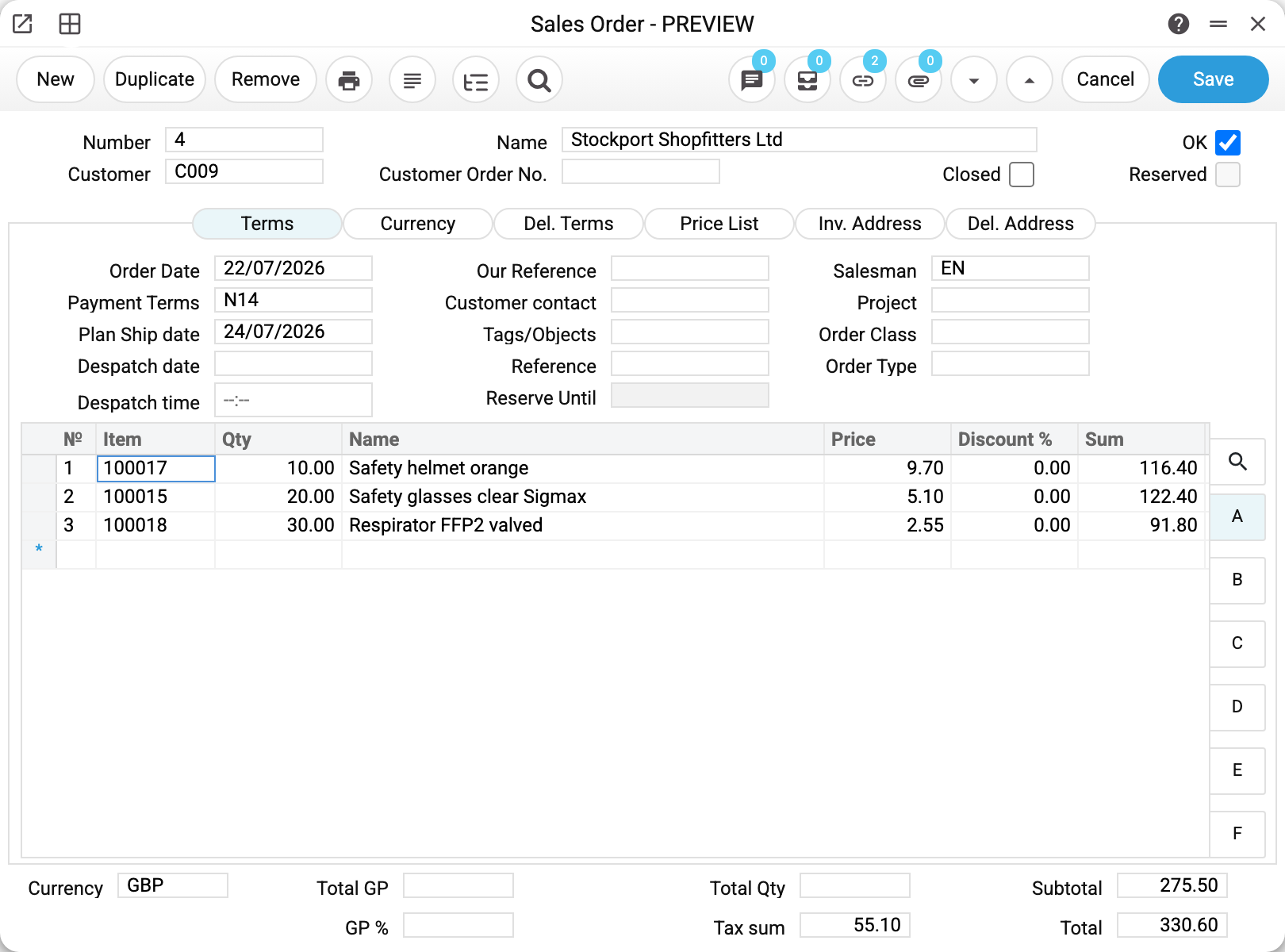
That is why an approved document opens in preview mode: the fields are locked, and only the header comment (see below) and the "OK" mark in the top right corner stay available. That is the way back.
The steps
- Open the document.
- Clear the "OK" mark.
- Click "Save".
- The fields are now unlocked — make your changes and save them.
- Set "OK" again: the system re-approves the document, now with the new data.
!!! warning "Removing OK and editing are two separate saves" Until the removal of "OK" is saved, the fields and the table stay locked — that is by design. The system has to reverse the movements by the rows that were approved: if the rows changed in the same save, it would return to stock something other than what it wrote off. So if changed rows arrive together with the removal of "OK" (an import, the API), the system refuses: "Document approved! The item rows of an approved document cannot be changed".
How to remove a wrong line from a document
There is no separate «delete a line of an approved document» operation: a line is removed the same way as any other correction is made.
- Remove the «OK» mark and save — the document becomes a draft and the table unlocks.
- Select the line in the document table — by clicking its number in the left column — and press Delete.
- Save the document.
- Set «OK» again: the system approves the document anew, now without that line.
Do not reorder the steps: until the removal of «OK» is saved, the table is locked, and the system has to reverse the movements by the rows that were approved, not by the corrected ones.
If other documents have already grown out of this one — the customer returned goods from a shipment, goods from a receipt were returned to the supplier, an invoice has been paid or credited — deal with them first: while a linked document is approved, «OK» cannot be removed from the original.
What happens when OK is removed
Removing OK is not "clearing a checkbox" but a full rollback of the approval. The system undoes everything it did when approving:
- returns the goods to stock (or cancels the receipt) and removes the movement history entries;
- deletes the postings in the general ledger;
- recalculates the status of the linked order — the icons in its list will change;
- removes the payment history for this document and reopens the prepayment it had closed;
- restores serial numbers and item statuses to their previous state.
Setting "OK" again re-approves the document and duplicates nothing. That is exactly why the "remove — fix — set back" sequence is safe, while editing around it is not.
Who is allowed to do it
The right to remove OK is not part of ordinary access to a document: an employee may create and approve invoices without being able to unapprove them. The permissions are granted by a role as a row of the "action" type:
| Task in the role | What it allows |
|---|---|
| "Can remove OK" | the basic right: without it nothing can be unapproved |
| "Can unconfirm stock documents" | every document that moves stock |
| "Can unconfirm Goods Receipts" and similar | pinpoint: receipts only, shipments only, write-offs only, movements only, returns only, production only, invoices that update stock only |
Stock documents require two permissions at once: the basic one and a stock one — either the general permission or the pinpoint permission for that document type. This is deliberate: an unapproved receipt changes stock balances and cost price, and that should be done by someone who understands the consequences.
Why the system refuses
The messages are short, and each one means its own thing:
"Permission denied" — the basic "Can remove OK" right is missing. A question for the administrator, not for the document.
"You cannot unapprove a warehouse document! You need the canUnOkStockDock permission. Contact the administrator" — the basic right is there, the stock one is not.
"There are approved returns with goods from the shipped list!", "There are approved returns to supplier created from this goods receipt!", "Unable to unapprove an invoice for which payment was made!", "Cannot remove OK: related documents exist" (rental agreement) — other documents have already grown out of this one: a return, a payment, a credit note, invoices and acts under the agreement. Deal with the follow-up first — unapprove or delete it — and only then return to the original document.
"Period closed!" — the document falls into a closed period. This is the Closing changes setting: once reporting is filed, backdated edits are forbidden to everyone except the users listed there.
When not to unapprove
Unapproving suits a fresh mistake while the period is still open. For documents from earlier months there is a safer path — a correcting document:
- a mistake in an invoice — issue a credit note for the difference;
- too much was shipped — register a return from customer;
- a mistake in a receipt — a return to vendor or a stock write-off.
The difference matters: unapproving erases the trace of the mistake, a correcting document keeps it. In a closed period the first is simply forbidden, while the second is normal accounting practice.
Common situations
"I removed OK and saved, but the fields are still locked." The window is showing stale data. Close the record and open it again.
"The OK mark is gone but the stock quantity did not change." Check that the document was actually saved after the mark was cleared: movements are reversed on save, not on the click.
"I only need to fix the comment." The header comment can be changed in an approved document without removing OK — this is how the documents that move stock, money or payroll work: invoices, shipments, goods receipts, returns, stock movements, write-offs, stocktakes, service stock movements, sales orders and purchase orders, worksheets, customer and vendor payments, cash documents, payroll calculations and personnel payments, and others. Open the document, type the comment and save — the "OK" mark, stock movements and postings stay as they were. Any other change in such a document is refused: "Only the comment can be edited in a posted document! Unapprove the document, make the change and approve it again" (a few service fields — such as "Closed" in a sales order — the rule lets through). The vendor invoice window has no comment field, so there is nothing to edit there.
"I unapproved the document but the order status stayed the same." Statuses are derived from documents and normally recalculate themselves. If the icons in the list lag behind, there is the Sales orders statuses service, where you enter the number of the specific order.
"An employee asks to be given the right to remove OK permanently." The usual practice is not to: unapproving is left to one or two people responsible for the accounts. Correcting documents are enough for everyone else.