NP Setting
One window for the whole company: it switches the Nova Poshta module on inside documents and holds what does not belong to any single cabinet — the default sender, the currency and the way cash on delivery is passed to the carrier.
Where to find it: Modules → Nova Poshta → Settings → NP Setting
The division of labour is this: the cabinet card answers "from where and from whom does the parcel travel", while this window answers "which cabinet to use by default and how to handle the money".
Menu: Modules → Nova Poshta → Settings → NP Setting.
A worked example
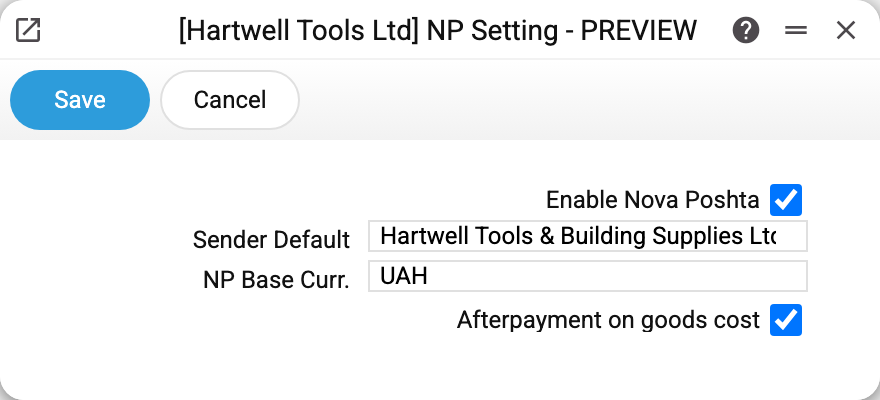
Four parameters:
Enable Nova Poshta — the main switch. Without it the module's registers stay where they are, but Nova Poshta disappears from documents: Shipments and Sales Orders lose the "Nova Poshta" tab, and the shipment list loses the "Nova Poshta" (delivery flag) and "Status by NP" columns. So the flag governs not the services, but whether a manager sees NP fields in a document.
Sender by default — "Hartwell Tools & Building Supplies Ltd". Picked from the register of cabinets, and what lands in the field is the sender's name from the card. When a new sales order is created, the system finds the card with that sender and fills the document with the cabinet, the payer and the first contact person from the "Counterparties" tab.
NP base curr. — UAH. The currency into which the system converts the value of the shipped goods for the insured value and cash on delivery. Nova Poshta receives bare numbers, without a currency, and reads them as hryvnias — so this field should hold the hryvnia. The delivery cost comes from Nova Poshta as it is; this setting does not convert it.
Afterpayment on goods cost — a flag about how exactly cash on delivery is passed to Nova Poshta. Cleared, the amount travels as an ordinary return money transfer. Set, it travels as "afterpayment on goods cost". For Nova Poshta these are two different services with different tariffs and payout rules, so the choice follows your contract rather than habit. At the moment the flag has no effect: cash on delivery and document return are not passed to the express waybill whichever way it is set (see NP Backward Delivery Cargo Types).
Where the data comes from
- The "Sender by default" field looks the cabinet card up by text, not by code: the setting must hold exactly the same value as the card's "Sender" field.
- The currency is checked against your company's Currencies. If the hryvnia is not there, the window will not save — it reports «Currency 'UAH' is not set!».
- The setting is per company: Nova Poshta enabled in one company does not enable it in another.
Parameters
| Parameter | Description |
|---|---|
| Enable Nova Poshta | Shows NP fields and tabs in Shipments and Sales Orders |
| Sender by default | The sender whose cabinet card is used for new documents |
| NP base curr. | The currency the insured value and cash on delivery are converted into (Nova Poshta reads the numbers as hryvnias); must exist in the currency reference book |
| Afterpayment on goods cost | How cash on delivery is passed: afterpayment on goods cost instead of an ordinary money transfer |
Common situations
- The module is on, but the document has no NP fields. The tab is added when the document window opens — reopen the document after changing the setting.
- A new order gets no sender. The text in the setting no longer matches any cabinet card: the card's "Sender" was changed and the setting kept the old value. Pick the sender again through the lookup.
- It will not save because of the currency. Add the currency to this company's reference book and try again. The check runs per company.
- The wrong contact person was filled in. The document takes the first row of the card's "Counterparties" tab. The order of rows is yours to set — move the right person to the top.
Nearby
- Nova Poshta — the cabinet card: key, sender, shipment defaults
- NP Counterparties — the cabinet's counterparties
- Nova Poshta data download — the service that fills the reference books
- Waybill status update — the service that tracks shipments