Worksheets
A work sheet is the service centre's «invoice»: the list of labour done and parts used for one service order. The order answers «what is wrong with the device and where the repair stands», the work sheet — «what was done and what it costs». Approving a work sheet writes parts off the warehouse, makes the ledger transactions and adds its total to the order. A work sheet can also be created from a project budget — with no order behind it, such a work sheet posts expenses only (see below).
Where to find it: Modules → Service Orders → Registers → Worksheets
The register lives in the Service Orders module.
A worked example
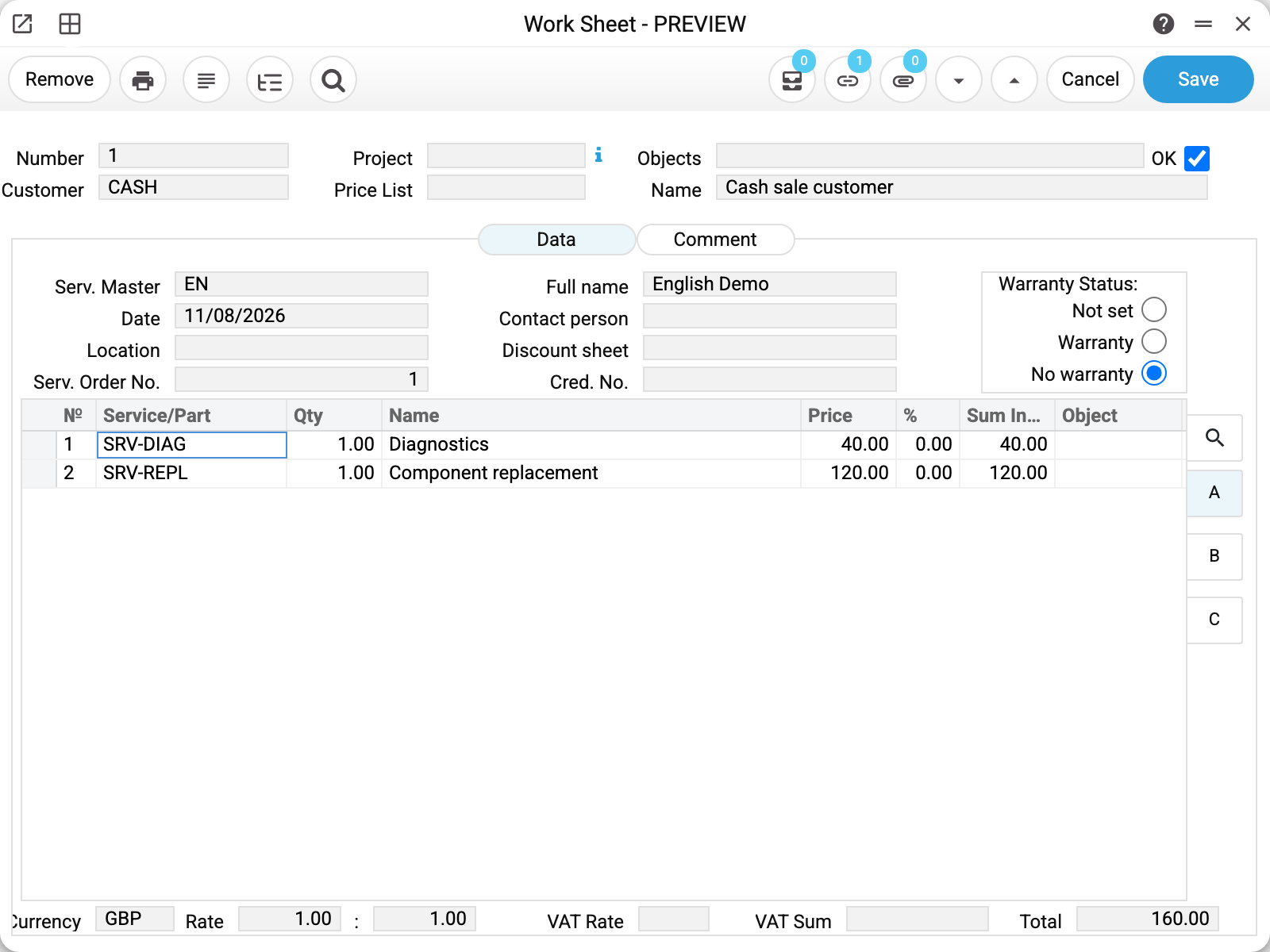
Work sheet No. 1 from the demo database — the drill repair from service order No. 1:
- The header — the number, the customer (inherited from the order), analytics objects and the main OK checkbox.
- «Serv. Order No.» — the link to the order: after OK the total lands exactly there. The documents are also cross-linked — the order opens from the work sheet card through the links (the chain icon).
- «Serv. Master» with the full name — who did the work.
- «Discount sheet» — the customer's discount matrix pulled from their card: the rows get the «%» column filled by themselves.
- «Warranty Status» — inherited from the order: «No warranty» — a paid repair, «Warranty» — at the workshop's expense (see below).
- The matrix — rows of two kinds: services (Diagnostics 40, Component replacement 120 — items of the «service» type) and parts (ordinary stock items). Quantity, price, discount, sum including VAT.
- The bottom — the currency with its rate (the service side can keep its own currency — the «Service currency» setting), VAT and the «Total».
What OK does
Approval is a point of no return (OK cannot be removed: «Work already done!»; a wrong work sheet is fixed with a credit one, see below). At the moment of OK:
- parts are written off the warehouse in the «Location» field at FIFO cost; serial numbers come off the serial balance;
- ledger transactions are made (see below);
- the total is added to the order: the order's «Total repair cost» and «Rest to pay» grow by the work sheet's «Total»; a message «work table created … for the sum …» drops into the order's chat;
- the order enters the open (unpaid) service orders register until a payment closes the debt.
The transactions the document makes
Work sheet No. 2 from the demo — made from a service order (diagnostics 40 + a stock item at 84.90 + component replacement 120 = 244.90):
| Dr | Cr | Amount | What it is |
|---|---|---|---|
| 361 | 702 | 244.90 | the customer's debt and the revenue — the whole work sheet total |
| 902 | 201 | 54.20 | the FIFO cost of the parts written off the warehouse |
Services carry no cost — they only feed the first row. Parts add the second one: the item left the warehouse at 54.20 cost and was sold to the customer at 84.90. If the order held a prepayment, one more pair appears — «advances received → receivables» — the prepayment is set off against the debt.
If the rows carry VAT, each such row adds one more pair, "sales → unconfirmed tax liability" (the liability account comes from the row's VAT code): the VAT is taken out of the revenue. The pair is the same when the posting contains a prepayment offset, and for a part with zero cost. In a credit work sheet it is mirrored: "unconfirmed tax liability → returns".
The accounts behind these chains live in the «Account Usage» setting: receivables, sales, cost of goods, stock.
The work sheet posts only if the «Worksheets» box is ticked on the «Logistics» tab of the «Records from Subsystems» setting; without it the work sheet is approved with no ledger transaction and no warning, while the parts leave the warehouse as usual. Approval is irreversible, so the work sheet will not get its transaction later — only one entered by hand.
A warranty work sheet is free for the customer
In a work sheet with the «Warranty» status the prices and sums stay in the work sheet itself — you see them on the card and in print — but at approval the work sheet's sum is not added to the order: the customer owes nothing, no debt, no revenue and no VAT arise. The cost of the parts used goes not to cost of sales but to the warranty account — the workshop's warranty expenses stay visible on their own.
A work sheet from a project budget
A work sheet can also be created from a project budget: the budget card → menu ▾ → «Create budget work table». Such a work sheet gets the budget's customer, the project code and the project's objects, the «No warranty» status — but it has no service order («Serv. Order No.» is empty). So approving it does less:
- parts are written off the warehouse as with any work sheet; the cost transaction follows the same «Records from Subsystems» rule;
- no customer debt, no revenue and no VAT: the work sheet posts the «receivables / sales» pair, and with it the rows' VAT (it comes off that same revenue), only as part of a service order (and not under warranty) — the VAT is charged by the customer invoice made from the quotation;
- the total is not added anywhere — there is no order;
- labour and services do not reach the ledger; their cost shows only in the Project Information Report — at the budget row's cost, or without it at the purchase price from the item card.
Project revenue comes not from the work sheet but from a customer invoice made from the budget's quotation (the same budget's menu → «Create a budget proposal») with the project code in its header. So the work sheet and the invoice do not double the revenue: the work sheet is the project's expense, the invoice its revenue.
The credit work sheet
A wrongly approved work sheet is reversed: the card's menu (the ▾ button) → «Create a credit work sheet». It creates a draft with the rows at negative quantities («Cred. No.» points to the original). The credit work sheet takes the «Warranty Status» of the original: for a warranty work sheet it is «Warranty» too — the reversal does not touch the debt and the revenue, and returns the cost from the warranty account; for others — «No warranty». The parts return to the warehouse and the total comes off the order when the credit work sheet is approved — tick OK and save. Then a correct work sheet is made. The same menu holds «Open transaction record» — this work sheet's ledger entries.
How to work with it
1. Create it from the order
In the service order card — the ▾ menu → «Create work table». The customer, discount, price list, warranty type and master are inherited. The order must be saved, the device accepted, the status not «Pending», the department chosen.
2. Fill it
Matrix rows: services and parts (search by code or through the magnifier). For parts the «Location» matters — that is where the write-off comes from. Check the «Total».
3. Approve
The OK checkbox + save. After that only the comment of the work sheet can be changed — a credit work sheet fixes a mistake.
Print variables
Values available in this document's printed form templates. How to write a variable in a template — see Print Forms.
Header fields:
| Variable | What it holds |
|---|---|
| Location | Warehouse |
| Number | Number |
| No | Number 2 |
| Cust_Name | Name |
| Order_Date | Order date |
| Date | Date |
| Serv_Master | Full name |
| Cred_No | Cred. No. |
| Item_Code | Item code from the service order |
| Description | Item name from the service order |
| Sum_With_VAT | Amount including VAT |
| Currency | Currency |
| Comment | Comment |
| Cust_Phone | Phone |
| Serial_No | Item serial number |
| Item_Comment | Customer Complaints |
| Warr_Months | Warranty (month) |
| Prepay_Sum | Prepayment Sum |
| Pers_Discount | Credit card |
| Warr_No | Warr. No. |
| Other | Other |
| Warr_to_Date | Warr. to date |
| Appearance | Appearance |
| Cust_Addr | Legal address |
| Cust_Tax_No | Tax Number |
| Cust_Bank | Bank |
| Cust_Bank_Acc | Bank Account |
| Date_UA | Date spelled out in Ukrainian |
| Rep_Cost | Repair amount in words (from the service order) |
| Sum_pay | Rest to pay |
| Sum_UA | Amount in words, Ukrainian |
| Sum_ENG | Amount in words, English |
| Total_VAT | VAT Sum |
| Total_Art | Number of items in the document |
| Total_w/o_VAT | Total without VAT |
| Warr_Status | Warranty status |
Row fields:
| Variable | What it holds |
|---|---|
| MNo | Row position number |
| Qty_serv/parts | Qty |
| Descr_serv/parts | Name |
| Price | Price |
| Discount | % |
| Sum_With_VAT | Amount including VAT |
| VAT | VAT Rate |
| Sum_VAT | VAT Sum |
| Sum_w/o_VAT | Row amount excluding VAT |
| Units | Unit of measur. |
| Unit_Name | Unit name |
The records the document refers to through its form fields (location, customer, currency…) also expose the rest of their variables — code and name are already listed in the tables above, the rest is described in the register's article:
- Company details — name, addresses, bank accounts, officers, the printing user: Main Company
Common situations
«Work already done!» — an attempt to remove OK. An approved work sheet is irreversible: a mistake is fixed by a credit work sheet plus a correct new one.
«Only the comment can be edited in a posted document!» — something other than the comment was changed in an approved work sheet. The advice in the refusal is «A posted work sheet cannot be unapproved: create a credit work sheet to reverse it»: do exactly that, then create a correct new work sheet.
The work sheet won't create from the order. The device is not accepted, the order is still «Pending», or no department is chosen — details in the orders article.
The part is not in stock. The write-off comes from the warehouse in the work sheet's «Location» field — check the location and the item's stock.
The discount did not come through. «Discount sheet» is taken from the customer's card (or their category) when the work sheet is created from the order — check the field on the work sheet and the customer card.
A warranty work sheet has prices, yet the order shows no debt. By design: «Warranty» does not zero the prices — they stay on the sheet and in print — but at approval the sheet's total is not added to the order, so the customer does not pay.
«The return cost of item '…' could not be determined from the original work sheet» — when approving a credit work sheet: it has a row of a stock item that is not in the original (added by hand, or the credit work sheet was duplicated), or the original has the item in several rows with different costs. The return cost is taken only from an original of the same customer. Remove the row or create the credit work sheet from the original's menu: «Create a credit work sheet».
«The quantity of a stock item in a work sheet cannot be negative» — when approving an ordinary work sheet: it has a stock item with a minus. A return of goods is a credit work sheet. A service may be approved with a minus.
«In a credit work sheet the quantity of a stock item cannot be positive» — a credit work sheet returns goods to stock, so its quantity carries a minus.
«A credit work sheet cannot return to stock more than the original work sheet wrote off» — the credit work sheet has more of the item than is left to return: the second line of the message shows how much the original wrote off, how much other posted credit sheets already returned and how much can still be returned. It counts by item and serial number. The original must be posted and belong to the same customer.
Field reference
| Field | Description |
|---|---|
| Number, Date | The work sheet number (automatic) and date |
| Customer, Name, Contact person | Inherited from the order |
| Serv. Order No. | The order the total falls into |
| Serv. Master, Full name | The person who did the work (a system user) |
| Location | Where parts are written off from |
| Discount sheet | The customer's discount matrix; fills the «%» column |
| Warranty Status | Not set / Warranty (free, costs go to the warranty account) / No warranty |
| Cred. No. | On a credit work sheet — the original's number |
| Price List | The source of row prices |
| OK | Approval: write-off + transactions + the total into the order; irreversible |
| Matrix: Service/Part, Qty, Price, %, Sum incl. VAT | Rows of labour («service» items) and parts (stock items) |
| Currency, Rate | The work sheet's currency (the service currency) and rate |
| VAT Rate, VAT Sum, Total | The tax and the total |