Production operations
A production operation is one stage of one production run: cutting on this machine, then assembly, then packing. Nobody creates them by hand: production creates them when it moves to "Started" — one per distinct "Stage + Queue" pair found in its rows.
Where to find it: Modules → Production → Registers → Production operations
The point is that the shop floor sees the job in portions rather than as one indivisible document: each stage has its own machine, its own quantity and its own status.
A worked example
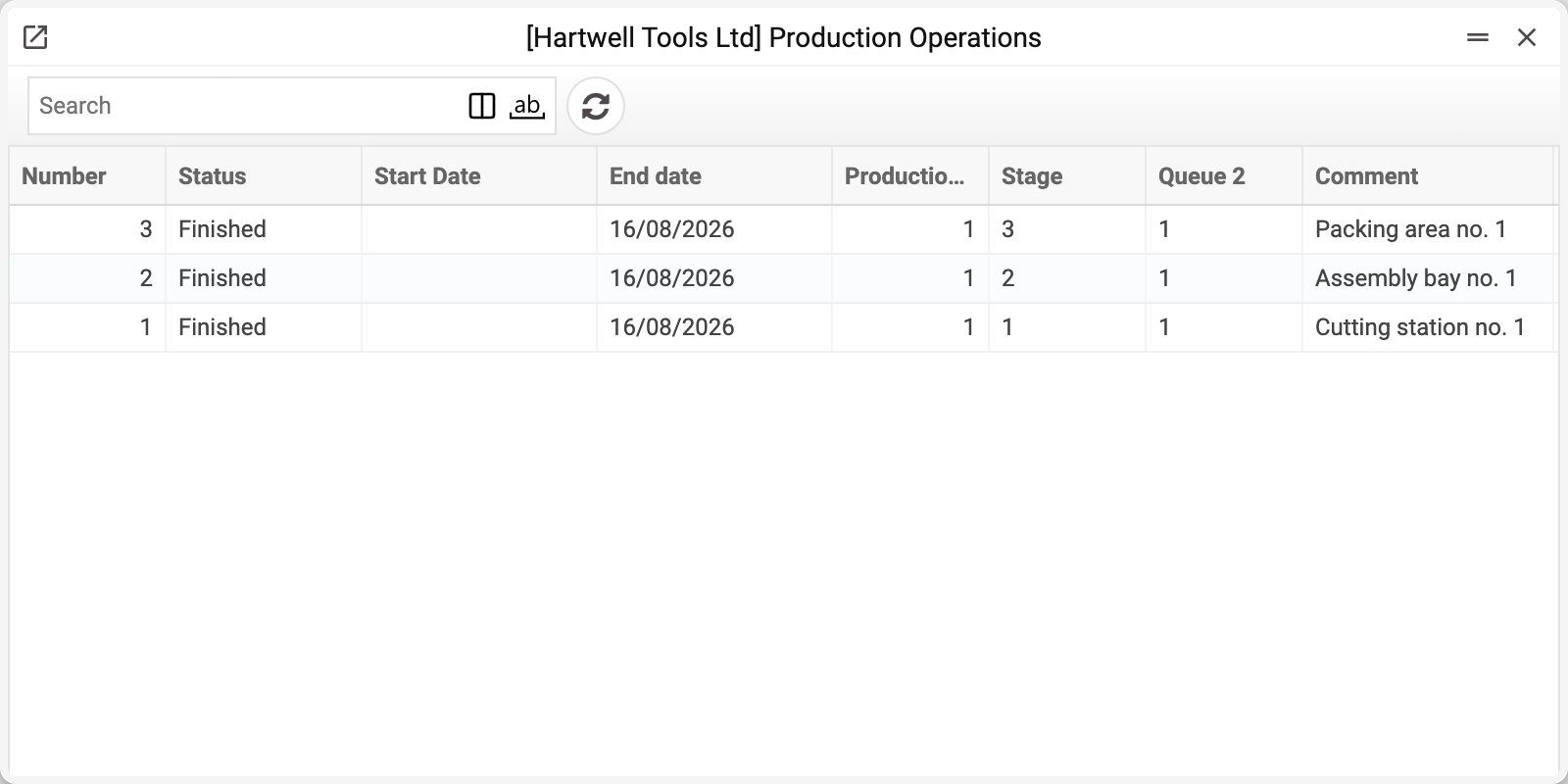
The demo company has three operations — the three stages (cutting, assembly, packing) of production No. 1, all finished on 16/08/2026. Their «Start Date» is empty: they went straight from «Created» to «Finished», skipping «Started», and at the time the server set the start date only on the move to «Started». It now sets the date on a direct finish too, but old operations do not get it retroactively. Let's open operation No. 3 — the packing stage.
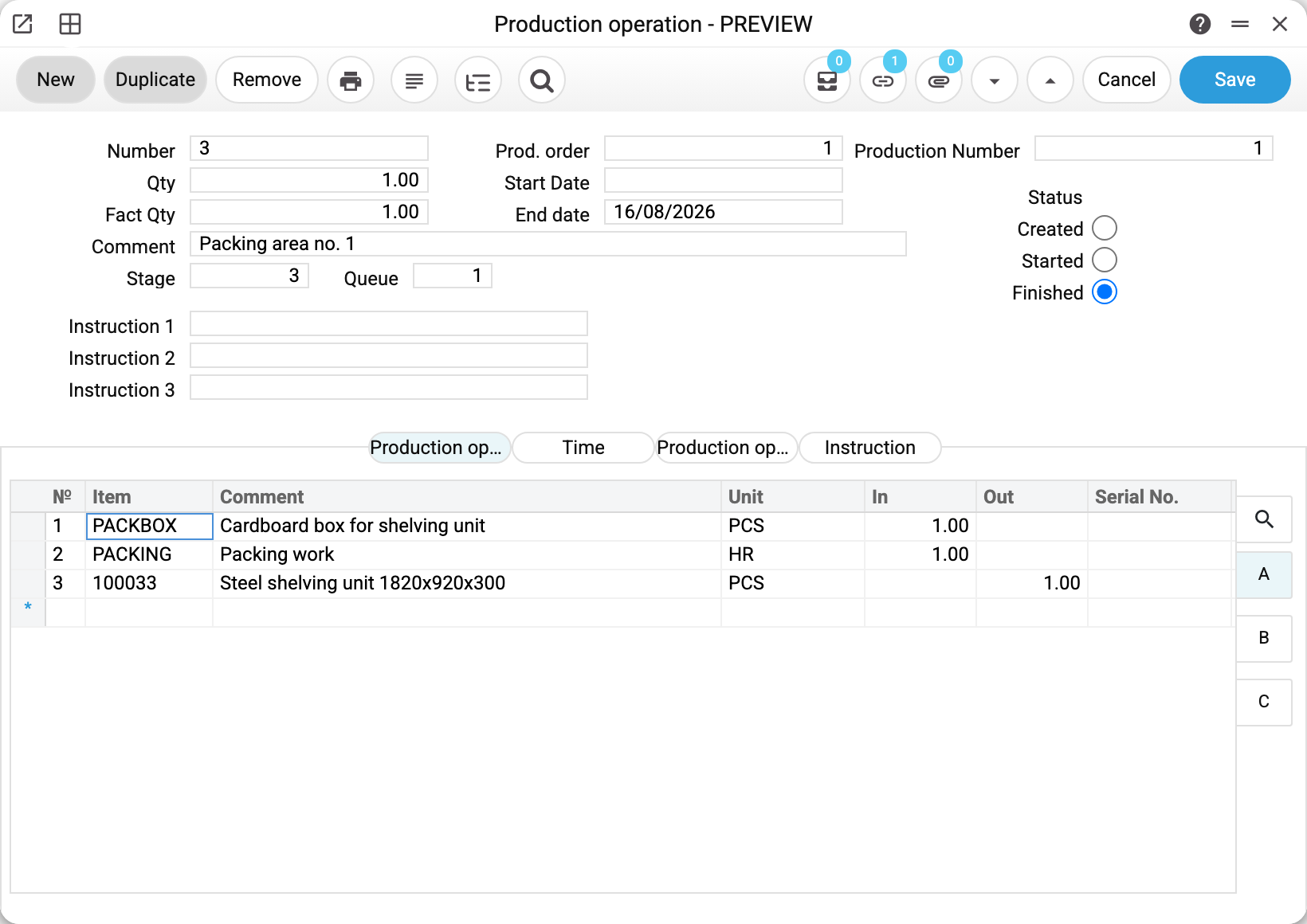
Operation No. 3: production order 1, production number 1, stage 3, queue 1, machine "Packing area no. 1" (it sits in the Comment field). Qty 1, fact qty 1, status Finished.
The matrix carries only this stage's rows: the cardboard box, the packing work — and, because this is the last stage, the finished unit itself in the "Out" column. That is where the goods are received into stock.
The "Time" and "Instruction" tabs hold the timings (setup, queue, move and run time, start and end time) and the text instructions for the operator.
How operations close a production run
Each operation has its own three statuses — Created, Started, Finished. When the last operation reaches Finished, production closes itself: it gets the Finished status and an end date. The production itself does not touch stock or the ledger at that point — the finished goods are received and posted by the operation whose rows carry the output (usually the last stage).
An operation's stock moves and transactions go by its dates: the start by the start date, the finish by the end date. Done on 30 September and entered on 2 October — while the operation is Created, enter 30.09, and the system keeps that date; an empty one it fills with the moment of the status change. A started operation that is finished later is also finished with its real date: while it is Started, enter the end date and time — a past date too — and then set Finished. The end date cannot be earlier than the start date — the system refuses such a save. The closed production gets the end date entered in it, or, when there is none, the end date of the last operation.
So in a production with stages the work runs bottom-up: stages close, then production closes, and the production order follows: finishing the last operation passes the status and the quantity made to the order, just as a production without stages does. Reopen an operation of a finished production and the order leaves "Finished" too.
What the operation posts
When the production rows carry a Stage and a Queue, it is not the production that moves stock and reaches the books but each operation on its own (the machine plays no part in this) — which is exactly why cost accumulates in portions, stage by stage. An operation of the first stage (plywood and sawing) posts:
| Dr | Cr | Amount | Matrix line |
|---|---|---|---|
| 231 | 281 | 500.00 | plywood: 1 pc × 500.00 × fact qty 1 |
| 231 | 911 | 400.00 | sawing: 2 h × 200.00 × fact qty 1 |
Usually these are two transactions, not one: the material is written off by the start transaction (in the document menu — «Open transaction record of the start of production operation»), the work and the output by the finish transaction («Open transaction record of the finish of production operation»). An operation finished straight from «Created» makes one finish transaction with all the rows when the start and end fall on the same day; on different days there are two, as with a separate start and finish.
Both lines debit the same account — production costs. The difference is on the credit side, and it is meaningful: material is written off stock, labour off an expense account. The goods were on the balance sheet, machine time was not; its value is simply recognised as an expense and immediately carried into the item's cost.
Hence a practical rule: the service card ("Sawing", "Joinery", "Packing") must carry an expense account. Put a revenue account there by mistake and the operation will credit revenue — production will start "earning" from itself.
When a stage yields output, the mirror pair appears: Dr stock account / Cr 231 — exactly as in production without stages.
The operation posts only if the "Production operations" box is ticked on the "Logistics" tab of the "Records from Subsystems" setting; without it the operation goes through its statuses with no transaction and no warning.
Where the accounts come from
The same as for production: the cost account from the production header, the stock account through item card → group → location → Account Usage, and the labour account from the service card or its group.
Quantity and fact. «Qty» is how many runs of the map fall on the stage (the production quantity), «Fact Qty» is how many of them this very operation performs. The fact is set before the start: the rows are multiplied by it, stock is written off and received by it, and after the start it can no longer be changed. If the fact is below the quantity, on start the system creates one more operation of the same stage for the difference — a remainder with the status «Created»: it is started separately, and an unneeded one can be deleted. The next stage is started only for what is already finished on the previous one.
Typical situations
No operations, although production has started. An operation is created only for rows where "Stage" and "Queue" are both above zero; the machine plays no part in this. The numbers come into production from the technological map — set them on the map (and, in a production already filled from it, on its rows too), then return the production to Created and move it to Started again.
A stage has to be redone. Step the operation's status back — the materials it consumed return (exactly what the operation's start consumed, even if the item's type was changed on its card after the start), and production leaves the Finished state. Only a role with the action "Can unconfirm Productions" or "Can unconfirm stock documents" may step it back — without it the system answers "The product has been removed from the stock!".
A stage is subcontracted. The map's row carries an "Outsource" flag, but for now it is only a mark: it is copied into the operation and changes nothing else — the operation is created and posted the same way, and subcontracted work is not accounted for separately.
Order of the stages. Two numbers set it — «Stage» and «Queue». Stages follow one another: an operation of stage 2 can be started only for the quantity already finished on stage 1 (with several queues on the previous stage — by the smallest of them), otherwise the system answers «Cannot start this operation until all previous operations are fully finished.». Queues of one stage are parallel and do not wait for each other, but an operation with an output can be finished only once the lower queue of its stage has started: the output takes its cost. Status goes back from the end: while a later operation is started, an earlier one will not go back («Return the later operation to the previous status first»).
Where to look next
- Production — the document that creates operations.
- Technological map — where stages and machines are defined.
- Machines — the equipment the operations run on.