Mail Sender
The service emails a document to a customer: it takes the mail template, fills the print form with the document's data and sends it to the addresses given.
Where to find it: Modules → System → Maintenances → Mail Sender
A worked example
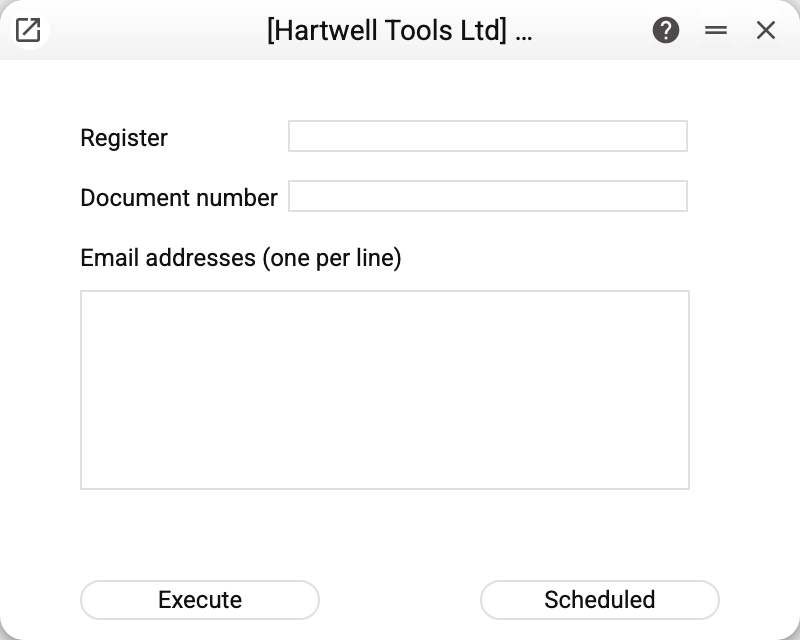
Three fields, all required:
| Field | What goes in |
|---|---|
| Register | the document register's technical name as in the system — Invoices for invoices, for instance, not the menu name |
| Document number | which document exactly |
| Email addresses (one per line) | who to send it to |
Leave any of them empty and the service answers "All fields are required" and sends nothing. A register name that does not exist in the system (including a different letter case) also stops the service, but the window shows only a generic service error.
Where the letter's content comes from
The service invents neither subject nor body — everything sits in the mail template for that register:
- the subject — from the template's header field, with the document's data filled in;
- the opening and closing text — the template's two blocks;
- the attachment — the print form the template names, filled with the document's data, in its template's format (.docx or .xlsx — not a PDF). It is the same form as printing from the document window: dates in this form's format, numbers in your number format;
- extra files — anything attached to the template itself (a price list, terms, bank details).
With no template for that register, the service says so plainly and stops. That is not a failure but a reminder: describe what the letter should look like first.
Typical situations
"Mail template not found for this register". Create a template for the register in question.
The letter arrived with no attachment. The template's "Form Name" is empty. If the form the template names was deleted, disabled or its file has an unsupported format, the letter is not sent at all: the service refuses and names the form.
Several recipients. Enter one address per line — that is what the field asks for. The first address is the recipient; the rest get the letter as a blind copy and do not see each other's addresses.
Where to look next
- Mail templates — subject, texts and attachments.
- Print forms — what the attachment looks like.
- Standard texts — the blocks a letter is assembled from.