Ukrsibbank Business Settings
Connects the company to Ukrsibbank Business: which credentials ERPJS uses to sign in to the bank, which account the payments leave from and which key signs them. Once the setting is filled in, a vendor payment goes to the bank straight from the payment window — with the "Send to Ukrsibbank" menu item, without exporting a file to the client-bank. There is one setting per company. Until it has a Client ID, a Client Secret and a signing key, nothing goes to the bank.
Where to find it: Modules → Ukrsibbank → Settings → Ukrsibbank Business Settings
A worked example
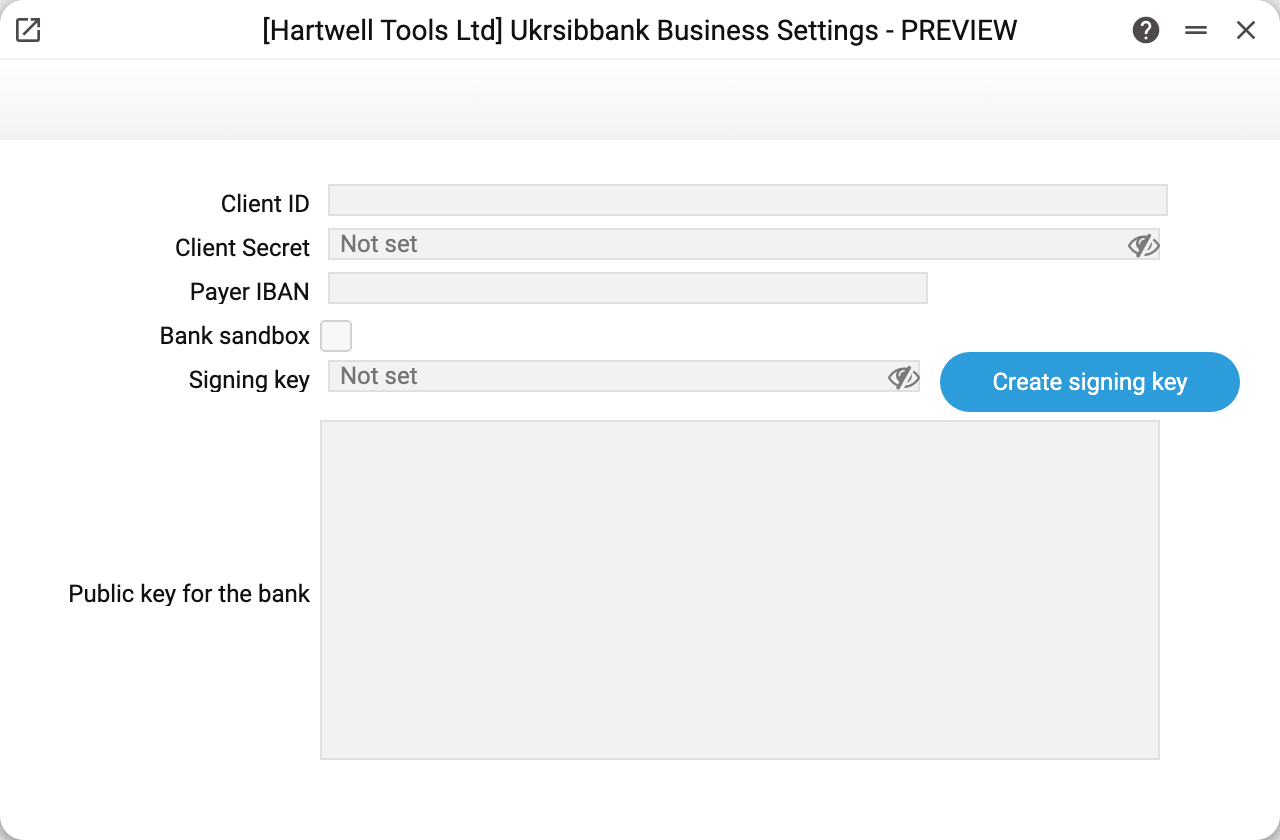
In the demo company the fields are empty: the bank is not connected, so the secret and the key show "Not set". The window has six fields:
- Client ID and Client Secret — the identifier and secret of the company's application, issued by the bank. The Client ID is not a secret: it goes into the bank sign-in address. The Client Secret is stored encrypted and never comes back into the window (details below);
- Payer IBAN — the company account the payments leave from. Empty — the "Current A/C" from the Main Company setting is used;
- Bank sandbox — the bank's test mode instead of the production one: payments go through, but no money moves. Handy for checking the connection. Off by default;
- Signing key and the "Create signing key" button — the private key ERPJS signs every payment with. The server creates it; the window shows it only as a mask;
- Public key for the bank — the pair of the signing key. Copy it from here and upload it to the Ukrsibbank Business cabinet. The field cannot be edited: the button fills it in.
The module exists only in the Ukrainian version of ERPJS: the Kenyan version has neither its menu item, nor the setting, nor the payment window menu items.
Connecting in four steps
- Register the company's application in Ukrsibbank Business together with the return address after sign-in: the address of your ERPJS database plus
openserver/ukrsibbank/OAuth2— for example,https://s.erpjs.biz/<database>/openserver/ukrsibbank/OAuth2. The bank accepts no other address, and the sign-in would not complete. - Enter the Client ID and Client Secret issued by the bank and save the setting.
- Press "Create signing key". The server creates a key pair: the private key stays in ERPJS encrypted and never leaves it — the bank receives only signatures — and the public key appears in the "Public key for the bank" field. The button works only for a saved setting; otherwise — "Save the Ukrsibbank settings first".
- Upload the public key to the bank cabinet.
What remains is to give the right to the people who will send payments: the role action "Can send payments to the bank" in Roles. Only the action's own row in the role opens it — an actions row with an empty "for" does not switch it on. Without the right, sending is refused: "You have no right to send payments to the bank (role action "Can send payments to the bank")". The same right is needed to clear the "Payment sent" marks.
The secret and the key show as a mask
The Client Secret and the signing key are write-only fields. A value that is set shows as a mask, not as text; a value that is not set shows as an empty field with the hint "Not set".
- Left the field alone — the saved value stays on save.
- Typed a new one — it replaces the old one.
- Cleared the mask — the value is removed on save; the field warns about it with the hint "The secret will be removed when you save".
These values cannot be read through the API or MCP. When the setting is written through the API, an empty value keeps the saved one and - erases it.
The sandbox and production are different bank addresses. If the secret is already saved and you switch "Bank sandbox" on or off, type the Client Secret again — otherwise saving is refused: "The saved password is sent only to the saved server. To use another server, type the password". A saved secret goes only to the bank address it was saved with.
Replacing the key
Once a key exists, the button reads "Replace signing key" and asks first: "Replace the signing key? Until you upload the new public key to Ukrsibbank, the bank will not accept payments signed with it". Closed the question window — the key stays as it was. Confirmed — the new key is in the "Public key for the bank" field; upload it to the bank before sending payments.
How a payment goes to the bank
In a vendor payment — a saved one, otherwise "Please, save document!" — use the "Send to Ukrsibbank" menu item.
The first send is a sign-in to the bank. ERPJS answers "Sign in to Ukrsibbank, then send the payment again" with a "Sign in to Ukrsibbank" button. The button opens the bank page in a new window; after the sign-in the window closes by itself, and ERPJS says "You are signed in to Ukrsibbank. Send the payment again". Every user signs in on their own. The sign-in link is valid for 10 minutes and only from the ERPJS window the sign-in was started in. You will have to sign in again after the ERPJS server restarts (an update), after the Client ID or the sandbox mode changes, and when the bank stops accepting the sign-in.
The next send — the rows go to the bank. Rows without the "Payment sent" mark go: one row as a single document, several as a group. Where the bank gets the data from:
| In the bank | From ERPJS |
|---|---|
| amount | the row's "Bank Sum" |
| payment purpose | the row's "Payment purpose" (tab D) |
| payer account | "Payer IBAN" of this setting, otherwise the company's "Current A/C" |
| recipient | the row's contact, "Requisites" tab: "IBAN", "Reg. Number" (if empty — "Tax Number"), name, bank |
| payment kind | the contact's "Bank payment kind": Payment, Salary or Tax |
For a tax payment the bank also receives the contact's "Payment type code", and when the row has no purpose — the contact's "Additional record information". The "Tax notice (decision) information" and "Budget payment type" fields of the contact card are stored but do not go to the bank yet.
Rows the bank accepted get the "Payment sent" mark (tab D of the rows), and the window shows "Sent to the bank, rows: 1, 2". A row the bank did not accept is a separate line of the message with the reason; it has no mark and can be sent again. A row the bank's answer to a group did not mention is "The bank did not report this row: check it in Ukrsibbank Business before sending again": the bank may have accepted it, so it will not go again by itself (below).
The "Payment sent" mark and a repeat
A row that has already gone to the bank does not go a second time: "All rows of this payment have already been sent to the bank". It cannot be changed, moved or removed, and a payment with it cannot be deleted: "Row 1 was sent to Ukrsibbank: the payment cannot be deleted. To delete it, clear the marks first". This way the vendor invoice does not stay open if the bank has already made the payment.
If the bank did not answer or the connection broke, the payment may have been created: "The bank did not confirm the payment, and it may have been created. Check it in Ukrsibbank Business before sending again". Such rows do not go again by themselves either: the next send says "Rows 1, 2 were sent to the bank, but the result is unknown. Check them in Ukrsibbank Business; to send again, clear the marks".
The "Clear "Payment sent" marks" menu item — for when you have checked in the bank that the payment is not there. The answer is "Marks cleared, rows: 2". A row that is being sent right now (or went to the bank less than two minutes ago) keeps its mark: "Being sent to the bank right now, rows: 3". If there is nothing else to clear, the answer is a refusal: "Rows 3 are being sent to the bank right now. Wait two minutes and try again". Cleared marks allow the money to be sent once more, so only someone with the right to send can clear them.
Typical situations
"Fill in the Ukrsibbank settings: Client ID, Client Secret and the signing key". One of the three is missing. Create the signing key with the "Create signing key" button and upload the public key to the bank.
"Row 2: only hryvnia payments go to Ukrsibbank, the row currency is USD". Only hryvnia payments go from ERPJS to the bank (the row's bank currency is the hryvnia, or empty when the hryvnia is the base currency). Pass a foreign-currency payment to the bank another way, for example through the client-bank.
"Row 1 (contact 00012): fill in Recipient IBAN, Payment purpose". The vendor's contact lacks requisites ("Requisites" tab), or the payment row has no purpose (tab D). Fill them in and send again.
The bank rejects every payment. Check that the public key from this setting has been uploaded to the bank — after "Replace signing key" it has to be uploaded again, — that the "Payer IBAN" is correct and that "Bank sandbox" is off in the production database: no money moves in the sandbox.
The sign-in to the bank does not complete. The return address registered in the bank does not match the address of your ERPJS database — check it (step 1 of connecting). The page "Return to the ERPJS window where you started the sign-in and start it again there" means the sign-in link was opened outside ERPJS (forwarded, opened in another browser).
Where to look next
- Vendor Payments — the document the payments go to the bank from.
- Contacts — the recipient's requisites, "Requisites" tab.
- Roles — the "Can send payments to the bank" action.
- Main Company — "Current A/C" when the payer IBAN is not set.