Object Mask
The rule "only this kind of analytics belongs on this account". The mirror twin of object type control: that one demands an object to BE there, the mask makes sure nothing EXTRA is. When a document builds a transaction, the system consults the mask and silently strips from each row the objects whose types are not listed for the account.
Where to find it: Modules → Nominal Ledger → Settings → Object Mask
Walkthrough
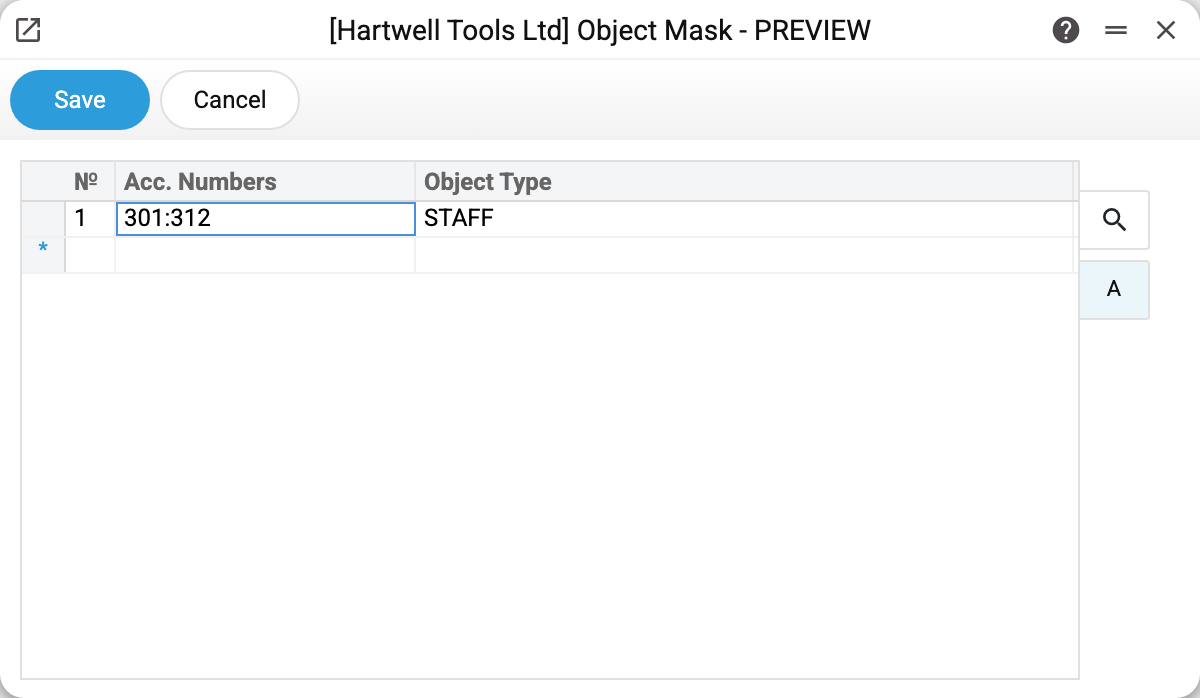
One row in the demo: accounts 301:312 (all cash and bank) allow only type STAFF. Why: a salary payout should carry the employee tag (Dr 661 / Cr 301 — who received it), while business-line analytics — WHOLESALE, RETAIL — makes no sense on money accounts: the cash is shared, splitting the till by sales channel explains nothing. If a document tries to put "WALSH,RETAIL" on 311, only WALSH survives.
Matrix columns:
- Acc. Numbers — a single account (
301), a comma list (301,311) or a colon range (301:312); each account may appear in only one mask row. A single account and a list act only on the account with exactly that number (361does not act on361.1or3611), a range — on accounts whose number by its leading digits is within it (300:399also covers361.1, but not3611); - Object Type — the allowed types via comma; the column is required: a row without a type will not be saved.
Where it fires
- Transactions generated from documents — payments, cash desk, shipments: extra objects are removed automatically, no warnings.
- Closing the books — the mask is applied to the closing entries that move balances to the financial result.
- Together with type control: the check of a transaction — manual or created by a document — drops a demand for a type the mask does not allow on the account. But documents with their own control check (customer and vendor invoices, payments, cash, stock documents) run it earlier and without regard to the mask — for them such an object is still required. Without their own check, i.e. with the mask's concession, post advance reports, POS cash collection and, in closing the books, currency revaluation and profit calculation.
- Forward balances — here the mask does not remove, it stops: a row with an object of a disallowed type will not save — "Object … not allowed for account …".
Manual transactions are not cleaned by the mask: what you type is what saves (as long as type control is satisfied). The mask grooms the automatic postings specifically.
Common situations
Set an object in the document, but the transaction does not have it. Check the mask: most likely that object's type is not allowed on the posting account. No data is lost — the document still carries the object; it just did not reach the ledger.
Want to ban all objects on an account. The mask cannot do that: it only lists the allowed types, and a row without a type is not saved. A row without a type left over from earlier versions is skipped by the mask — the account behaves as if the row were not there.
The object vanished from one side of the posting only. Working as designed: the mask is applied per row, by that row's account. Dr 92 keeps "RETAIL" while Cr 311 of the same entry loses it.
How is this different from type control? The control stops the save with an error ("Enter object with type…"); in document postings the mask stops nothing — it quietly removes the excess (it stops only in forward balances). The control is about completeness of analytics, the mask about its cleanliness.