Production
Production is the fact: the document that consumes materials from stock and receives the finished goods. It also posts to the ledger, and it cuts the production operations from the map's stages.
Where to find it: Modules → Production → Registers → Production
If the order is the intent, production is what actually came of it.
A worked example
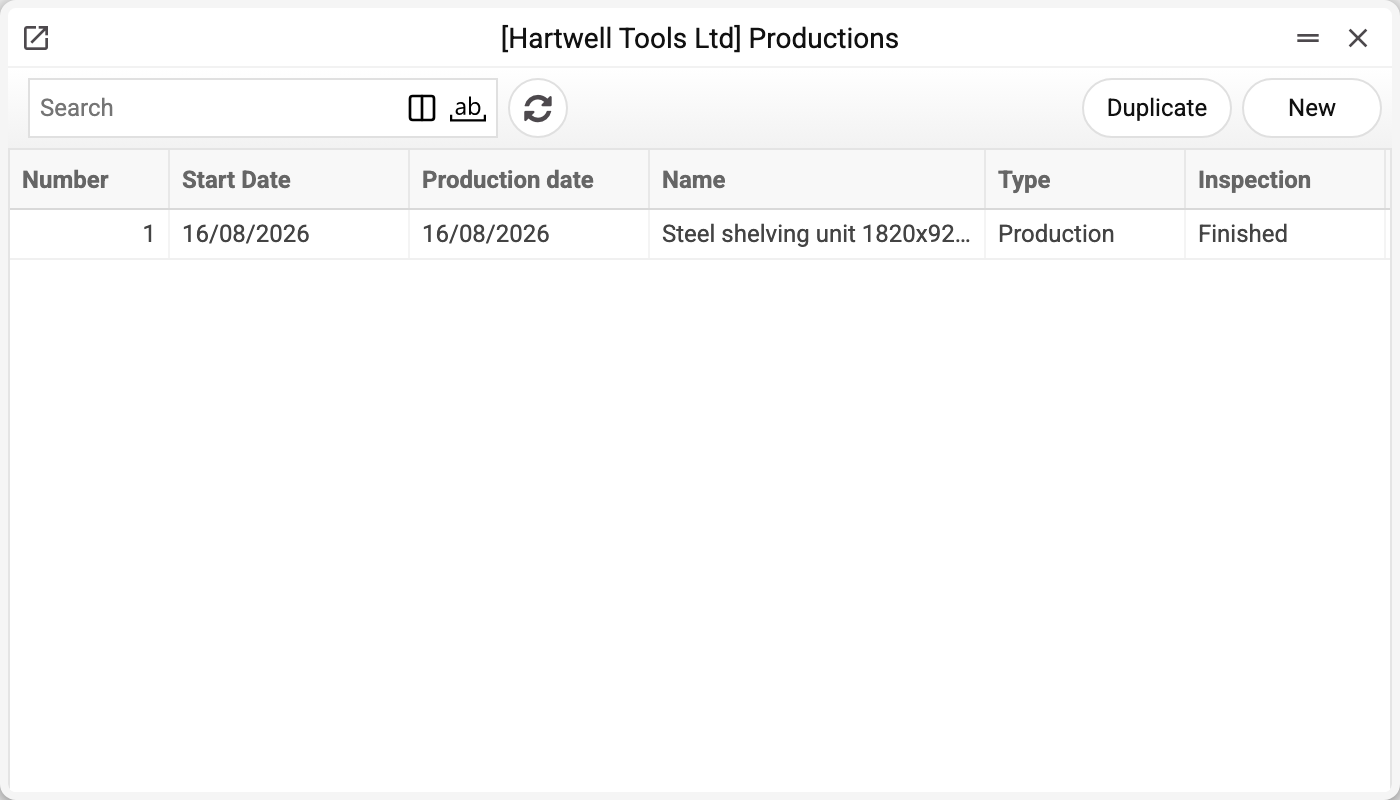
The journal shows the number, start and production dates, the item name, type and status. There is one production here — No. 1 of 16/08/2026, and that is the one we take.
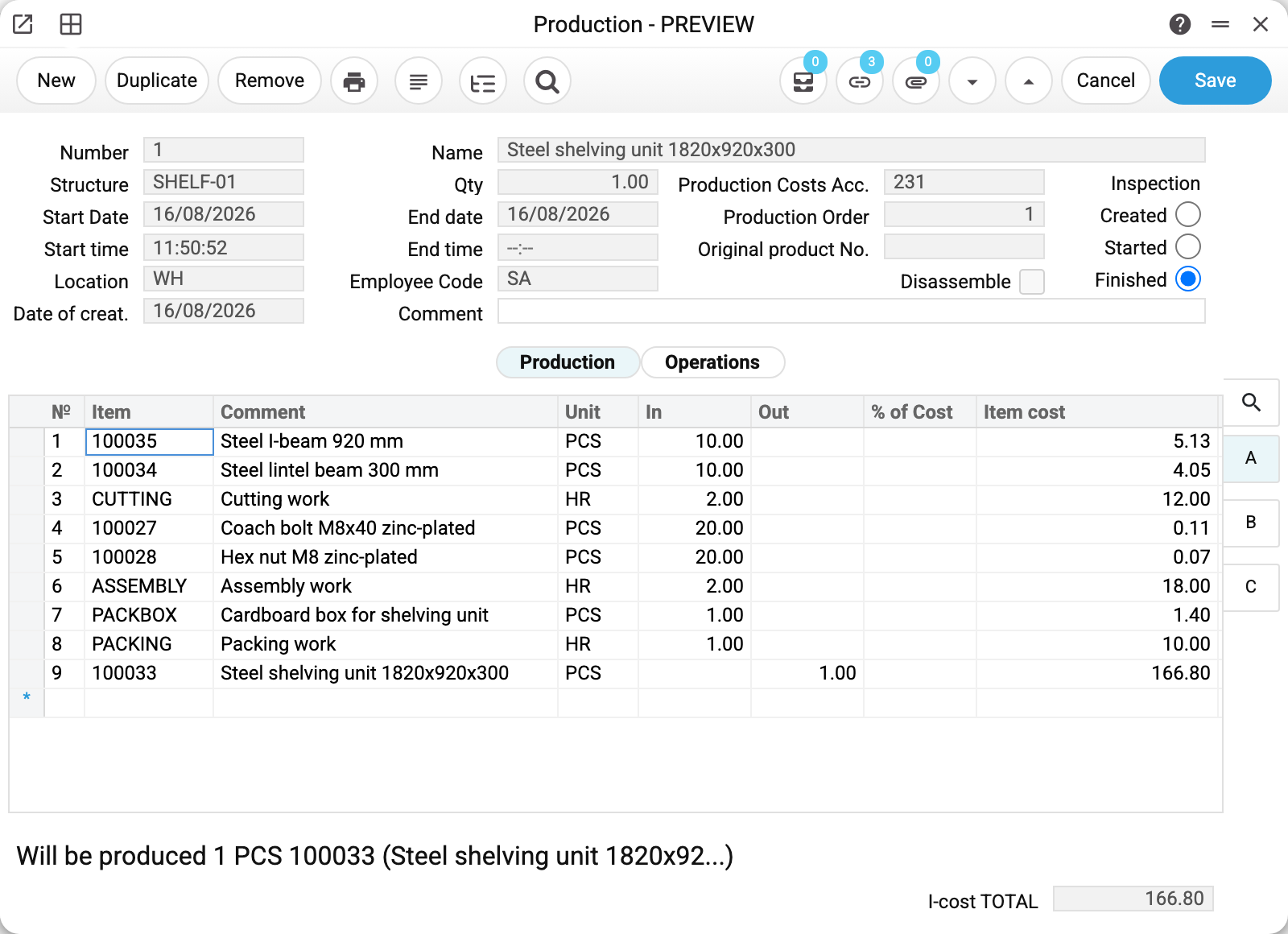
Production No. 1 against structure SHELF-01, quantity 1, location WH, production costs account 231, production order 1. Status — Finished.
The matrix repeats the map: eight consumption rows and a ninth for the finished unit. Below it the hint "Will be produced 1 PCS 100033" and the cost total 166.80.
The second tab, Operations, lists this document's stages — three records the system created on its own. Each operation number is a link: clicking it opens that operation for viewing.
Three statuses and what they do
| Status | What happens |
|---|---|
| Created | nothing. The document is a draft, stock is untouched |
| Started | without stages — materials leave stock, first posting (stock → production costs); with stages — operations are created, and they will write the materials off |
| Finished | without stages — finished goods are received, second posting (production costs → stock); with stages the status is set by itself after the last operation |
Moving from Created to Started is the shop floor picking the job up. After that, if the rows carry a Stage and a Queue, you cannot set Finished by hand: the system answers "production will be completed automatically once all operations are done". Close the operations, and the last one closes the production itself. If all operations were deleted, it cannot be finished by hand either: "Production operations have not been created". Return it to Created and start it again, and the operations will be created anew.
It is those two numbers that decide, not the machines: one operation is created per distinct "stage + queue" pair found in the rows, while the machine and its group merely go into the operation's description. With no stages in the rows no operations are created, and production is set to Finished manually.
The date is the production date, not the entry date. Produced on 30 September and entered on 2 October — while the production is Created, enter 30.09 as the start and end dates: stock and transactions go to September. Empty dates the system fills with the moment of the status change. A production started earlier and finished later is finished with its real date: the finish date is entered together with the Finished status — backdated too. It cannot be earlier than the start date — the system refuses such a save. The exception is a production with stages: its finish date is set by the last operation, and when operations are entered backdated, the finish can come out earlier than the start. Stock and ledger entries are made by the operations with their own dates, so accounting is not affected — only the dates on the production card disagree. A closed period (Closing changes, the Productions date) is judged by these very dates — for the production and for its operations alike.
What the document posts
Production does not create value out of thin air — it moves value from one account to another: first from stock to the production cost account, then back from cost to stock, this time as finished goods. Hence two postings, made by different statuses.
Step one, "Started": materials went to the shop floor. Each cost line is its own pair:
| Dr | Cr | Amount |
|---|---|---|
| 231 | 281 | 950.00 |
| 231 | 281 | 700.00 |
| 231 | 281 | 980.00 |
| 231 | 281 | 1,900.00 |
Step two, "Finished": the goods came back from the shop floor to stock — now as a single amount collected from all the costs:
| Dr | Cr | Amount |
|---|---|---|
| 281 | 231 | 4,530.00 |
After completion the production cost account (231) nets to zero: whatever arrived on it as materials left it as cost of goods. A remaining balance on 231 means production was started and never finished — a convenient way to spot work in progress in the trial balance.
!!! note "Our example has no postings of its own" Production no. 1 runs through operations, and it is they that post, each on its own stage. The tables above come from a production without stages, where the document posts by itself. The rule: a Stage and a Queue in the rows — the operations move stock and post; none — the production does. A machine or machine group does not change this: it is only carried into the operation — its description and the "Used Machine" and "Machine Group" fields; it is set either on every row or on none ("Enter machine or machine group").
Where the accounts come from
- the production cost account — a field in the header, defaulted from Account Usage, "Stock" tab. Leave it empty and the document will not post; the system says so;
- the stock account — through the chain item card → item group → location card → the same setting. For non-stock lines (works, services) the expense account from the item card or its group is used instead;
- on a disassembly, the difference between the item's FIFO value and the sum of its components goes to a separate disassembly difference account from the same setting.
As with every other document, posting can be switched off in the Records from Subsystems setting — stock will still move, but the books will never hear about it.
Planned cost versus actual
Prices in the technological map are planned. Production takes the actual ones — what the material is carried at in stock under FIFO. Here the lintel beam planned at 3.78 was consumed at 4.05, so the total came to 166.80 against the map's 164.10.
That is not an error: the map says what it should have cost, production says what it did cost.
Typical situations
The material isn't in stock. Booking fails with a message naming the item, the quantity and the location. Receive the material, or change the location on the document.
Production has to be reversed. Step the status back — stock and postings unwind to the chosen status: from Finished to Started the finished goods leave stock, back to Created the materials return to stock as well. Exactly what the start consumed comes back — even if the item's type was changed on its card after the start (a service turned into a stock item or the other way round); such a change does not block stepping the status back. If the product has already been shipped, moved or written off, the system refuses: "Items on the production list have already been shipped, moved, or written off". Only a role with the action "Can unconfirm Productions" or "Can unconfirm stock documents" may step the status back — without it the system answers "The product has been removed from the stock!". A finished production with stages cannot be reversed this way ("All production operations are completed"): its operations are reversed instead, and stepping an operation back returns the production to Started.
Fewer units were made than planned. Book production for the actual quantity; the order stays "Started" and waits for the rest.
The reverse job is needed — break a unit back into components. Open the finished production and pick "Create Disassembly" from the menu: the system creates a separate disassembly document — the matrix reads backwards, the product is written off and the components return to stock. A disassembly can only be made from a finished production ("Complete production first!") and only for the quantity not yet sent to disassembly: once disassemblies cover the whole production quantity, the system answers "Disassembly has already been created according to this production." The "Disassemble" flag in the header just shows that the document is a disassembly; it is not set by hand.
Not everything comes back: paint and labour cannot be taken apart. Delete the rows that do not return to stock from the disassembly document and start it as it is. When the disassembly is finished, the value of what did not come back is moved from the production costs account to the "Disassemble Diff. Acc." (Account Usage, "Stock" tab), so the document leaves nothing on the production account. If that account is empty, the disassembly will not finish — the message says where to fill it in. The "% of Cost" column is not checked in a disassembly: the cost of the components comes from their rows, so there is no need to bring the shares up to 100 % by hand. In an ordinary production the output shares must still add up to 100 % when it is started.
Where to look next
- Technological map — what we build against.
- Product orders — the plan this document fulfils.
- Production operation — the stages this document created.
- Productions list — what was made over a period.
Print variables
Values available in this document's printed form templates. How to write a variable in a template — see Print Forms.
Header fields:
| Variable | What it holds |
|---|---|
| Number | Number |
| Structure | Structure |
| Start_date | Start Date |
| Start_time | Start time |
| Location | Warehouse |
| Date_of_creat | Date of creat. |
| Str_name | Name |
| Q-ty | Qty |
| End_date | End date |
| End_time | End time |
| Employee_code | Employee Code |
| Comment_full | Comment |
| Prod_Costs_Acc | Production Costs Acc. |
| Production_Order | Production Order |
| Original_Prod_Nr | Original product No. |
| Disassemble | Disassembly flag |
| Inspection | Inspection created mark |
| I-cost_TOTAL | Total item cost |
Row fields:
| Variable | What it holds |
|---|---|
| No | Row position number |
| Item_Code | Item |
| Description | Comment |
| In_Qty | In |
| Out_Qty | Out |
| ItemCost | Item cost |
| %_of_Cost | Row share of the cost, % |
| Out_Serial_No. | Out Serial No. |
| Objects | Objects |
| In_Serial_No | In Serial No. |
| FIFO Row Sum | Row amount by FIFO |
The records the document refers to through its form fields (location, customer, currency…) also expose the rest of their variables — code and name are already listed in the tables above, the rest is described in the register's article:
- Company details — name, addresses, bank accounts, officers, the printing user: Main Company