Payments
The money has arrived. A payment is the document that records it: it increases the balance in the bank or the till, and it clears what the customer owed.
Where to find it: Modules → Sales Ledger → Registers → Payments
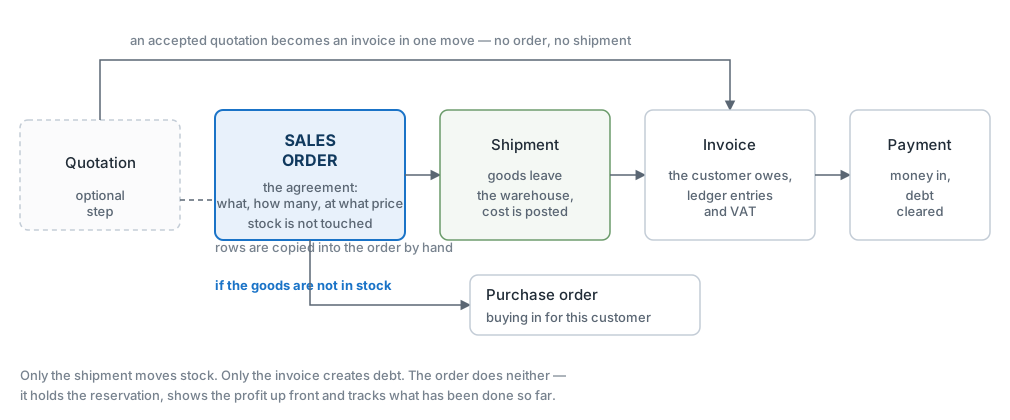
This is the last link of a sale. The order agrees the deal, the shipment hands the goods over, the invoice creates the debt — and the payment closes it.
The one thing worth understanding about this document: it is not about a single invoice. A payment is a list of rows, and each row clears its own invoice. The customer sent one transfer covering five invoices? One document, five rows.
The register lives in the Sales Ledger module. It is created from an invoice card with «Create customer payment», or by hand — when the money has landed and which invoice it belongs to still has to be worked out.
Where it sits
What approval does
- increases the money on the account behind the payment method;
- reduces what the customer owes by the amount of each row;
- posts to the ledger: money on the debit side, the receivable on the credit side;
- closes the invoice if the amount matches in full, or leaves it partly paid.
A worked example
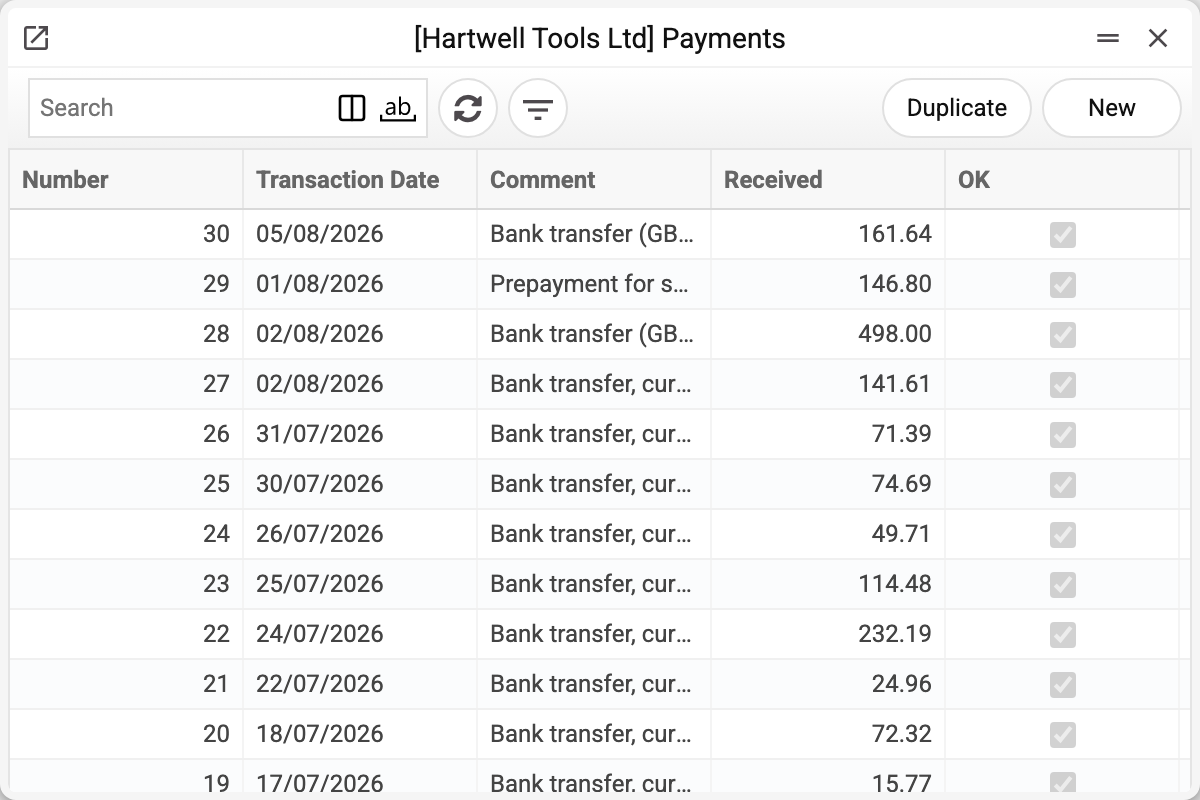
The journal shows the number, transaction date, comment, amount received and approval. We will take No. 30 of 05/08/2026 for 161.64.
Stockport Shopfitters Ltd has paid invoice №53 — the one for the helmets and the safety glasses.
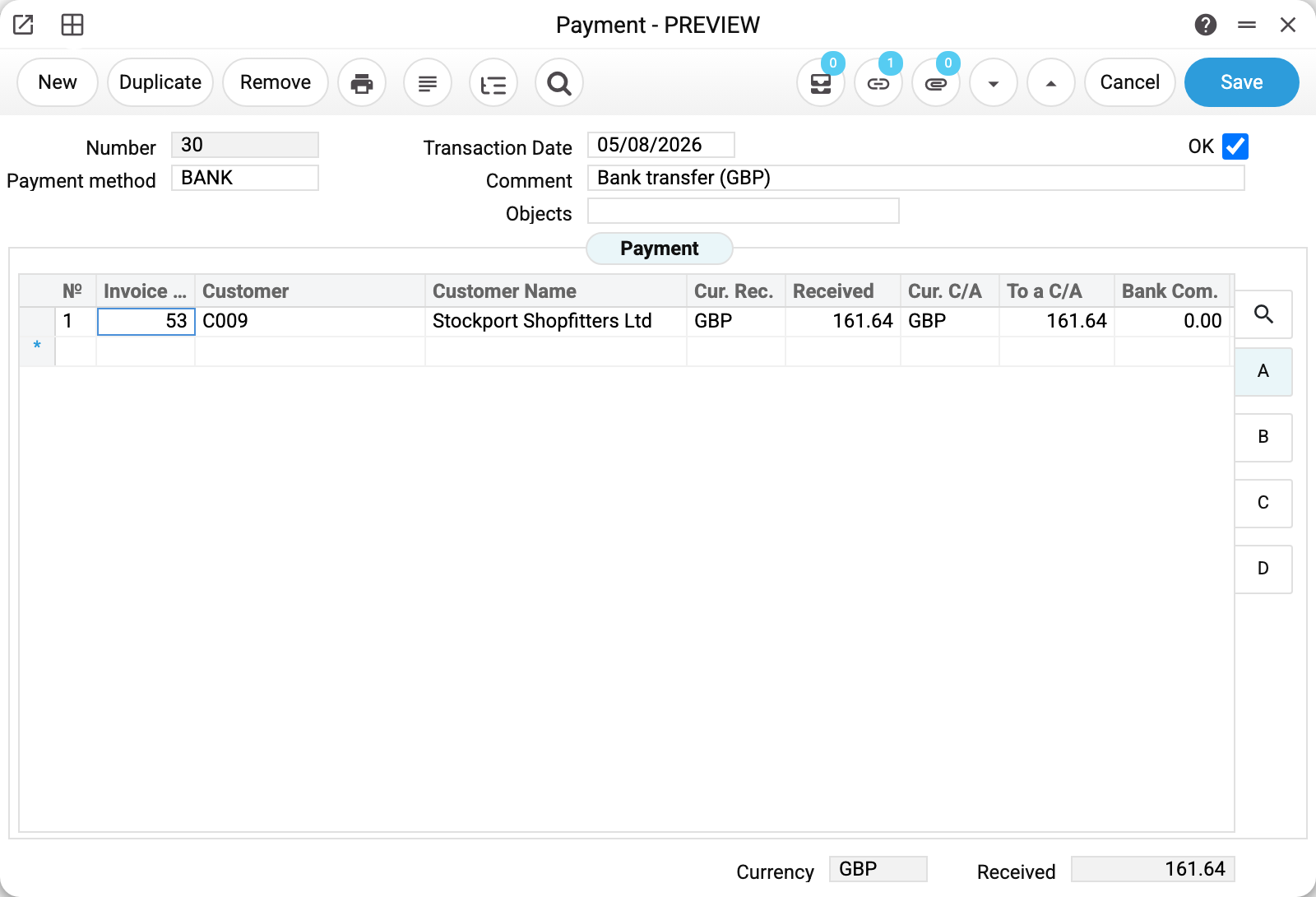
The header is short, and it holds one field the ledger entry depends on — «Payment method» BANK. From it the system works out which account the money goes to: the bank account, the till, another bank. Here it is a bank transfer, so the amount lands on the current account.
«Transaction Date» 05/08/2026 is the date the money enters the books. That is the day it actually arrived, not the day you got round to entering the document.
The payment row

One row, one invoice:
- «Invoice No.» 53 — which invoice is being cleared. The customer and the name are pulled in automatically;
- «Received» 161.64 — what came in to clear the invoice, in the invoice's own currency (it is shown in «Cur. Rec.»; on a row with an invoice it does not change);
- «To a C/A» 161.64 — what it comes to in your account's currency, before the bank's charge;
- «Bank Com.» 0.00 — the bank's charge, if it took one out of the transfer.
The last two fields matter when the money crosses a border or goes through a bank that charges. When the currencies differ, «Received» and «To a C/A» legitimately differ: the customer paid, say, in euros, and your account was credited in hryvnias. A bank charge, though, goes into «Bank Com.», while «To a C/A» in the same currency stays equal to «Received»: the charge is posted as a separate entry to the commission account, and the bank gets the amount net of it. If you lower «To a C/A» instead, the difference goes to the exchange-difference account, not to the commission.
How much is still owed

Sheet B shows the «Not Paid» 161.64 column — the debt outstanding on the invoice before this payment. It is the most useful number in the document: it tells you whether the payment clears the invoice in full or in part.
Here the payment equals the outstanding amount, so invoice №53 is closed and the debt on this deal disappears. The chain is complete: the customer has the goods, you have the money.
What the document posts
The transaction is short because the operation is simple: a debt turns into money.
| Dr | Cr | Amount | What it is |
|---|---|---|---|
| 311 | 361 | 161.64 | the money arrived on the account, the customer's debt is closed |
This is the last transaction of the chain. Put the three documents together — shipment, invoice and payment — and you have the whole deal: the cost written off, the revenue recognised, the tax charged, the money in the bank and no debt left.
The payment posts only if the «Payments» box is ticked on the «Accounting» tab of the «Records from Subsystems» setting; without it the payment is approved with no transaction and no warning.
Where the accounts come from
The money account is yours to choose — through the payment method. It is not a separate account field but the «Payment method» field in the header: every method in the register carries its own account. Pick the bank and the money arrives on the current account; pick the till and it arrives in cash. Hence a common mistake: a payment lands «in the wrong place» not because someone picked the wrong account, but because they picked the wrong payment method.
The receivable account the system resolves itself: it takes the debtors account from the invoice being paid (the same account is filled into the payment row, where you can change it); if the invoice names none — the customer category's account, and failing that — the general receivables account from the settings. So the payment clears exactly the account the invoice put the debt on.
Besides the two main rows, others may appear, each with its own account from the settings:
- the bank commission, if the bank withheld it from the transfer;
- the exchange difference, when the invoice is in a foreign currency and the money arrived at a different rate; gains and losses go to different accounts;
- the tax on a prepayment, if the money arrived before the shipment and the rules require the liability to be recognised.
The accounts these chains end with are set in the «Account Usage» setting, the «Debtors» tab: «Account Receivable» for the debt and «Comission» for the bank charge. Do not look for the money account there — it lives in the payment methods register.
«Account Receivable» in the setting must always be filled in: without it a row with an invoice is not posted — «Debtor account not defined!» — even when the invoice or the row carries its own account.
A prepayment goes to the advance account, not to the receivable account: the «Prepayment account» from the customer card, and if that is empty — the «Prepayment Account» on the same «Debtors» tab. The «Debtors Account» column in a prepayment row does not affect the posting.
How to work with it
1. Create it
From the card of an approved invoice — «Create customer payment»: the invoice number, the customer and the amount (the unpaid balance) are filled in for you. The payment is created as a draft, without OK, dated today and with the first payment method of the «Payment Methods» register — check the method and the date before approving. If the money arrived as one lump, it is easier to create the payment by hand and enter the invoices as rows.
2. Pick the payment method
«Payment method» decides where the money goes. Getting it wrong means the money sits on the wrong account, and you will find out from the bank statement.
3. Fill in the rows
Each row takes an invoice number and an amount. Watch the «Not Paid» column: it tells you what is left.
If there is more money than the invoices need, the excess is recorded as a prepayment: a row without an invoice number, which on sheet C gets a «Prep No.» — or the «Generate prep No.» box is ticked so the system assigns the number itself.
When one amount covers several invoices, use «Distribute sum» from the menu. Enter a row with only the customer and the amount — no invoice or prepayment number — and the command spreads the amount over that customer's open invoices, starting from the earliest due date; each invoice gets no more than its balance. The customer's credit notes become rows too and add their amount to the distribution. Whatever is left after all invoices becomes a prepayment row with «Generate prep No.» ticked. Rows that already name an invoice or a prepayment are left as they are.
4. Approve
OK and save. The money is in the books, the debt is down, the ledger entries are made.
If approval rules are set for payments, instead of posting you get «Confirmation request sent!»: the document is saved without OK, and the request goes to the approver.
5. Next
- «Open transaction record» — the ledger entry that was made;
- «Create VAT invoice» — tax invoices for the prepayment rows that name an order, when the money came before the goods; works only in an approved payment;
- «Distribute sum» — spread one amount across the customer's open invoices (see step 3);
- «Create buying/selling currency document» — when foreign currency has to be converted.
How to be sure the document is right
- The amount on the document equals the one on the bank statement.
- «Payment method» matches the account the money really landed on.
- The transaction date is the day the money arrived, not the day the document was typed.
- The rows carry the right invoice numbers, and after approval the debt on them has gone down: a fully paid invoice has disappeared from «Open Invoices», a partly paid one stays there with a smaller balance. The «Not Paid» column in the payment itself does not change — it is the balance before the payment.
- If the bank took a charge, it is in its own column rather than lost inside the amount.
Print variables
Values available in this document's printed form templates. How to write a variable in a template — see Print Forms.
Header fields:
| Variable | What it holds |
|---|---|
| Payments_Number | Number |
| Payments_PaymentMethod | Payment method |
| Payments_Date | Transaction Date |
| Payments_Comment | Comment |
| Payments_Objects | Objects |
| Payments_OK | OK |
| Payments_Received | Received |
| Payments_Currency | Currency |
Row fields:
| Variable | What it holds |
|---|---|
| MNo | Row position number |
| MInvoiceNumber | Invoice No. |
| MCustomer | Customer |
| MCustomeName | Customer Name |
| MBankVal | To a C/A |
| MReceivedCurrency | Cur. Rec. |
| MReceived | Received |
| MBankCurrency | Cur. C/A |
| MInvoiceCurrency | Cur. Inv. |
| MNotPaid | Not Paid |
| MPaid | Amount paid on the invoice |
| MPaymentType | Payment method |
| MCheckNumber | Check No. |
| MAccountNumber | Account cus. No. — the customer order number |
| MPrepNumber | Prep No. |
| MGeneratePrepNumber | Generate prep No. |
| MInvoiceCurrencyToRate | ↑ Rate Inv. |
| MInvoiceCurrencyFromRate | ↓ Rate Inv. |
| MReceivedCurrencyToRate | ↑ Bank Rate |
| MReceivedCurrencyFromRate | ↓ Bank Rate |
| MPaymentDate | Payment Date |
| MVAT | VAT |
| MVATSum | VAT Sum |
| MVATAdd | VAT add |
| MObjects | Objects |
| MAccRounded | Acc. rounded |
| MRounded | Rounded |
| MNextPayment | Next payment |
| MLinkNumber | Link Number |
| MDebtorsAccount | Debtors Account |
| MBankCom | Bank Com. |
| MDebContr | Debit contract No. |
| MComment | Comment |
Common situations
The customer paid less than the invoice. Enter what actually arrived. The invoice stays partly paid, and the remainder keeps showing in the debt reports.
The customer paid more than the invoice. Record the amount above «Not Paid» as a separate prepayment row. If the whole amount goes into the invoice row, the invoice does not close but stays in «Open Invoices» with a negative balance — an overpayment. When «Prohibit invoice overpayment» is ticked in «Account Usage», such a payment cannot be approved: «The amount exceeds the amount of the invoice!» — with a hint on which excess to record as a prepayment.
The customer paid several invoices with one transfer. One document, several rows. Or one amount and the «Distribute sum» command.
The money came in first and there is no invoice yet. That is a prepayment: a row with no invoice number. Later, when the invoice exists, the advance is tied to it on the invoice's «Prepayment» tab.
The bank took a charge. «Received» and «To a C/A» are what the customer sent, and what the bank withheld goes into «Bank Com.». The charge is posted as a separate entry to the commission account and does not reduce what the customer is credited with; the bank gets the amount net of it. Do not lower «To a C/A» by the charge: the difference would then go to the exchange-difference account, not to the commission.
A mistake in an approved payment. In an approved payment only the header «Comment» can be changed; any other edit is refused on save: «Only the comment can be edited in a posted document!». To fix amounts, invoices, the payment method or the date, remove OK and save — this takes the «Can remove OK» right — then make the fix and set OK again. Removing OK deletes the ledger entry and restores the debt on the invoices; the new OK posts the payment afresh.
Field reference
Header
| Field | Description |
|---|---|
| Number | Internal payment number, assigned automatically |
| Payment method | Decides the account the money goes to: bank, till, another bank |
| Transaction Date | The date the money arrived |
| Comment | Free text; often repeats the payment reference |
| Objects | Analytical objects of the document |
| OK | Approval: banks the money and clears the debt |
Rows
| Field | Sheet | Description |
|---|---|---|
| Invoice No. | A, B, D | The invoice being cleared; empty means a prepayment |
| Customer, Customer Name | A, B, C | Who is paying |
| Cur. Rec., Received | A, B, C | Currency and amount the customer sent |
| Cur. C/A, To a C/A | A | Your account's currency and the amount in it before the bank's charge: the account gets «To a C/A» minus the bank's charge |
| Bank Com. | A | The bank's charge on the transfer |
| Cur. Inv., Not Paid | B | Currency of the invoice, and the debt outstanding before this payment |
| Prep No., Generate prep No. | C | Recording an advance — when there is no invoice yet |
| Account cus. No. | C | The customer order the money came in against |
| Debtors Account | C | The receivable account of a row with an invoice, when it differs from the invoice's; in a prepayment row it does not affect the posting |
| Cur. Inv., ↑ Rate Inv., ↓ Rate Inv., Cur. C/A, ↑ Bank Rate, ↓ Bank Rate | D | Currencies and rates of the invoice and the bank — needed when the invoice, the payment and the bank are in different currencies |
| Objects | D | Analytics of the payment row |
Document totals
| Field | Description |
|---|---|
| Currency | Currency of the document |
| Received | Total amount of the payment |