POS Sessions
A till shift is the stretch between "the cashier came in and counted the money in the drawer" and "the cashier handed the money over and left". The system records every such stretch here as two rows: an opening and a closing.
Where to find it: Modules → POS → Registers → POS Sessions
The register is read-only: the records are created by the till itself, never entered or edited by hand. That is not a whim — the till's expected-cash calculation and the cash out report rely on the shift's opening amount, so being able to "adjust" it would break the whole cash trail. The one action here is Remove the cash register lock in the shift window menu, for when a cashier left without unlocking the till (see "Common situations"); it touches no amounts or dates.
Worked example
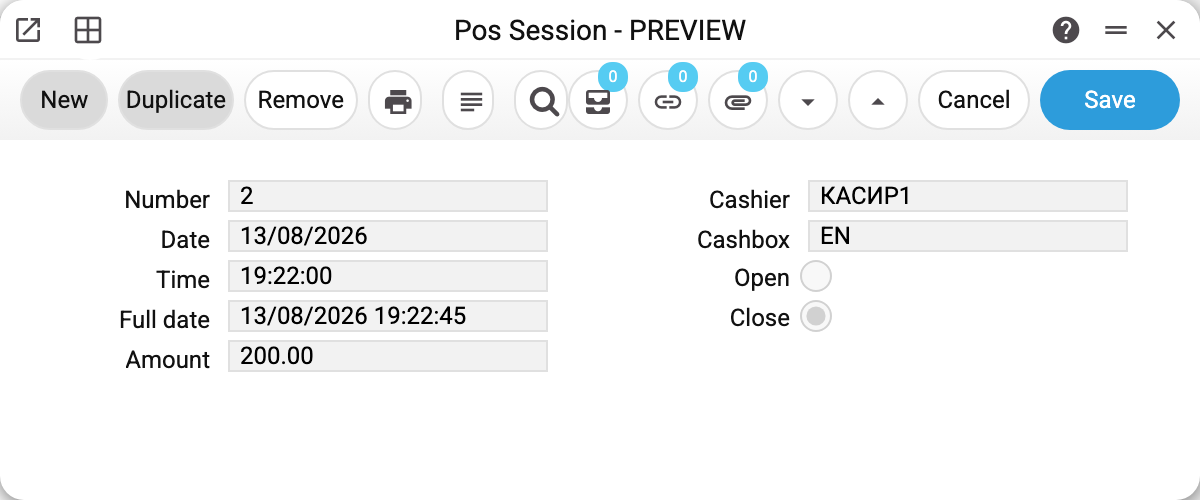
The record is short, and every field answers one question:
- Number — the running record number; the opening and the closing of one shift have DIFFERENT numbers (1 and 2 in the example);
- the open/close radio button — the record type: a shift opening or a shift closing; read-only as well;
- Amount — at the opening it is the float the cashier starts the day with, at the closing it is what stays in the drawer for tomorrow;
- Cashbox and Cashier — who worked: the logins of the till and of the cashier that signed into the POS;
- Date, Time, Full date — when it happened; the system fills these in;
- Locked — the cashier put the till on a break with the Lock till button on the till screen (ticked only on the opening of the open shift);
- Lock removed by — login and time of whoever removed the lock here, in the back office; empty if the cashier unlocked the till themselves.
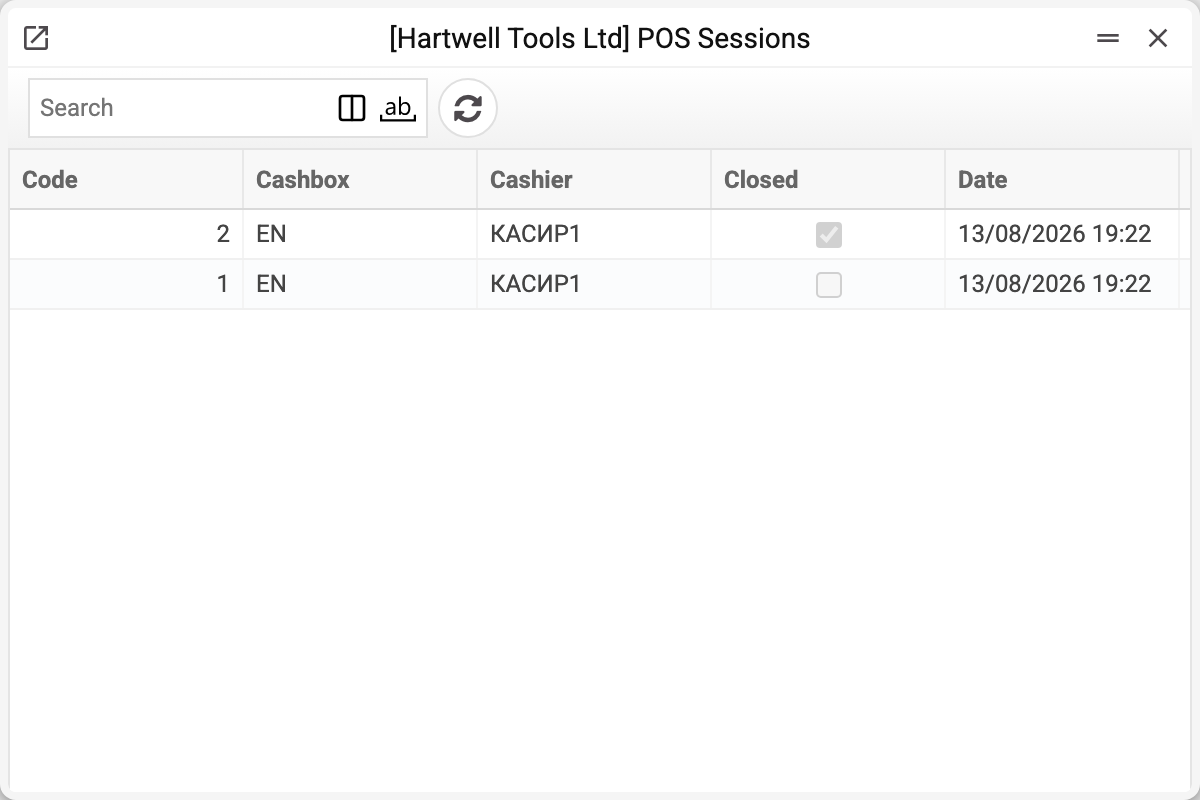
The list shows pairs of "opening → closing". An opening without a closing means the shift is still running.
How the records appear
The opening is created by the till when the cashier authorises at the selling screen. The till can open a shift only for the cashier whose sign-in it works under: a request with another cashier's login gets "Permissions denied". Along with the record, the system also opens a shift in the fiscal device, if one is configured.
The closing is written by the close-the-till procedure. Together with it, if the cashier entered a withdrawal amount, a cash-out row is created — see Cash In/Out.
A dangling shift closes itself. If the cashier walked away without closing the till, the next opening on the same point of sale closes the previous shift first — at the current time and with the cash recalculated: opening amount + deposits − withdrawals + the cash part of the shift's receipts. On a fiscal till (a Vchasno.Kasa "Fiscal cash register" is set) only a shift with no cash left closes this way: if money is still in it, the login is refused ("A fiscal shift is closed only with an empty till…"), and the previous cashier takes the remainder out first. The demo shows this nicely in the cash out report: a shift whose operations are dated January gets a closing dated the day the next one was opened.
A shift cannot be created, changed or deleted over the REST integration. Creating and editing return "POS session is created automatically and cannot be created or edited manually", deleting — "POS session is created automatically and cannot be deleted manually". Only two logins may create records — the cashier's and the point of sale's — that is, exactly what the till itself uses.
Parameters
| Field | Description |
|---|---|
| Number | Record number, assigned by the system. |
| Open/close radio button | Record type: 0 — shift opened, 1 — shift closed. |
| Amount | Cash in the till: at the start of the shift or at its end. |
| Cashbox | Login of the till the shift belongs to. |
| Cashier | Login of the cashier working the shift. |
| Date, Time, Full date | Moment of the operation; filled in by the system. |
| Locked | The till is on a break (Lock till); while it is, the till does not sell, take cash in or out, close the shift or let another cashier in. |
| Lock removed by | Who removed the lock from the back office, and when ("login, date time"); filled in by the system. |
Common situations
The till is locked and the cashier has left. The cashier removes the lock with their own password on the till screen. Another cashier cannot get into a locked till — not after reloading the page, not from a new or private browser window: the lock lives on the server, and the login answers "The cash register is locked" with the hint "Only cashier … can unlock it with their password". If the cashier is gone for good (fell ill, forgot to unlock), open the opening record of their shift here and choose Remove the cash register lock in the window menu. Your role needs the right to edit POS Sessions — an existing right, no new role; whoever has it can remove the lock (a cashier with that right too). The shift and the money stay as they were, and Lock removed by shows your login and the time. The sign-in of the cashier who left is revoked at the same time: on the till, refresh the page (F5) — "Cashier login" appears, and nobody can keep working under that cashier's name without the password. The exception is a user with this cashier's login who was renamed or created after the lock: then the sign-in is not revoked, and the window suggests revoking it by hand — "Force logout" in the user's card. The next cashier logs in as usual — the login itself closes the old shift with a cash recount. If you remove the lock yourself as the cashier of this shift, your sign-in is not revoked.
What the lock does not protect against. The lock is a cashier's break: it stops a person who walks up to the till from selling, depositing or withdrawing money on the till screen. It does not protect against someone who sends requests to the server by hand from the same till device: such a request can name another, even non-existent till — that till has no shift, hence no lock, and it takes its payment methods and fiscal register from "POS settings", i.e. the same ones as the database's only till. SERP works the same way: the till in a document is whatever is written in it; there is no "logged in at till A — write only to A" binding there. Owner's decision of 10.10.2026 (REQ #9734) — leave it as is.
A shift is left open. No harm done: the next opening closes it automatically (on a fiscal till — only when no cash is left in it, see above). But while it is open, the cash out report and the expected-cash calculation are about that shift.
The closing amount does not match the drawer. The system does not verify it: the cashier does not enter the actual count of the drawer. The closing amount is the shift's cash (opening + deposits − withdrawals + the cash part of receipts) minus the withdrawal the cashier entered when closing. On a fiscal till and when a dangling shift is closed automatically, the server computes it; on an ordinary till the till sends it when closing, and the server does not recompute it. Hunt the difference with the report — it shows what should have been left according to the operations.
The amount has to be corrected. It cannot be — neither in the record nor through the integration. The proper way is to register a cash movement: a cash in or a cash out with an explanation.
Two tills, one shift. A shift belongs to a point of sale, so every till has its own shifts. Record numbers are one running series for all tills: the shifts of two tills are interleaved.
See also
- A cashier's day — how the shift opens and closes on the till screen
- Cash In/Out — money moving inside the shift
- POS Cash Collection — handing the takings over at the end of the day
- Cash Out Report — the whole shift, from opening to closing
- Vchasno.Kasa — opening and closing the shift in the fiscal device (Z-report)