Rental orders
A customer rings up: "I need a generator and a scaffold tower from Monday, for two weeks." Signing an agreement is still some way off, but the equipment has to be picked, the price worked out and the arrangement recorded. That is what a rental order is for.
Where to find it: Modules → Rental → Registers → Rental orders
It is not an accounting document: it posts nothing and moves no stock. Its job is to capture the request and turn into an agreement.
A worked example
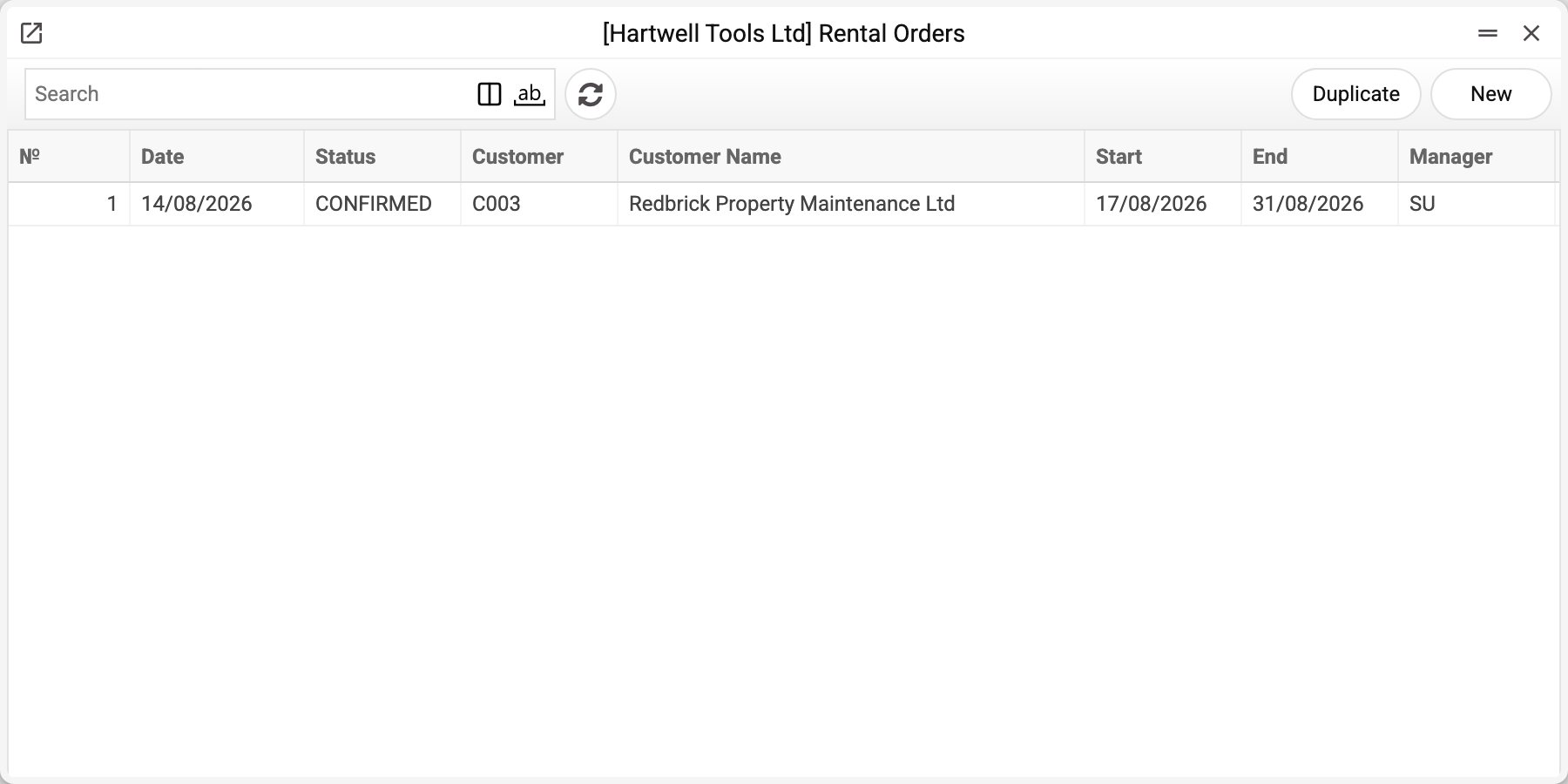
The journal shows the number, date, status, customer, hire period and manager. There is one order here — No. 1, and that is the one we take.
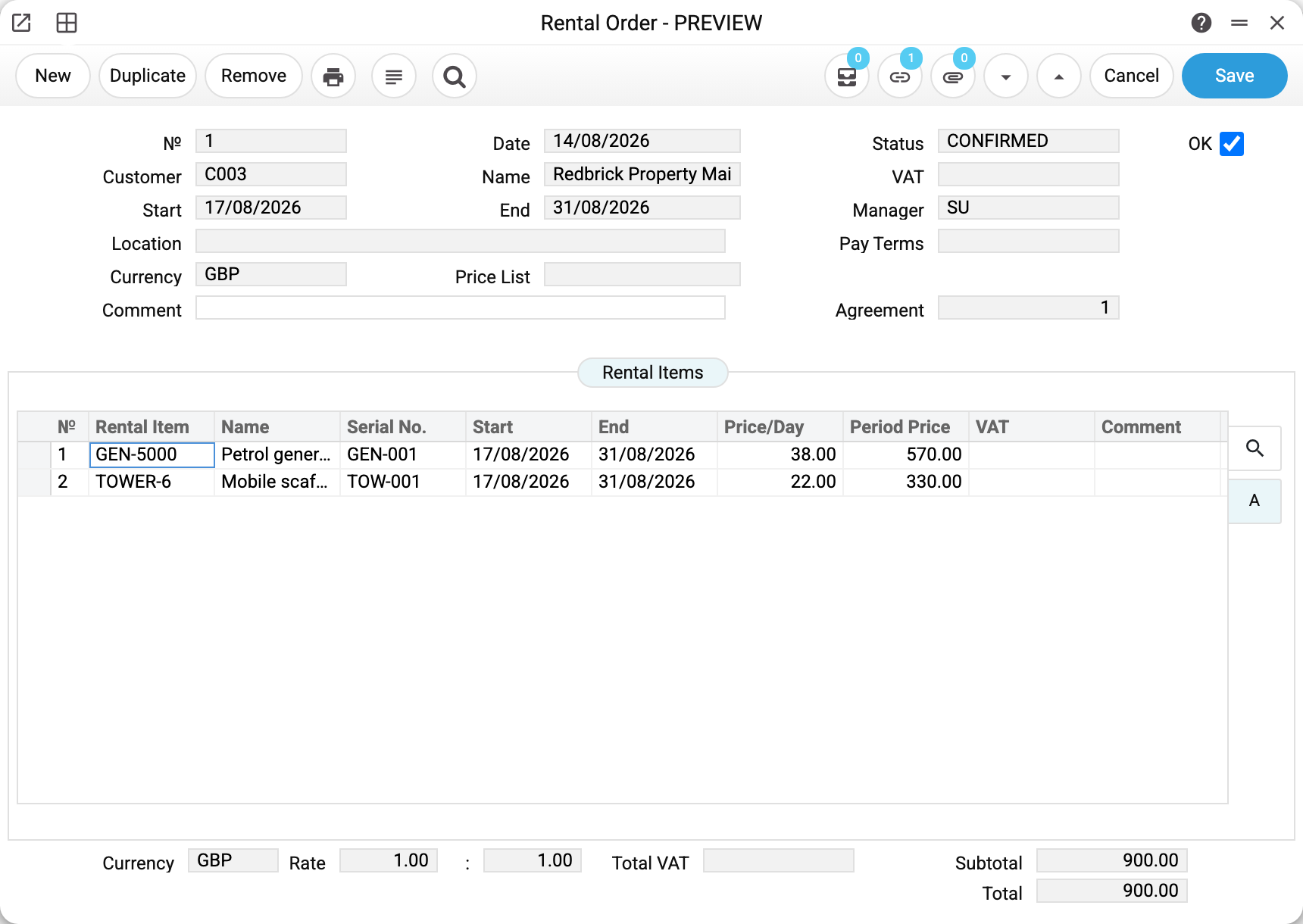
Order No. 1 of 14/08/2026 for customer C003 (Redbrick Property Maintenance): hire from 17/08 to 31/08, currency GBP, status CONFIRMED.
The lines hold two rental items:
| Item | Serial No. | Start | End | Price/Day | Period Price |
|---|---|---|---|---|---|
| GEN-5000 | GEN-001 | 17/08/2026 | 31/08/2026 | 38.00 | 570.00 |
| TOWER-6 | TOW-001 | 17/08/2026 | 31/08/2026 | 22.00 | 330.00 |
Total 900.00. Each line carries its own dates: not all machines have to go out at once.
Top right sits the Agreement field — the number of the agreement created from this order.
What the system checks
On save:
- customer, start date and end date are mandatory, and the end cannot precede the start;
- at least one line;
- the rental item must exist in the register, and a serial number may not repeat within the document;
- the header and row VAT codes must be in the VAT rates reference;
- a document in the base currency may only have rate 1, and an order in another currency cannot be confirmed (OK) without a rate.
Statuses: DRAFT and CONFIRMED — the status follows the OK checkbox, on the first save too: ticked — CONFIRMED, cleared — DRAFT; or CANCELLED, which the checkbox does not switch. There is no separate "turned into an agreement" status: the Agreement field with its number tells you that.
Turning into an agreement
The order's "Convert to Agreement" menu item (the order must be saved) carries everything across: customer, period, currency and rates, price list, payment terms, manager, VAT code, comment, totals and all the priced lines. The agreement appears as DRAFT — there is still room to adjust it before activation.
At the same time the system:
- writes the agreement number into the order's "Agreement" field;
- links both documents, so the order is visible from the agreement and vice versa.
After that the order's OK flag cannot be removed and the order cannot be deleted: the system points out that an agreement already exists and asks you to delete it first. That guards against the request and the live agreement drifting apart. A repeated conversion is not stopped: while the first agreement is not posted, it creates one more, and "Agreement" gets the new number.
Typical situations
The customer backs out before signing. Nothing is booked anyway. CANCELLED cannot be set in the window: the "Status" field is read-only and there is no separate action. An order without OK and without an agreement can simply be deleted.
More items are needed in the same agreement. If the agreement does not exist yet, add lines to the order (a confirmed order's lines are locked — remove OK first). If it does, edit the agreement itself.
The equipment is busy on those dates. An order does not book anything: booking appears together with the agreement. Check availability through the item status and the resource calendar.
Where to look next
- Rental items — what is being ordered.
- Rental agreements — the next step of the chain.
- Issue acts — handing the equipment over to the customer.
Print variables
Values available in this document's printed form templates. How to write a variable in a template — see Print Forms.
Header fields:
| Variable | What it holds |
|---|---|
| RO_No | № |
| RO_Date | Date |
| RO_Status | Status |
| RO_Cust_Code | Customer |
| RO_Cust_Name | Name |
| RO_VAT_Code | VAT |
| RO_Start_Date | Start |
| RO_End_Date | End |
| RO_Manager | Manager |
| RO_Location | Location |
| RO_Pay_Terms | Pay Terms |
| RO_Currency | Currency |
| RO_Price_List | Price List |
| RO_Comment | Comment |
| RO_Agreement_No | Agreement |
| RO_Rate | Rate |
| RO_VAT | Total VAT |
| RO_Subtotal | Subtotal |
| RO_Total | Total |
| RO_Contact | Contact |
| RO_Phone | Phone |
| RO_Email |
Row fields:
| Variable | What it holds |
|---|---|
| RO_Obj_No | Row position number |
| RO_Obj_Code | Rental Item |
| RO_Obj_Name | Name |
| RO_Obj_Serial | Serial No. |
| RO_Obj_Start | Start |
| RO_Obj_End | End |
| RO_Obj_Price_Day | Price/Day |
| RO_Obj_Price_Period | Period Price |
| RO_Obj_VAT_Code | VAT Code |
| RO_Obj_VAT | VAT |
| RO_Obj_Comment | Comment |
| RO_Obj_Item | Item |
The records the document refers to through its form fields (location, customer, currency…) also expose the rest of their variables — code and name are already listed in the tables above, the rest is described in the register's article:
- Company details — name, addresses, bank accounts, officers, the printing user: Main Company