Items
The item card is the only place where a product is described. Everything else refers to it: a purchase order, a goods receipt, an invoice, a price list, a receipt at the till. When a code is typed into a document, the system takes the name, the unit and the price from the card, the VAT rate too unless the customer or the price list sets it, and on posting — the accounts (the account chain is below). So whatever is filled in here is then repeated across hundreds of documents.
Where to find it: Modules → Stock (the item is present in other modules too) → Registers → Items
A worked example
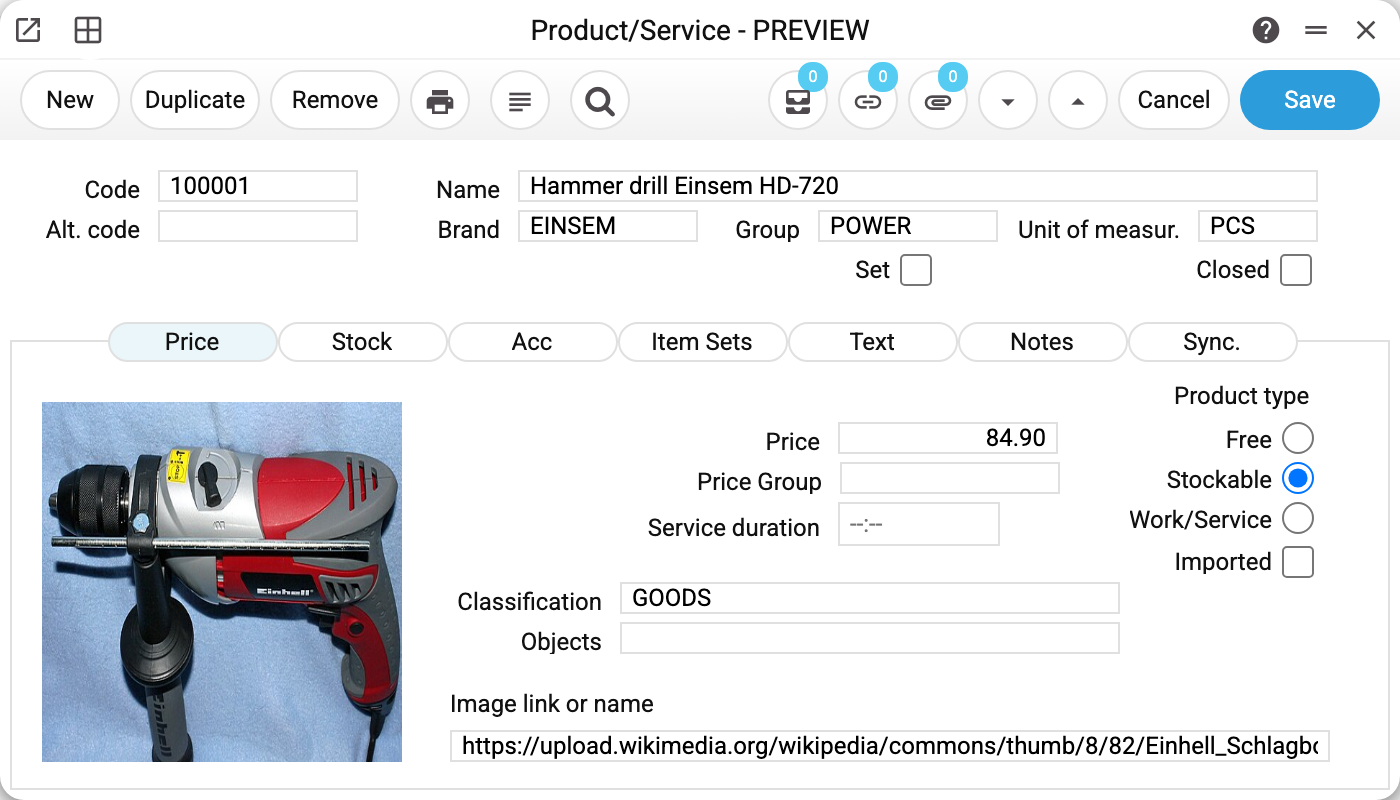
The same drill that went through the purchase order: code 100001, "Hammer drill Einsem HD-720".
The header stays visible on every tab:
- Code 100001 — the main identifier; this is what documents look up. Leave it empty and the code comes from the Serial Number Range for Items (for the item's group or a general one); with no range the card is not saved. Once saved, the code cannot be changed.
- Name and unit of measure are required: without them the card is not saved. A new card takes its unit from the "Unit by default" field of the Items Setting.
- Alt. code — a second code: the supplier's part number or a code from a previous system. It can be typed into a document just like the main one. The system checks that alt. codes do not repeat only when "Enable check for Alt code" is ticked in the Items Setting — without it, keep them unique yourself.
- Brand EINSEM, group POWER, unit of measure PCS — three references to registers: brand, item group, unit of measure.
- Set and Closed — two checkboxes, each changing how the card behaves; see below.
The "Price" tab holds the selling price of 84.90, the price group (when the price is calculated by a formula), the classification GOODS and, above all, the product type:
| Type | What it means |
|---|---|
| Free | No balance, no cost — the document line is just a description and an amount |
| Stockable | Quantity and cost are tracked; the item moves between warehouses |
| Work/Service | Sold but not stored; it has no stock cost |
The drill is "Stockable", which is why it shows up in stock balances, in cost of sales and in stocktaking. A new card gets this type straight away; so does an item from "XLSX import" whose type cell is empty or that has no type column. In the file the type is written as its position number: 1 — "Free", 2 — "Stockable", 3 — "Work/Service". While the item has stock this type cannot be changed: the system answers «The product type cannot be changed while the item has stock». Write off the remaining quantity first; movement history without a balance is not an obstacle.
The "Stock" tab covers movement and identification:
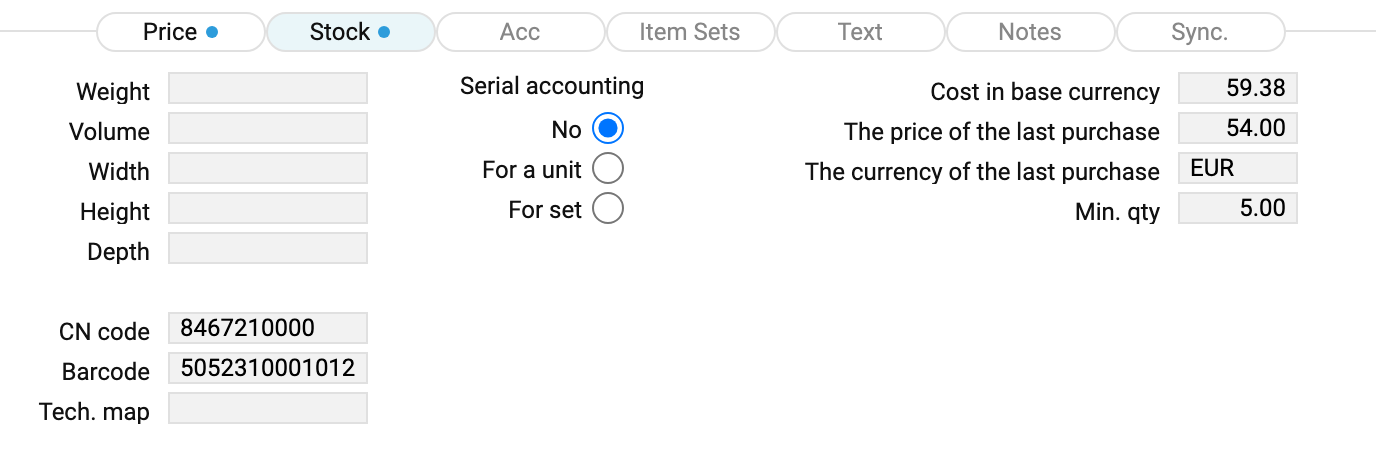
- CN code 8467210000 — the customs commodity code, needed for tax invoices and for imports.
- Barcode 5052310001012 — the card's primary barcode; two cards cannot share it: "A product with this barcode already exists". Additional ones live in a separate barcodes register. A barcode entered there must not match the code, barcode or alt. code of another card.
- Serial accounting — "No", "For a unit" or "For set" (per batch); the choice decides whether a serial number is required on every movement. Once the item has moved, the choice cannot be changed: "You cannot change the serial accounting of an item for which there is already a history".
- Cost in base currency 54.20 (the field has this name on the card, in the role's field rights, the list window setting, a new import template and the change history; import templates created earlier keep the column "The cost of the last receipt" and work as before), the price of the last purchase and the currency of the last purchase (it applies only to the purchase price; the cost is always in the base currency) — the system fills these itself when a goods receipt made from a purchase order is approved, and when the approval is removed it brings back the values of the previous such receipt. If it was the item's first such receipt, check these fields by hand after removing the approval. A goods receipt without an order leaves them as they are: a purchase price counts as checked only against an order. The cost (but not the purchase price) is also written by a finished production or a finished production operation — to the stockable product made, at its output cost. A disassembly does not touch the cards: a component returned to stock is not a new receipt. The fields can be corrected by hand, but the next such receipt or production overwrites them. A user without the "Show cost price" right sees neither the cost nor the purchase price — on the card or in print.
- Min. qty — the threshold below which the item appears in shortage reports.
- Weight, volume, width, height and depth are for reference: the card and the print show them, but documents do not use them in calculations.
The "Acc" tab has four fields, and in the demo database all four are empty except the VAT code:
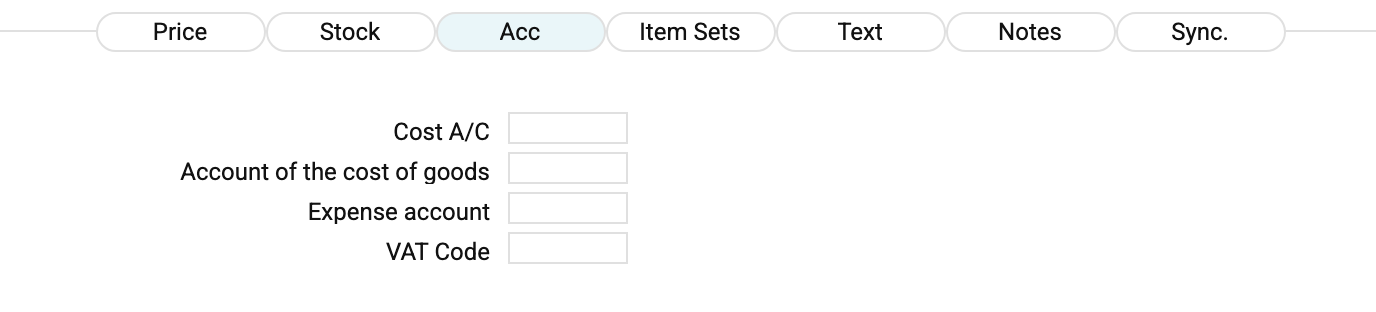
That emptiness is deliberate. The system looks for a posting account down a chain, stopping at the first level that is filled in. The stock account ("Account of the cost of goods"):
item card → item group → location → the general "Account Usage" setting
The "Cost A/C" (cost of sales) follows the same chain without the location: item card → item group → the general setting.
In the English demo company the warehouses carry no accounts of their own, so the chain runs all the way down to the general setting. Fill in an account on the card only when this one item has to be accounted for separately from everything else — whatever you write there overrides every level below.
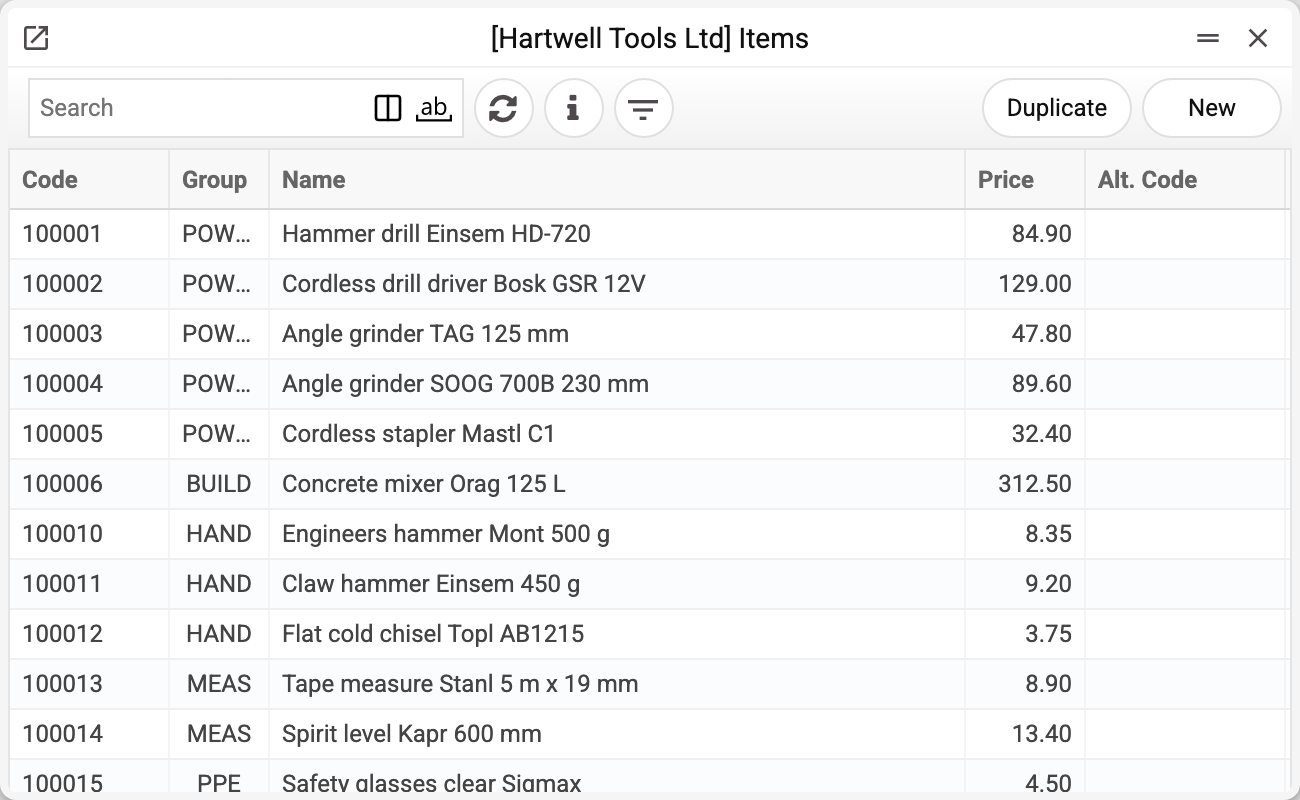
The "Item Sets" tab holds the set's composition. A filled matrix without the "Set" checkbox ticked in the header is not saved:
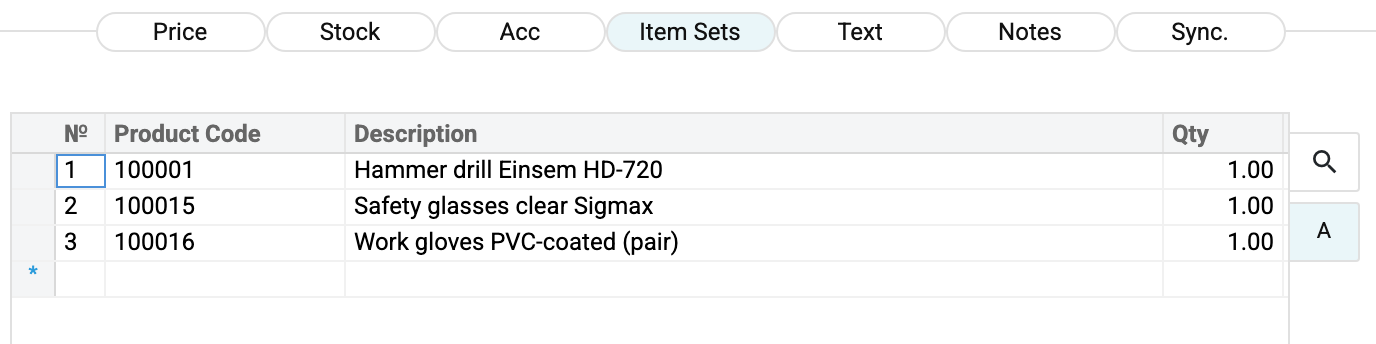
The kit "drill + glasses + gloves" is a card of its own, with its own code and price, and the matrix lists what it consists of. The kit is sold as one line, and three items leave the warehouse.
The product type of the set card itself must be "Free" — otherwise the refusal is «The type of set must be "Free"!»; the lookup offers stockable items as components. The set itself has no stock balance: the quantity is counted on the components. The set's price is entered on the card by hand — it is not calculated from the components. A set inside a set is not allowed either way: a set cannot be chosen in another set's matrix, and an item that is already a component of another set cannot become a set itself. A stockable item that is in a set and has already moved cannot change its type: "You cannot change item type if it is used in sets". How to sell a set whole or in parts and how to receive it from a supplier — Product sets.
The item picture is set where the price is — the "Image link or name" field. There are two different ways to fill it, and confusing them is the usual reason for an empty picture:
- with the address of a picture on the web: paste the link; if you paste it without «https://» (just
site.com/photo.jpgorwww.site.com/photo.jpg), the system adds the prefix itself; - with the name of a file attached to the card itself: the file goes in through the paperclip button in the window header (see Attachments), and the field takes the file name as it is, extension included. Leave the field empty and the card shows the first file attached to it, if that is a jpg, png, gif, webp or avif image; another format (svg, pdf) gives no picture, so attach the image first or type its name into the field.
A picture pasted from the clipboard as an image is not accepted: the answer is "This image type is not supported!". So is an address longer than 500 characters.
The remaining tabs are shorter: "Text" holds texts of the item in different languages (language and text) that stay on the card only — documents, printing and the Prom or Rozetka exports do not use them; "Notes" are internal remarks, "Sync." holds the item's codes in Prom and Rozetka.
How the system finds an item
When a code is typed or scanned into a document line, the search runs in order:
- the item code;
- the barcode on the card;
- the alt. code;
- the barcodes register — and then the item the barcode points to is substituted.
That is why a scanner at the till recognises an item equally well by the manufacturer's barcode and by a warehouse label.
Typical situations
The item is no longer sold. Do not delete the card — tick "Closed". History and balances stay intact, and the item lookups of most documents stop offering a closed item. An invoice, a sales order, a purchase order, a recipe, a production order and a production with a closed item are not saved: "Item 100001 is closed". Most of them also refuse a draft the item got into before it was closed (removing the approval is still allowed), so close an item once no unfinished documents with it are left. Goods receipts and stock movements do not check the flag.
The card will not delete. The system refuses to delete an item anything still refers to: stock movements and non-zero balances, sales, purchase and production documents, price lists, worksheets, barcodes, settings. If the item has movements or a balance, the answer is "Item used in documents!"; otherwise the message names the first place where the item was found (for example, "Price Lists"). That is protection against holes in the history, not an error. A set card cannot be deleted while any component has movements or balances: "Set component 100001 has stock movements or balances!".
Quotation price lists do not block deletion. Their generator builds them from the item cards on its own, so a new card lands there without you doing anything. When the card is deleted, its rows in those price lists are removed along with it — except in a company that uses another group company's shared price lists: there the owner's generator rebuilds them.
The price on the card differs from the price in the document. The card price is the starting point. On top of it work price lists, price groups and customer discounts; the document takes its final price from there.
Changing the group or the brand does not rewrite the past. Documents store the item code, not the group, so old reports recalculate along the new grouping once an item is moved. That is normal; when history has to stay fixed, create a new card.
The unit of measure is a code. The card and the document rows store the unit's code, and the printed form takes its name from the register at print time. So renaming a unit also changes the name when documents already entered are printed again (the quantity stays the same). If you need a different unit, create a new one rather than renaming one in use.
Where to look next
- Item groups, brands, units of measure, CN codes, barcodes — the registers the card refers to;
- Item status and item history — how much there is and what happened to it;
- Price lists — where the selling price comes from;
- Goods receipts — where the cost comes from.
Print variables
Values available in this document's printed form templates. How to write a variable in a template — see Print Forms.
Header fields:
Main
| Variable | What it holds |
|---|---|
| Items_Code | Code |
| Items_Name | Name |
| Items_AltCode | Alt. code |
| Items_Brand | Brand |
| Items_Group | Group |
| Items_UnitOfMeasure | Unit of measur. |
| Items_Set | Set |
| Items_Closed | Closed |
| Items_ProductType | Product type |
| Items_SerialAccounting | Serial accounting |
Price
| Variable | What it holds |
|---|---|
| Items_Price | Price |
| Items_PriceGroup | Price Group |
| Items_Classification | Classification |
| Items_Objects | Objects |
| Items_PickArea | Image link or name |
| Items_Imported | Imported |
Stock
| Variable | What it holds |
|---|---|
| Items_Weight | Weight |
| Items_Volume | Volume |
| Items_Width | Width |
| Items_Height | Height |
| Items_Depth | Depth |
| Items_CNCode | CN code |
| Items_BarCode | Item barcode — "Barcode" field |
| BAR128_Item_Code | The "Barcode" field, printed as a CODE128 barcode — for labels. An empty field gives an empty tag. It does not hold the item code — use Items_Code for that |
| Items_TechMap | Tech. map |
| Items_LastReceipt | Cost in base currency |
| Items_LastPurchase | The price of the last purchase |
| Items_LastCurrency | The currency of the last purchase |
| Items_MinQty | Min. qty |
Notes
| Variable | What it holds |
|---|---|
| Items_Notes | Notes |
| Items_Warranty | Warranty |
| Items_HygienicCertificate | Hygienic Certificate |
| Items_CountryOfOrigin | Country of Origin |
Acc
| Variable | What it holds |
|---|---|
| Items_CostAccount | Cost A/C |
| Items_AccountGoods | Account of the cost of goods |
| Items_ExpenseAccount | Expense account |
| Items_VATCode | VAT Code |
Sync.
| Variable | What it holds |
|---|---|
| Items_PromSync | Synchronization with Prom.ua |
| Items_PromCode | Code Prom |
| Items_RozetkaSupplierCode | Code Rozetka supplier |
Other variables
| Variable | What it holds |
|---|---|
| BAR128_Items_Code | Service barcode of the item card in CODE128: the record type and number, encoded. It holds neither the item code nor the "Barcode" field, and scanning it into a document row or at the POS does not find the item. For labels use BAR128_Item_Code |
Row fields:
| Variable | What it holds |
|---|---|
| MNo | Row position number |
| MProductCode | Product Code |
| MQty | Qty |
| MDescription | Description |